logo头像
Snippet 博客主题

threejs光源

前言

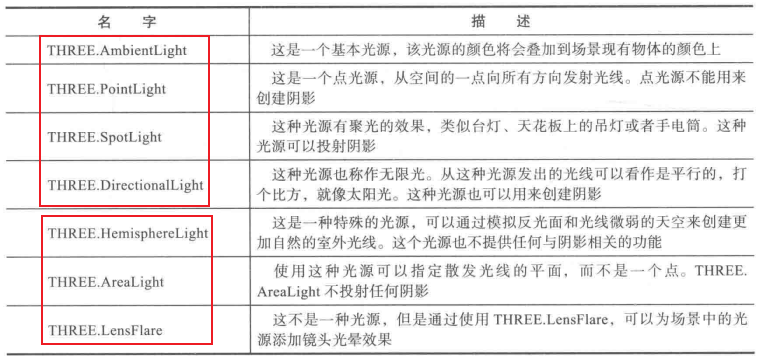
没有光源,渲染场景将不可见。threejs中已经帮我们实现了大量的光源,我们可以直接使用,主要分为两类:基础光源和特殊光源,下面将依次详细介绍。


基础光源

1. THREE.AmbientLight(环境光)

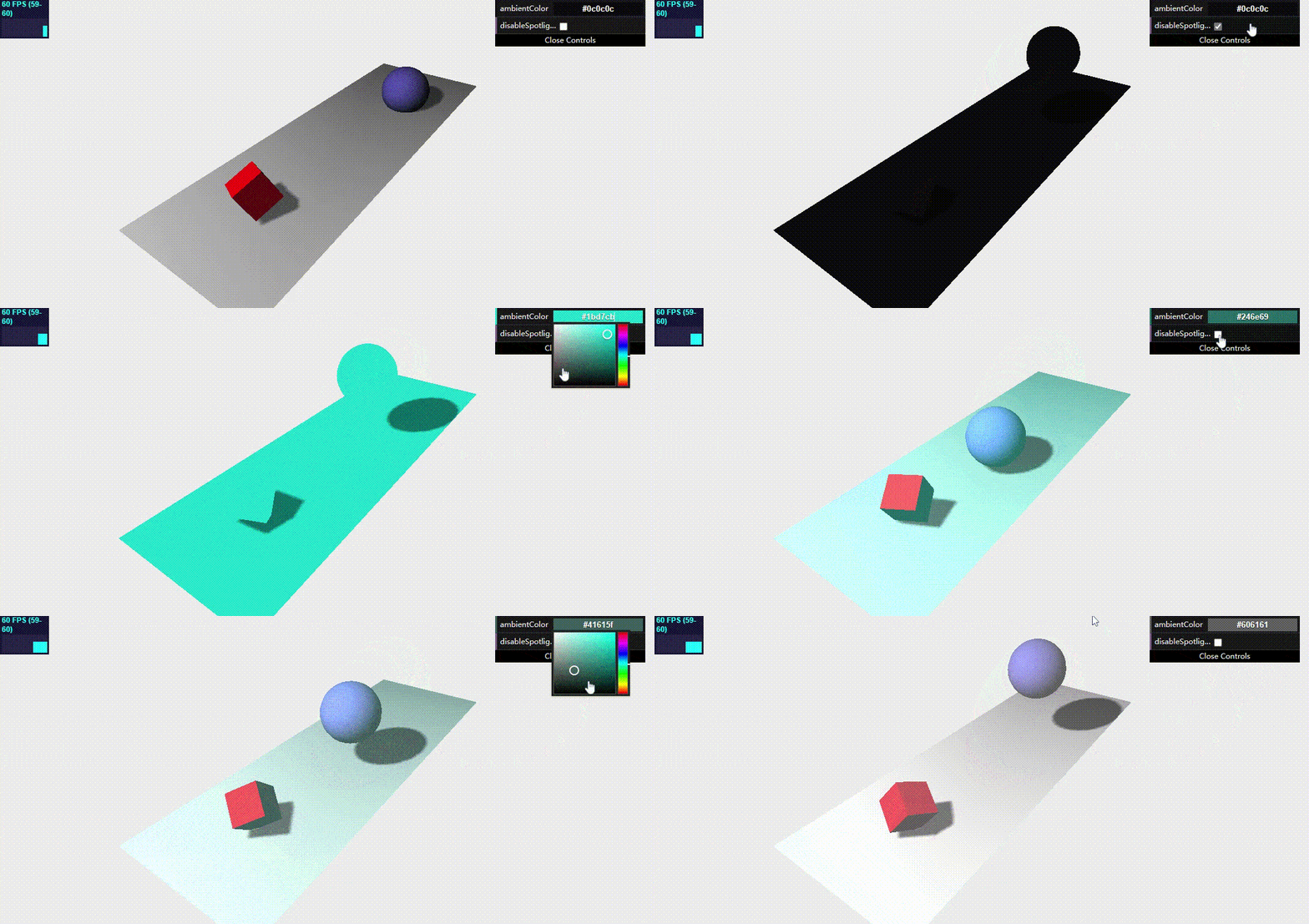
该光源颜色会应用到场景全局,光源没有特别的来源方向,并且不会生成阴影。通常,不会将环境光作为场景中唯一的光源,因为它会将场景中的所有物体渲染为相同颜色。一般和其它光源一起使用,它只是为了弱化阴影或给场景添加一些额外的颜色,所以它的用色应该尽量保守,如果设置的颜色过于明亮,那么画面颜色就过于饱和了。

下面示例帮助你理解,试试改变AmbientLight光颜色或开启/关闭spotLight光源,观察场景变化。

1
2
3
4
5
6
7
8
9
10
11
12
13
14
15
16
17
18
19
20
21
22
23
24
25
26
27
28
29
30
31
32
33
34
35
36
37
38
39
40
41
42
43
44
45
46
47
48
49
50
51
52
53
54
55
56
57
58
59
60
61
62
63
64
65
66
67
68
69
70
71
72
73
74
75
76
77
78
79
80
81
82
83
84
85
86
87
88
89
90
91
92
93
94
95
96
97
98
99
100
101
102
103
104
105
106
107
108
109
110
111
112
113
114
115
116
117
118
119
120
121
122
123
124
125
126
127
128
129
130
131
132
133
134
135
136
137
138
139
140
141
142
143
144
145
146
147
148
149
150
151
152
153
154
155
156
157
158
159
160
161
162
163
<!-- chapter-03-01.html -->
<!DOCTYPE html>
<html>
<head>
<title>Ambient Light</title>
<script type="text/javascript" src="../libs/three.js"></script>
<script type="text/javascript" src="../libs/stats.js"></script>
<script type="text/javascript" src="../libs/dat.gui.js"></script>
<style>
body {
margin: 0;
overflow: hidden;
}
</style>
</head>
<body>

<div id="Stats-output">
</div>

<div id="WebGL-output">
</div>

<script type="text/javascript">
function init() {
// 初始化fps显示插件
var stats = initStats();

// 创建场景对象
var scene = new THREE.Scene();

// 创建透视投影摄像机
var camera = new THREE.PerspectiveCamera(45, window.innerWidth / window.innerHeight, 0.1, 1000);

// 创建渲染器
var renderer = new THREE.WebGLRenderer();
renderer.setClearColor(new THREE.Color(0xEEEEEE, 1.0)); // 设置背景颜色
renderer.setSize(window.innerWidth, window.innerHeight); // 设置渲染窗口大小
renderer.shadowMapEnabled = true; // 激活阴影

// 创建平面
var planeGeometry = new THREE.PlaneGeometry(60, 20, 1, 1);
var planeMaterial = new THREE.MeshLambertMaterial({color: 0xffffff});
var plane = new THREE.Mesh(planeGeometry, planeMaterial);
plane.receiveShadow = true; // 接收阴影

// 设置平面位置
plane.rotation.x = -0.5 * Math.PI;
plane.position.x = 15;
plane.position.y = 0;
plane.position.z = 0;
scene.add(plane);

// 创建立方体对象
var cubeGeometry = new THREE.BoxGeometry(4, 4, 4);
var cubeMaterial = new THREE.MeshLambertMaterial({color: 0xff0000});
var cube = new THREE.Mesh(cubeGeometry, cubeMaterial);
cube.castShadow = true; // 投射阴影

// 设置立方体位置
cube.position.x = -4;
cube.position.y = 3;
cube.position.z = 0;
scene.add(cube);

// 创建球体
var sphereGeometry = new THREE.SphereGeometry(4, 20, 20);
var sphereMaterial = new THREE.MeshLambertMaterial({color: 0x7777ff});
var sphere = new THREE.Mesh(sphereGeometry, sphereMaterial);

// 设置球体位置
sphere.position.x = 20;
sphere.position.y = 0;
sphere.position.z = 2;
sphere.castShadow = true; // 投射阴影
scene.add(sphere);

// 设置摄像机位置
camera.position.x = -25;
camera.position.y = 30;
camera.position.z = 25;
// 设置摄像机镜头朝向
camera.lookAt(new THREE.Vector3(10, 0, 0));

// 创建环境光
var ambiColor = "#0c0c0c"; // 使用的是比较暗淡的灰色
var ambientLight = new THREE.AmbientLight(ambiColor);
scene.add(ambientLight);

// 创建聚光灯并开启投射阴影
var spotLight = new THREE.SpotLight(0xffffff);
spotLight.position.set(-40, 60, -10);
spotLight.castShadow = true;
scene.add(spotLight);

// 将渲染器添加到DOM里显示
document.getElementById("WebGL-output").appendChild(renderer.domElement);

// 设置dat.GUI插件显示属性
var controls = new function () {
this.ambientColor = ambiColor; // 环境光颜色
this.disableSpotlight = false; // 聚光灯是否可见
};

// 将添加的控制属性添加到gui界面
var gui = new dat.GUI();
// 颜色设置
gui.addColor(controls, 'ambientColor').onChange(function (e) {
ambientLight.color = new THREE.Color(e);
});
// 开关设置
gui.add(controls, 'disableSpotlight').onChange(function (e) {
spotLight.visible = !e; // 聚光灯是否可见
});

// 开始渲染
render();
var step = 0;
function render() {
// 更新fps显示
stats.update();

// 旋转立方体
cube.rotation.x += 0.02;
cube.rotation.y += 0.02;
cube.rotation.z += 0.02;

// 跳动球体
step += 0.03;
sphere.position.x = 20 + ( 10 * (Math.cos(step)));
sphere.position.y = 2 + ( 10 * Math.abs(Math.sin(step)));

// 重新渲染
requestAnimationFrame(render);
renderer.render(scene, camera);
}

// 初始化fps显示插件
function initStats() {
var stats = new Stats();
stats.setMode(0); // 0: fps, 1: ms

// Align top-left
stats.domElement.style.position = 'absolute';
stats.domElement.style.left = '0px';
stats.domElement.style.top = '0px';
document.getElementById("Stats-output").appendChild(stats.domElement);
return stats;
}
}

window.onload = init;

// 改变窗口大小后适配
function onResize() {
camera.aspect = window.innerWidth / window.innerHeight;
camera.updateProjectionMatrix();
renderer.setSize(window.innerWidth, window.innerHeight);
}
window.addEventListener('resize', onResize, false);
</script>
</body>
</html>

效果:

2. THREE.PointLight(点光源)

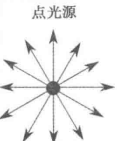
点光源发射光线示意图:

从特定的一点向所有方向发射光线。夜空中的照明弹就是一个很好的点光源例子。

threejs里的点光源也没有阴影,因为它朝所有方向发射光线,这种情况下计算阴影对GPU是一个沉重的负担。

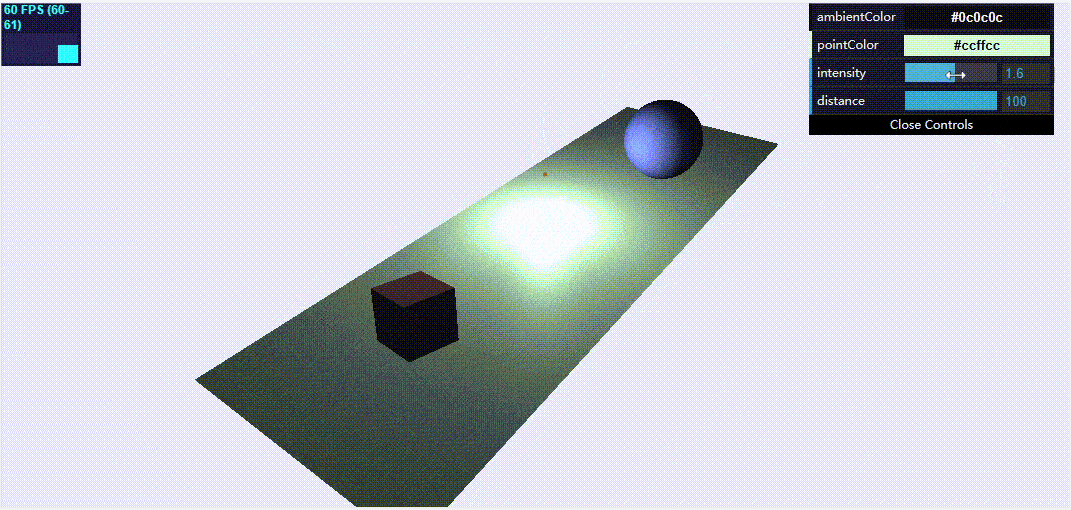
下面我们依旧通过示例来理解,这是一个点光源绕场景移动,为了看到点光源位置,我们让一个橙色的小球沿着相同的轨迹移动。你可以看到随着光源的移动,红色的方块和蓝色的球被这个光源从不同的侧面照亮。

1
2
3
4
5
6
7
8
9
10
11
12
13
14
15
16
17
18
19
20
21
22
23
24
25
26
27
28
29
30
31
32
33
34
35
36
37
38
39
40
41
42
43
44
45
46
47
48
49
50
51
52
53
54
55
56
57
58
59
60
61
62
63
64
65
66
67
68
69
70
71
72
73
74
75
76
77
78
79
80
81
82
83
84
85
86
87
88
89
90
91
92
93
94
95
96
97
98
99
100
101
102
103
104
105
106
107
108
109
110
111
112
113
114
115
116
117
118
119
120
121
122
123
124
125
126
127
128
129
130
131
132
133
134
135
136
137
138
139
140
141
142
143
144
145
146
147
148
149
150
151
152
153
154
155
156
157
158
159
160
161
162
163
164
165
166
167
168
169
170
171
172
173
174
175
<!-- chapter-03-02.html -->
<!DOCTYPE html>
<html>
<head>
<title>point Light</title>
<script type="text/javascript" src="../libs/three.js"></script>
<script type="text/javascript" src="../libs/stats.js"></script>
<script type="text/javascript" src="../libs/dat.gui.js"></script>
<style>
body {
margin: 0;
overflow: hidden;
}
</style>
</head>
<body>

<div id="Stats-output">
</div>

<div id="WebGL-output">
</div>

<script type="text/javascript">
function init() {
var stats = initStats();

var scene = new THREE.Scene();
var camera = new THREE.PerspectiveCamera(45, window.innerWidth / window.innerHeight, 0.1, 1000);

var renderer = new THREE.WebGLRenderer();
renderer.setClearColor(new THREE.Color(0xEEEEEE, 1.0));
renderer.setSize(window.innerWidth, window.innerHeight);
// renderer.shadowMapEnabled = true; // 点光源没有阴影

var planeGeometry = new THREE.PlaneGeometry(60, 20, 20, 20);
var planeMaterial = new THREE.MeshPhongMaterial({color: 0xffffff});
var plane = new THREE.Mesh(planeGeometry, planeMaterial);
// plane.receiveShadow = true;
plane.rotation.x = -0.5 * Math.PI;
plane.position.x = 15;
plane.position.y = 0;
plane.position.z = 0;
scene.add(plane);

var cubeGeometry = new THREE.BoxGeometry(4, 4, 4);
var cubeMaterial = new THREE.MeshLambertMaterial({color: 0xff7777});
var cube = new THREE.Mesh(cubeGeometry, cubeMaterial);
// cube.castShadow = true;
cube.position.x = -4;
cube.position.y = 3;
cube.position.z = 0;
scene.add(cube);

var sphereGeometry = new THREE.SphereGeometry(4, 20, 20);
var sphereMaterial = new THREE.MeshLambertMaterial({color: 0x7777ff});
var sphere = new THREE.Mesh(sphereGeometry, sphereMaterial);
sphere.position.x = 20;
sphere.position.y = 0;
sphere.position.z = 2;
sphere.castShadow = true;
scene.add(sphere);

camera.position.x = -25;
camera.position.y = 30;
camera.position.z = 25;
camera.lookAt(new THREE.Vector3(10, 0, 0)); // 镜头照射位置

// 添加环境光,弱的灰色,为了柔化场景
var ambiColor = "#0c0c0c";
var ambientLight = new THREE.AmbientLight(ambiColor);
scene.add(ambientLight);

// 添加点光源
var pointColor = "#ccffcc";
var pointLight = new THREE.PointLight(pointColor);
pointLight.distance = 100; // 光源照射距离
scene.add(pointLight);

var sphereLight = new THREE.SphereGeometry(0.2);
var sphereLightMaterial = new THREE.MeshBasicMaterial({color: 0xac6c25});
var sphereLightMesh = new THREE.Mesh(sphereLight, sphereLightMaterial);
// sphereLightMesh.castShadow = true;
sphereLightMesh.position = new THREE.Vector3(3, 0, 3);
scene.add(sphereLightMesh);

document.getElementById("WebGL-output").appendChild(renderer.domElement);

var controls = new function () {
this.ambientColor = ambiColor; // 环境光颜色
this.pointColor = pointColor; // 点光源颜色
this.intensity = 1; // 光照强度
this.distance = 100; // 光照距离
};

var gui = new dat.GUI();
gui.addColor(controls, 'ambientColor').onChange(function (e) {
ambientLight.color = new THREE.Color(e);
});

gui.addColor(controls, 'pointColor').onChange(function (e) {
pointLight.color = new THREE.Color(e);
});

gui.add(controls, 'intensity', 0, 3).onChange(function (e) {
pointLight.intensity = e;
});

gui.add(controls, 'distance', 0, 100).onChange(function (e) {
pointLight.distance = e;
});


render();
var step = 0;
var invert = 1;
var phase = 0;
function render() {
stats.update();

cube.rotation.x += 0.03;
cube.rotation.y += 0.03;
cube.rotation.z += 0.03;

step += 0.03;
sphere.position.x = 20 + ( 10 * (Math.cos(step)));
sphere.position.y = 2 + ( 10 * Math.abs(Math.sin(step)));

// 模拟光源移动
if (phase > 2 * Math.PI) {
invert = invert * -1;
phase -= 2 * Math.PI;
} else {
phase += 0.03;
}
sphereLightMesh.position.z = +(7 * (Math.sin(phase)));
sphereLightMesh.position.x = +(14 * (Math.cos(phase)));
sphereLightMesh.position.y = 5;

if (invert < 0) {
var pivot = 14;
sphereLightMesh.position.x = (invert * (sphereLightMesh.position.x - pivot)) + pivot;
}
// 光源和球体一起移动
pointLight.position.copy(sphereLightMesh.position);

// 重新渲染
requestAnimationFrame(render);
renderer.render(scene, camera);
}

function initStats() {
var stats = new Stats();
stats.setMode(0); // 0: fps, 1: ms

// Align top-left
stats.domElement.style.position = 'absolute';
stats.domElement.style.left = '0px';
stats.domElement.style.top = '0px';
document.getElementById("Stats-output").appendChild(stats.domElement);
return stats;
}
}
window.onload = init;

// 改变窗口大小后适配
function onResize() {
camera.aspect = window.innerWidth / window.innerHeight;
camera.updateProjectionMatrix();
renderer.setSize(window.innerWidth, window.innerHeight);
}
window.addEventListener('resize', onResize, false);
</script>
</body>
</html>

所使用的点光源属性:

属性 描述
color(颜色) 光源的颜色
distance(距离) 光源照射的距离。默认值为0,这意味着光的强度不会随着距离增加而减少
intensity(强度) 光源照射的强度。默认值1
position(位置) 光源在场景中的位置
visible(是否可见) 默认为true,光源会打开;如果设置为false,光源就会关闭

效果:

3. THREE.SpotLight(聚光灯)

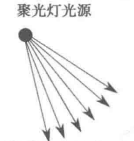
聚光灯发射光线示意图:

从特定的一点发射锥形形状的光线,这是最常使用的光源之一,特别是你想要使用阴影的话。该光源具有产生光的方向和角度,类似手电筒。

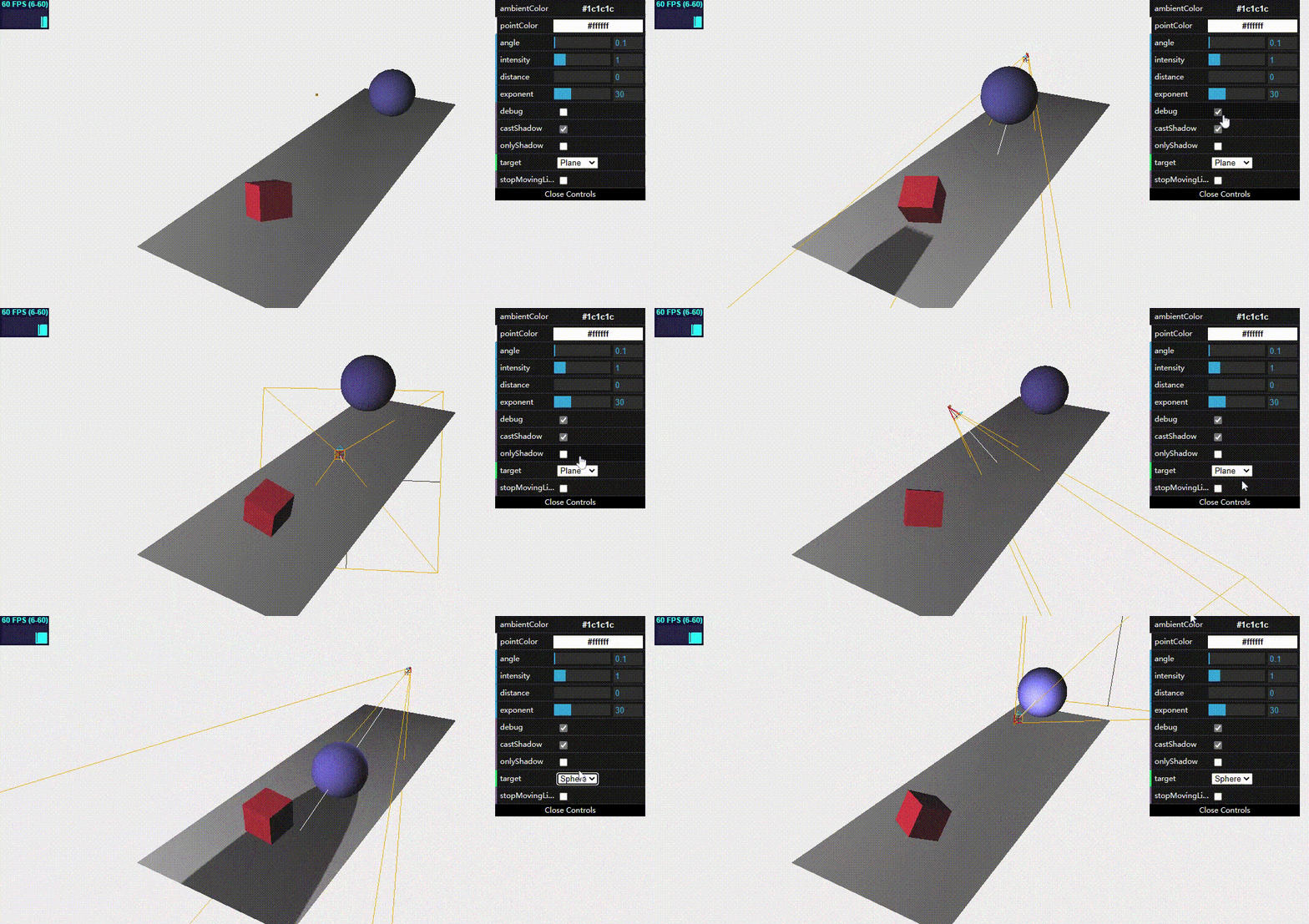
聚光灯光源的所有属性:

属性 描述
angle(角度) 光源发射出的光束的宽度。默认是Math.PI/3
castShadow(投影) 如果设置为true,这个光源就会投射阴影
color(颜色) 光源颜色
distance(距离) 光源照射的距离。默认值为0,这意味着光的强度不会随着距离增加而减少
intensity(强度) 光源照射的强度。默认值1
exponent(光强衰减指数) 发射的光线强度随着光源距离的增加而减弱,这个属性决定了光线强度递减的速度。使用小值,从光源发出的光线可以达到远处的物体,而使用大值,光线仅能到达非常接近光源的物体。
onlyShadow(仅阴影) 如果此属性设置为true,则该光源只生成阴影,不会在场景中添加任何光照
position(位置) 光源在场景中的位置
shadowBias(阴影偏移) 用来偏移阴影位置。当你使用非常薄的对象时,可能出现奇怪的渲染失真现象,如果你看到奇怪的阴影效果,将该属性设置为很小的值(如0.01)通过可以解决问题。此属性默认值为0
shadowCameraFar(投影远点) 到距离光源的哪一个位置可以生成阴影。默认值为5000(这几个参考投射投影摄像机理解)
shadowCameraNear(投影近点) 从距离光源的哪一个位置开始生成阴影。默认值为50
shadowCameraFov(投影视场) 用于生成阴影的视场有多大。默认值为50
shadowCameraVisible(投影方式是否可见) 如果设置为true,可以看到光源在哪里以及如何生成阴影的(看到光源照射锥体)。默认值为false
shadowDarkness(投影暗度) 定义阴影的暗度。在场景渲染后无法修改。默认值为0.5
shadowMapWidth和shadowMapHeight(阴影映射的宽/高) 决定有多少像素用来生成阴影。当阴影有锯齿或看起来不光滑时,可以增加这个值。在场景渲染后无法修改。两者默认值为512
target(目标) 可以将光源指向场景中特定的对象或位置(位置需要是THREE.Object3Dd对象,不是THREE.Vectors3对象)。
visible() 默认为true,光源会打开;如果设置为false,光源就会关闭
1
2
3
4
5
6
7
8
9
10
11
12
13
14
15
16
17
18
19
20
21
22
23
24
25
26
27
28
29
30
31
32
33
34
35
36
37
38
39
40
41
42
43
44
45
46
47
48
49
50
51
52
53
54
55
56
57
58
59
60
61
62
63
64
65
66
67
68
69
70
71
72
73
74
75
76
77
78
79
80
81
82
83
84
85
86
87
88
89
90
91
92
93
94
95
96
97
98
99
100
101
102
103
104
105
106
107
108
109
110
111
112
113
114
115
116
117
118
119
120
121
122
123
124
125
126
127
128
129
130
131
132
133
134
135
136
137
138
139
140
141
142
143
144
145
146
147
148
149
150
151
152
153
154
155
156
157
158
159
160
161
162
163
164
165
166
167
168
169
170
171
172
173
174
175
176
177
178
179
180
181
182
183
184
185
186
187
188
189
190
191
192
193
194
195
196
197
198
199
200
201
202
203
204
205
206
207
208
209
210
211
212
213
214
215
216
217
218
219
220
221
222
223
224
225
226
227
228
229
230
231
232
233
234
235
236
237
238
239
240
241
242
243
<!-- chapter-03-03.html -->
<!DOCTYPE html>
<html>
<head>
<title>Spot Light</title>
<script type="text/javascript" src="../libs/three.js"></script>
<script type="text/javascript" src="../libs/stats.js"></script>
<script type="text/javascript" src="../libs/dat.gui.js"></script>
<style>
body {
margin: 0;
overflow: hidden;
}
</style>
</head>
<body>

<div id="Stats-output">
</div>

<div id="WebGL-output">
</div>

<script type="text/javascript">
function init() {
// 是否停止移动光源
var stopMovingLight = false;

var stats = initStats();

var scene = new THREE.Scene();
var camera = new THREE.PerspectiveCamera(45, window.innerWidth / window.innerHeight, 0.1, 1000);

var renderer = new THREE.WebGLRenderer();
renderer.setClearColor(new THREE.Color(0xEEEEEE, 1.0));
renderer.setSize(window.innerWidth, window.innerHeight);
renderer.shadowMapEnabled = true;
renderer.shadowMapType = THREE.PCFShadowMap; // 这是默认值,如果设置为PCFSoftShadowMap则会使阴影更柔和

var planeGeometry = new THREE.PlaneGeometry(60, 20, 1, 1);
var planeMaterial = new THREE.MeshLambertMaterial({color: 0xffffff});
var plane = new THREE.Mesh(planeGeometry, planeMaterial);
plane.receiveShadow = true;
plane.rotation.x = -0.5 * Math.PI;
plane.position.x = 15;
plane.position.y = 0;
plane.position.z = 0;
scene.add(plane);

var cubeGeometry = new THREE.BoxGeometry(4, 4, 4);
var cubeMaterial = new THREE.MeshLambertMaterial({color: 0xff3333});
var cube = new THREE.Mesh(cubeGeometry, cubeMaterial);
cube.castShadow = true;
cube.position.x = -4;
cube.position.y = 3;
cube.position.z = 0;
scene.add(cube);

var sphereGeometry = new THREE.SphereGeometry(4, 20, 20);
var sphereMaterial = new THREE.MeshLambertMaterial({color: 0x7777ff});
var sphere = new THREE.Mesh(sphereGeometry, sphereMaterial);
sphere.position.x = 20;
sphere.position.y = 0;
sphere.position.z = 2;
sphere.castShadow = true;
scene.add(sphere);

camera.position.x = -35;
camera.position.y = 30;
camera.position.z = 25;
camera.lookAt(new THREE.Vector3(10, 0, 0));

// 添加环境光
var ambiColor = "#1c1c1c";
var ambientLight = new THREE.AmbientLight(ambiColor);
scene.add(ambientLight);

// 添加1个聚光灯光源,设置位置和照射方向(和摄像机设置类似), 这个固定照射地面
var spotLight0 = new THREE.SpotLight(0xcccccc);
spotLight0.position.set(-40, 30, -10);
spotLight0.lookAt(plane);
scene.add(spotLight0);

// 添加另一个聚光灯光源,和小球一起运动
//var target = new THREE.Object3D();
//target.position = new THREE.Vector3(5, 0, 0);

var pointColor = "#ffffff";
var spotLight = new THREE.SpotLight(pointColor);
spotLight.position.set(-40, 60, -10);
spotLight.castShadow = true;
spotLight.shadowCameraNear = 2;
spotLight.shadowCameraFar = 200;
spotLight.shadowCameraFov = 30;
spotLight.target = plane; // 照射方向,可以是这里的网格物体,也可以是上面的target具体某点对象
spotLight.distance = 0;
spotLight.angle = 0.4;
scene.add(spotLight);

var sphereLight = new THREE.SphereGeometry(0.2);
var sphereLightMaterial = new THREE.MeshBasicMaterial({color: 0xac6c25});
var sphereLightMesh = new THREE.Mesh(sphereLight, sphereLightMaterial);
sphereLightMesh.castShadow = true;
sphereLightMesh.position = new THREE.Vector3(3, 20, 3);
scene.add(sphereLightMesh);
document.getElementById("WebGL-output").appendChild(renderer.domElement);

var step = 0;
var invert = 1;
var phase = 0;
var controls = new function () {
this.ambientColor = ambiColor;
this.pointColor = pointColor;
this.intensity = 1; // 光照强度
this.distance = 0; // 光照距离
this.exponent = 30; // 随着距离光源越远,光强度衰减指数
this.angle = 0.1; // 光源视场角度
this.debug = false; // 是否开启调试模式(打开投影方式可见)
this.castShadow = true; // 是否投射阴影,false则不会产生阴影
this.onlyShadow = false; // 是否只生成阴影,true则不会在场景中产生光照
this.target = "Plane"; // 光源照射目标
this.stopMovingLight = false; // 是否停止移动光源
};

var gui = new dat.GUI();
gui.addColor(controls, 'ambientColor').onChange(function (e) {
ambientLight.color = new THREE.Color(e);
});

gui.addColor(controls, 'pointColor').onChange(function (e) {
spotLight.color = new THREE.Color(e);
});

gui.add(controls, 'angle', 0, Math.PI * 2).onChange(function (e) {
spotLight.angle = e;
});

gui.add(controls, 'intensity', 0, 5).onChange(function (e) {
spotLight.intensity = e;
});

gui.add(controls, 'distance', 0, 200).onChange(function (e) {
spotLight.distance = e;
});

gui.add(controls, 'exponent', 0, 100).onChange(function (e) {
spotLight.exponent = e;
});

gui.add(controls, 'debug').onChange(function (e) {
spotLight.shadowCameraVisible = e;
});

gui.add(controls, 'castShadow').onChange(function (e) {
spotLight.castShadow = e;
});

gui.add(controls, 'onlyShadow').onChange(function (e) {
spotLight.onlyShadow = e;
});
// gui添加选择列表方式
gui.add(controls, 'target', ['Plane', 'Sphere', 'Cube']).onChange(function (e) {
console.log(e);
switch (e) {
case "Plane":
spotLight.target = plane;
break;
case "Sphere":
spotLight.target = sphere;
break;
case "Cube":
spotLight.target = cube;
break;
}

});

gui.add(controls, 'stopMovingLight').onChange(function (e) {
stopMovingLight = e;
});


render();

function render() {
stats.update();
cube.rotation.x += 0.03;
cube.rotation.y += 0.03;
cube.rotation.z += 0.03;
step += 0.03;
sphere.position.x = 20 + ( 10 * (Math.cos(step)));
sphere.position.y = 2 + ( 10 * Math.abs(Math.sin(step)));

// 小球和spotLight光源一起移动
if (!stopMovingLight) {
if (phase > 2 * Math.PI) {
invert = invert * -1;
phase -= 2 * Math.PI;
} else {
phase += 0.03;
}
sphereLightMesh.position.z = +(7 * (Math.sin(phase)));
sphereLightMesh.position.x = +(14 * (Math.cos(phase)));
sphereLightMesh.position.y = 10;

if (invert < 0) {
var pivot = 14;
sphereLightMesh.position.x = (invert * (sphereLightMesh.position.x - pivot)) + pivot;
}

spotLight.position.copy(sphereLightMesh.position);
}

// 重新渲染
requestAnimationFrame(render);
renderer.render(scene, camera);
}

function initStats() {
var stats = new Stats();
stats.setMode(0); // 0: fps, 1: ms

// Align top-left
stats.domElement.style.position = 'absolute';
stats.domElement.style.left = '0px';
stats.domElement.style.top = '0px';
document.getElementById("Stats-output").appendChild(stats.domElement);
return stats;
}
}

window.onload = init;

// 改变窗口大小后适配
function onResize() {
camera.aspect = window.innerWidth / window.innerHeight;
camera.updateProjectionMatrix();
renderer.setSize(window.innerWidth, window.innerHeight);
}
window.addEventListener('resize', onResize, false);
</script>
</body>
</html>

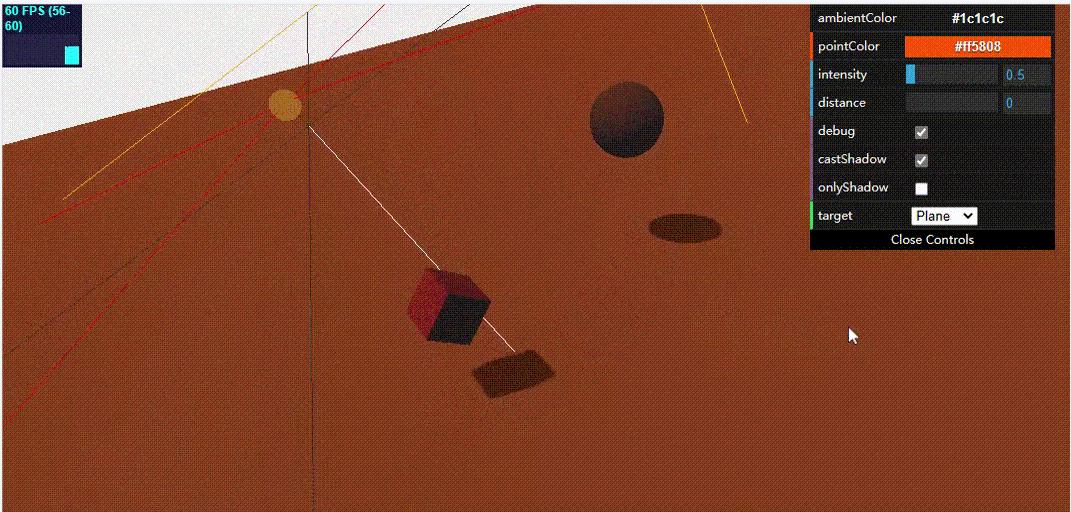
效果:

4. THREE.DirectionalLight(平行光)

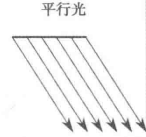
平行光发生光线示意图:

从二维平面发射光线,光线彼此平行。这种类型的光可以看作是距离很远的光,如太阳光,它如此遥远,以至于达到地球时所有的光线几乎都是相互平行的。它不像前面聚光灯那样离目标越远越暗淡,被平行光照亮的整个区域接收到的光强度是一样的。它也可以产生阴影,很多属性和上面SpotLight一样,它的光照区域是一个立方体,类似正交投影摄像机,而SpotLight则类似透视投影摄像机。

1
2
3
4
5
6
7
8
9
10
11
12
13
14
15
16
17
18
19
20
21
22
23
24
25
26
27
28
29
30
31
32
33
34
35
36
37
38
39
40
41
42
43
44
45
46
47
48
49
50
51
52
53
54
55
56
57
58
59
60
61
62
63
64
65
66
67
68
69
70
71
72
73
74
75
76
77
78
79
80
81
82
83
84
85
86
87
88
89
90
91
92
93
94
95
96
97
98
99
100
101
102
103
104
105
106
107
108
109
110
111
112
113
114
115
116
117
118
119
120
121
122
123
124
125
126
127
128
129
130
131
132
133
134
135
136
137
138
139
140
141
142
143
144
145
146
147
148
149
150
151
152
153
154
155
156
157
158
159
160
161
162
163
164
165
166
167
168
169
170
171
172
173
174
175
176
177
178
179
180
181
182
183
184
185
186
187
188
189
190
191
192
193
194
195
196
197
198
199
200
201
202
203
204
205
206
207
208
209
210
<!-- chapter-03-04.html -->
<!DOCTYPE html>
<html>
<head>
<title>Directional Light</title>
<script type="text/javascript" src="../libs/three.js"></script>
<script type="text/javascript" src="../libs/stats.js"></script>
<script type="text/javascript" src="../libs/dat.gui.js"></script>
<style>
body {
margin: 0;
overflow: hidden;
}
</style>
</head>
<body>

<div id="Stats-output">
</div>

<div id="WebGL-output">
</div>

<script type="text/javascript">
function init() {
var stats = initStats();
var scene = new THREE.Scene();

var camera = new THREE.PerspectiveCamera(45, window.innerWidth / window.innerHeight, 0.1, 1000);

var renderer = new THREE.WebGLRenderer();
renderer.setClearColor(new THREE.Color(0xEEEEEE, 1.0));
renderer.setSize(window.innerWidth, window.innerHeight);
renderer.shadowMapEnabled = true;
// 平面
var planeGeometry = new THREE.PlaneGeometry(600, 200, 20, 20);
var planeMaterial = new THREE.MeshLambertMaterial({color: 0xffffff});
var plane = new THREE.Mesh(planeGeometry, planeMaterial);
plane.receiveShadow = true;
plane.rotation.x = -0.5 * Math.PI;
plane.position.x = 15;
plane.position.y = -5;
plane.position.z = 0;
scene.add(plane);
// 立方体
var cubeGeometry = new THREE.BoxGeometry(4, 4, 4);
var cubeMaterial = new THREE.MeshLambertMaterial({color: 0xff3333});
var cube = new THREE.Mesh(cubeGeometry, cubeMaterial);
cube.castShadow = true;
cube.position.x = -4;
cube.position.y = 3;
cube.position.z = 0;
scene.add(cube);
// 球
var sphereGeometry = new THREE.SphereGeometry(4, 20, 20);
var sphereMaterial = new THREE.MeshLambertMaterial({color: 0x7777ff});
var sphere = new THREE.Mesh(sphereGeometry, sphereMaterial);
sphere.position.x = 20;
sphere.position.y = 0;
sphere.position.z = 2;
sphere.castShadow = true;
scene.add(sphere);

camera.position.x = -35;
camera.position.y = 30;
camera.position.z = 25;
camera.lookAt(new THREE.Vector3(10, 0, 0));

// 添加环境光,给场景润色
var ambiColor = "#1c1c1c";
var ambientLight = new THREE.AmbientLight(ambiColor);
scene.add(ambientLight);

// 添加平行光
var pointColor = "#ff5808";
var directionalLight = new THREE.DirectionalLight(pointColor);
directionalLight.position.set(-40, 60, -10);
directionalLight.castShadow = true;
// 设置光照立方体区域
directionalLight.shadowCameraNear = 2;
directionalLight.shadowCameraFar = 200;
directionalLight.shadowCameraLeft = -50;
directionalLight.shadowCameraRight = 50;
directionalLight.shadowCameraTop = 50;
directionalLight.shadowCameraBottom = -50;
// 同前面聚光灯属性
directionalLight.distance = 0;
directionalLight.intensity = 0.5;
directionalLight.shadowMapHeight = 1024;
directionalLight.shadowMapWidth = 1024;
scene.add(directionalLight);

// 和光源一起移动的小球
var sphereLight = new THREE.SphereGeometry(1);
var sphereLightMaterial = new THREE.MeshBasicMaterial({color: 0xac6c25});
var sphereLightMesh = new THREE.Mesh(sphereLight, sphereLightMaterial);
sphereLightMesh.castShadow = true;
sphereLightMesh.position = new THREE.Vector3(3, 20, 3);
scene.add(sphereLightMesh);

document.getElementById("WebGL-output").appendChild(renderer.domElement);

// 属性同上面聚光灯
var controls = new function () {
this.ambientColor = ambiColor;
this.pointColor = pointColor;
this.intensity = 0.5;
this.distance = 0;
this.exponent = 30;
this.angle = 0.1;
this.debug = false;
this.castShadow = true;
this.onlyShadow = false;
this.target = "Plane";

};

var gui = new dat.GUI();
gui.addColor(controls, 'ambientColor').onChange(function (e) {
ambientLight.color = new THREE.Color(e);
});

gui.addColor(controls, 'pointColor').onChange(function (e) {
directionalLight.color = new THREE.Color(e);
});

gui.add(controls, 'intensity', 0, 5).onChange(function (e) {
directionalLight.intensity = e;
});

gui.add(controls, 'distance', 0, 200).onChange(function (e) {
directionalLight.distance = e;
});

gui.add(controls, 'debug').onChange(function (e) {
directionalLight.shadowCameraVisible = e;
});

gui.add(controls, 'castShadow').onChange(function (e) {
directionalLight.castShadow = e;
});

gui.add(controls, 'onlyShadow').onChange(function (e) {
directionalLight.onlyShadow = e;
});

gui.add(controls, 'target', ['Plane', 'Sphere', 'Cube']).onChange(function (e) {
console.log(e);
switch (e) {
case "Plane":
directionalLight.target = plane;
break;
case "Sphere":
directionalLight.target = sphere;
break;
case "Cube":
directionalLight.target = cube;
break;
}

});

render();

var step = 0;
function render() {
stats.update();
cube.rotation.x += 0.03;
cube.rotation.y += 0.03;
cube.rotation.z += 0.03;

step += 0.03;
sphere.position.x = 20 + ( 10 * (Math.cos(step)));
sphere.position.y = 2 + ( 10 * Math.abs(Math.sin(step)));

sphereLightMesh.position.z = -8;
sphereLightMesh.position.y = +(27 * (Math.sin(step / 3)));
sphereLightMesh.position.x = 10 + (26 * (Math.cos(step / 3)));

directionalLight.position.copy(sphereLightMesh.position);

requestAnimationFrame(render);
renderer.render(scene, camera);
}

function initStats() {
var stats = new Stats();
stats.setMode(0); // 0: fps, 1: ms

// Align top-left
stats.domElement.style.position = 'absolute';
stats.domElement.style.left = '0px';
stats.domElement.style.top = '0px';
document.getElementById("Stats-output").appendChild(stats.domElement);
return stats;
}
}

window.onload = init;

// 改变窗口大小后适配
function onResize() {
camera.aspect = window.innerWidth / window.innerHeight;
camera.updateProjectionMatrix();
renderer.setSize(window.innerWidth, window.innerHeight);
}
window.addEventListener('resize', onResize, false);
</script>
</body>
</html>

效果:


特殊光源

1. THREE.HemisphereLight(半球光源)

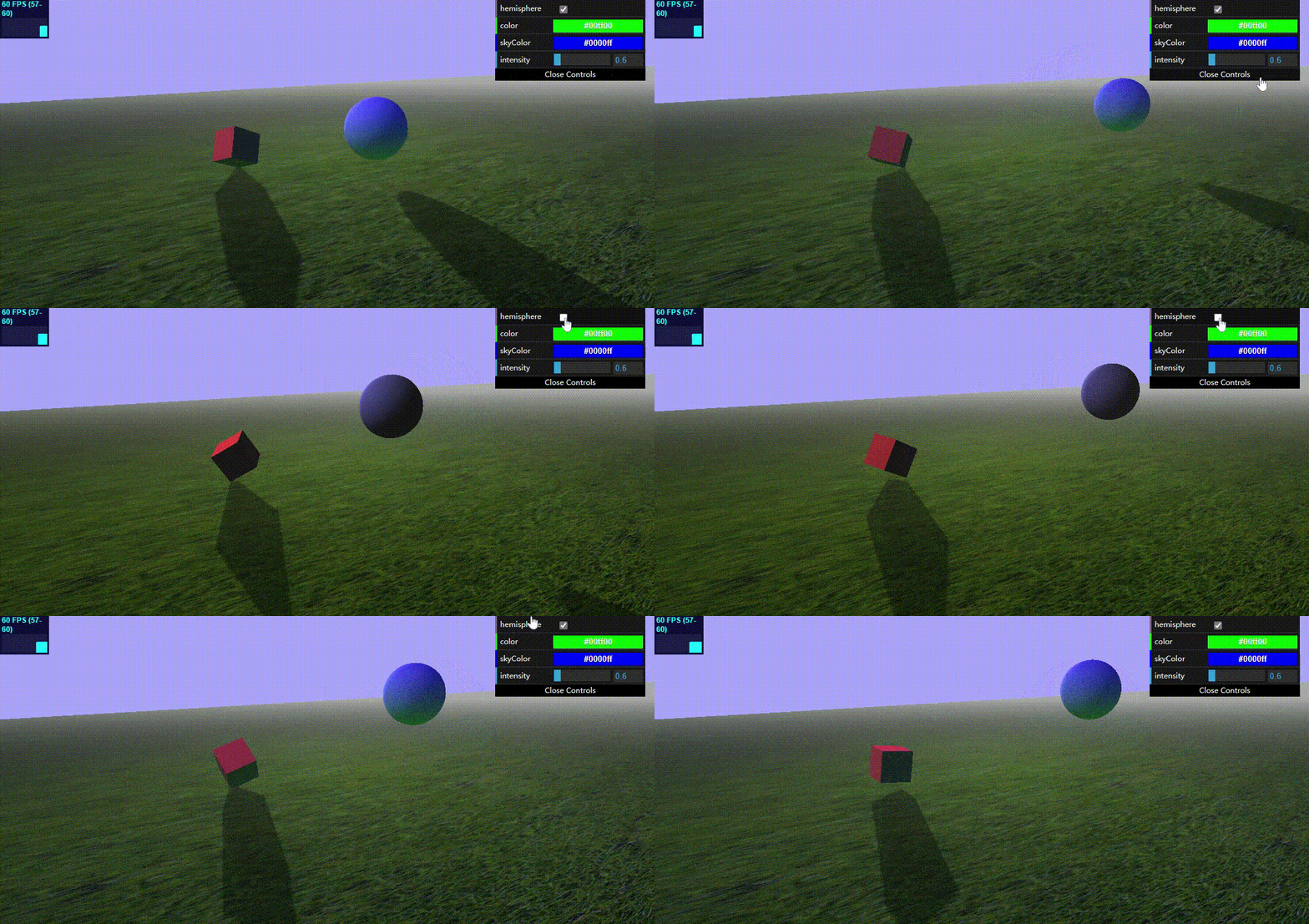
使用半球光源可以创建出更加贴近自然的户外光照效果。在户外,并不是所有的光照都来自上方,还有大气的散射和地面以及其它物体的反射。THREE.HemisphereLight光源就是为了这种情形创建的。

它的属性很简单:

属性 描述
groundColor 从地面发出的光线的颜色
color 从天空发出的光线的颜色
intensity 光线照射的强度
1
2
3
4
5
6
7
8
9
10
11
12
13
14
15
16
17
18
19
20
21
22
23
24
25
26
27
28
29
30
31
32
33
34
35
36
37
38
39
40
41
42
43
44
45
46
47
48
49
50
51
52
53
54
55
56
57
58
59
60
61
62
63
64
65
66
67
68
69
70
71
72
73
74
75
76
77
78
79
80
81
82
83
84
85
86
87
88
89
90
91
92
93
94
95
96
97
98
99
100
101
102
103
104
105
106
107
108
109
110
111
112
113
114
115
116
117
118
119
120
121
122
123
124
125
126
127
128
129
130
131
132
133
134
135
136
137
138
139
140
141
142
143
144
145
146
147
148
149
150
151
152
153
154
155
156
157
158
159
160
161
162
163
164
165
166
167
168
169
170
171
172
<!-- chapter-03-05.html -->
<!DOCTYPE html>
<html>
<head>
<title>Hemisphere Light</title>
<script type="text/javascript" src="../libs/three.js"></script>
<script type="text/javascript" src="../libs/stats.js"></script>
<script type="text/javascript" src="../libs/dat.gui.js"></script>
<style>
body {
margin: 0;
overflow: hidden;
}
</style>
</head>
<body>

<div id="Stats-output">
</div>

<div id="WebGL-output">
</div>

<script type="text/javascript">
function init() {
var stats = initStats();

var scene = new THREE.Scene();
scene.fog = new THREE.Fog(0xaaaaaa, 0.010, 200); // 添加雾化效果

var camera = new THREE.PerspectiveCamera(45, window.innerWidth / window.innerHeight, 0.1, 1000);

var renderer = new THREE.WebGLRenderer();
renderer.setClearColor(new THREE.Color(0xaaaaff, 1.0));
renderer.setSize(window.innerWidth, window.innerHeight);
renderer.shadowMapEnabled = true;

// 添加本地图片纹理(草地地面)
var textureGrass = THREE.ImageUtils.loadTexture("../assets/textures/ground/grasslight-big.jpg");
textureGrass.wrapS = THREE.RepeatWrapping;
textureGrass.wrapT = THREE.RepeatWrapping;
textureGrass.repeat.set(4, 4);

// 用本地图片做网格对象的材质
var planeGeometry = new THREE.PlaneGeometry(1000, 200, 20, 20);
var planeMaterial = new THREE.MeshLambertMaterial({map: textureGrass}); // 本地纹理材质
var plane = new THREE.Mesh(planeGeometry, planeMaterial);
plane.receiveShadow = true;
plane.rotation.x = -0.5 * Math.PI;
plane.position.x = 15;
plane.position.y = 0;
plane.position.z = 0;
scene.add(plane);

var cubeGeometry = new THREE.BoxGeometry(4, 4, 4);
var cubeMaterial = new THREE.MeshLambertMaterial({color: 0xff3333});
var cube = new THREE.Mesh(cubeGeometry, cubeMaterial);
cube.castShadow = true;
cube.position.x = -4;
cube.position.y = 3;
cube.position.z = 0;
scene.add(cube);

var sphereGeometry = new THREE.SphereGeometry(4, 25, 25);
var sphereMaterial = new THREE.MeshLambertMaterial({color: 0x7777ff});
var sphere = new THREE.Mesh(sphereGeometry, sphereMaterial);
sphere.position.x = 10;
sphere.position.y = 5;
sphere.position.z = 10;
sphere.castShadow = true;
scene.add(sphere);

camera.position.x = -20;
camera.position.y = 15;
camera.position.z = 45;
camera.lookAt(new THREE.Vector3(10, 0, 0));

// 添加聚光灯光源
var spotLight0 = new THREE.SpotLight(0xcccccc);
spotLight0.position.set(-40, 60, -10);
spotLight0.lookAt(plane);
scene.add(spotLight0);

// 添加半球光源
var hemiLight = new THREE.HemisphereLight(0x0000ff, 0x00ff00, 0.6);
hemiLight.position.set(0, 500, 0);
scene.add(hemiLight);

// 添加平行光源
var pointColor = "#ffffff";
var dirLight = new THREE.DirectionalLight(pointColor);
dirLight.position.set(30, 10, -50);
dirLight.castShadow = true;
dirLight.target = plane;
dirLight.shadowCameraNear = 0.1;
dirLight.shadowCameraFar = 200;
dirLight.shadowCameraLeft = -50;
dirLight.shadowCameraRight = 50;
dirLight.shadowCameraTop = 50;
dirLight.shadowCameraBottom = -50;
dirLight.shadowMapWidth = 2048;
dirLight.shadowMapHeight = 2048;
scene.add(dirLight);

document.getElementById("WebGL-output").appendChild(renderer.domElement);

var controls = new function () {
this.hemisphere = true; // 是否开启半球光源(通过光强为0来设置)
this.color = 0x00ff00; // 从地面发出的光线颜色
this.skyColor = 0x0000ff; // 从天空发出的光线颜色
this.intensity = 0.6; // 光照强度
};

var gui = new dat.GUI();
gui.add(controls, 'hemisphere').onChange(function (e) {
if (!e) {
hemiLight.intensity = 0;
} else {
hemiLight.intensity = controls.intensity;
}
});
gui.addColor(controls, 'color').onChange(function (e) {
hemiLight.groundColor = new THREE.Color(e);
});
gui.addColor(controls, 'skyColor').onChange(function (e) {
hemiLight.color = new THREE.Color(e);
});
gui.add(controls, 'intensity', 0, 5).onChange(function (e) {
hemiLight.intensity = e;
});

render();

var step = 0;
function render() {
stats.update();
cube.rotation.x += 0.03;
cube.rotation.y += 0.03;
cube.rotation.z += 0.03;

step += 0.03;
sphere.position.x = 20 + ( 10 * (Math.cos(step)));
sphere.position.y = 2 + ( 10 * Math.abs(Math.sin(step)));

requestAnimationFrame(render);
renderer.render(scene, camera);
}

function initStats() {
var stats = new Stats();
stats.setMode(0); // 0: fps, 1: ms

// Align top-left
stats.domElement.style.position = 'absolute';
stats.domElement.style.left = '0px';
stats.domElement.style.top = '0px';
document.getElementById("Stats-output").appendChild(stats.domElement);
return stats;
}
}
window.onload = init;

// 改变窗口大小后适配
function onResize() {
camera.aspect = window.innerWidth / window.innerHeight;
camera.updateProjectionMatrix();
renderer.setSize(window.innerWidth, window.innerHeight);
}
window.addEventListener('resize', onResize, false);
</script>
</body>
</html>

观察示例,通过开启/关闭半球光源,看场景中物体受反射光的影响。

2. THREE.AreaLight(区域光源)

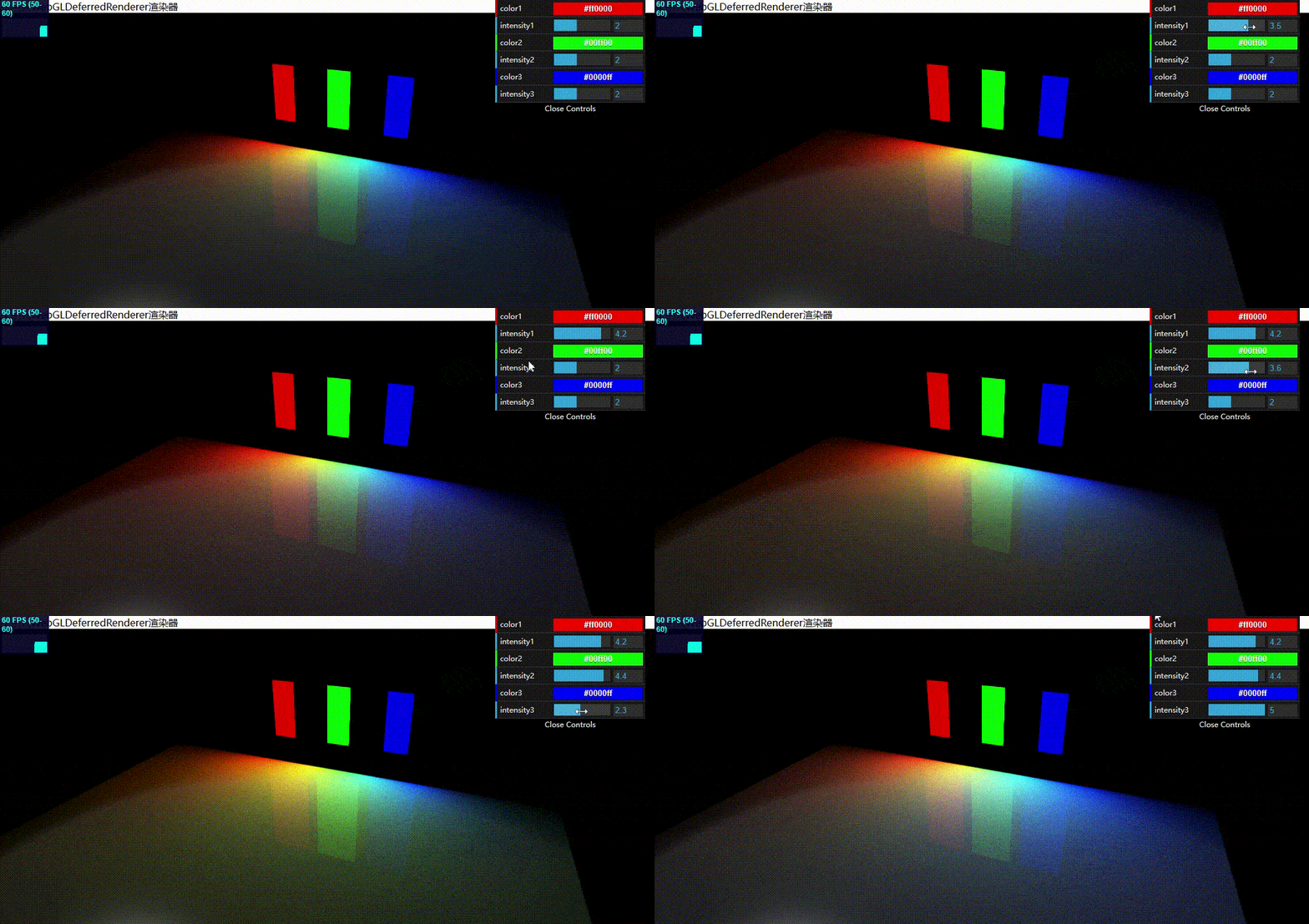
区域光不是从某一个点发光,它是从一块区域发光,可以定义长方形的发光区域。它没有定义在WebGLRenderer渲染器中,因为会带来非常严重的性能损失。而是定义在WebGLDeferredRenderer渲染器中,它使用了一种不同的方法(分成多个步骤),相对标志渲染器WebGLRenderer,可以更好地处理复杂地光照(或者非常大量地光源)。

使用WebGLDeferredRenderer要额外引入一些外部库。好像新版区域光源也给加到标志渲染器了,本示例用的旧版。

1
2
3
4
5
6
7
8
9
10
11
12
13
14
15
16
17
18
19
20
21
22
23
24
25
26
27
28
29
30
31
32
33
34
35
36
37
38
39
40
41
42
43
44
45
46
47
48
49
50
51
52
53
54
55
56
57
58
59
60
61
62
63
64
65
66
67
68
69
70
71
72
73
74
75
76
77
78
79
80
81
82
83
84
85
86
87
88
89
90
91
92
93
94
95
96
97
98
99
100
101
102
103
104
105
106
107
108
109
110
111
112
113
114
115
116
117
118
119
120
121
122
123
124
125
126
127
128
129
130
131
132
133
134
135
136
137
138
139
140
141
142
143
144
145
146
147
148
149
150
151
152
153
154
155
156
157
158
159
160
161
162
163
164
165
166
167
168
169
170
171
172
173
174
175
176
177
178
179
180
181
182
183
184
185
186
187
188
189
190
191
192
193
194
195
196
197
198
199
<!-- chapter-03-06.html -->
<!DOCTYPE html>
<html>
<head>
<title>Area Light</title>
<script type="text/javascript" src="../libs/three.js"></script>
<script type="text/javascript" src="../libs/stats.js"></script>
<script type="text/javascript" src="../libs/dat.gui.js"></script>
// 引入WebGLDeferredRenderer渲染器
<script type="text/javascript" src="../libs/WebGLDeferredRenderer.js"></script>
<script type="text/javascript" src="../libs/ShaderDeferred.js"></script>
<script type="text/javascript" src="../libs/RenderPass.js"></script>
<script type="text/javascript" src="../libs/EffectComposer.js"></script>
<script type="text/javascript" src="../libs/CopyShader.js"></script>
<script type="text/javascript" src="../libs/ShaderPass.js"></script>
<script type="text/javascript" src="../libs/FXAAShader.js"></script>
<script type="text/javascript" src="../libs/MaskPass.js"></script>

<style>
body {
margin: 0;
overflow: hidden;
}
</style>
</head>
<body>

<div id="Stats-output">
</div>

<div id="WebGL-output">
</div>

<script type="text/javascript">
var camera;
function init() {
var stats = initStats();
var scene = new THREE.Scene();

camera = new THREE.PerspectiveCamera(45, window.innerWidth / window.innerHeight, 0.1, 1000);
scene.add(camera);

// 针对区域光源这种大量光源性能优化的渲染器
var renderer = new THREE.WebGLDeferredRenderer({
width: window.innerWidth,
height: window.innerHeight,
scale: 1, antialias: true,
tonemapping: THREE.FilmicOperator, brightness: 2.5
});

// 地面
var planeGeometry = new THREE.PlaneGeometry(70, 70, 1, 1);
var planeMaterial = new THREE.MeshPhongMaterial({color: 0xffffff, specular: 0xffffff, shininess: 200});
var plane = new THREE.Mesh(planeGeometry, planeMaterial);
plane.rotation.x = -0.5 * Math.PI;
plane.position.x = 0;
plane.position.y = 0;
plane.position.z = 0;
scene.add(plane);

camera.position.x = 20;
camera.position.y = 30;
camera.position.z = 21;
camera.lookAt(new THREE.Vector3(0, 0, -30));

document.getElementById("WebGL-output").appendChild(renderer.domElement);

// 固定的聚光灯光源
var spotLight0 = new THREE.SpotLight(0xcccccc);
spotLight0.position.set(-40, 60, -10);
spotLight0.intensity = 0.1;
spotLight0.lookAt(plane);
scene.add(spotLight0);

// 添加红色区域光源1
var areaLight1 = new THREE.AreaLight(0xff0000, 3);
areaLight1.position.set(-10, 10, -35);
areaLight1.rotation.set(-Math.PI / 2, 0, 0);
areaLight1.width = 4;
areaLight1.height = 9.9;
scene.add(areaLight1);

// 添加绿色区域光源2
var areaLight2 = new THREE.AreaLight(0x00ff00, 3);
areaLight2.position.set(0, 10, -35);
areaLight2.rotation.set(-Math.PI / 2, 0, 0);
areaLight2.width = 4;
areaLight2.height = 9.9;
scene.add(areaLight2);

// 添加蓝色区域光源3
var areaLight3 = new THREE.AreaLight(0x0000ff, 3);
areaLight3.position.set(10, 10, -35);
areaLight3.rotation.set(-Math.PI / 2, 0, 0);
areaLight3.width = 4;
areaLight3.height = 9.9;
scene.add(areaLight3);

// 红色长方形1(z为0)设置到区域光源1位置,用于标志光源的位置
var planeGeometry1 = new THREE.BoxGeometry(4, 10, 0);
var planeGeometry1Mat = new THREE.MeshBasicMaterial({color: 0xff0000});
var plane1 = new THREE.Mesh(planeGeometry1, planeGeometry1Mat);
plane1.position.copy(areaLight1.position);
scene.add(plane1);

// 绿色长方形2设置到区域光源2位置
var planeGeometry2 = new THREE.BoxGeometry(4, 10, 0);
var planeGeometry2Mat = new THREE.MeshBasicMaterial({color: 0x00ff00});
var plane2 = new THREE.Mesh(planeGeometry2, planeGeometry2Mat);
plane2.position.copy(areaLight2.position);
scene.add(plane2);

// 蓝色长方形3设置到区域光源3位置
var planeGeometry3 = new THREE.BoxGeometry(4, 10, 0);
var planeGeometry3Mat = new THREE.MeshBasicMaterial({color: 0x0000ff});
var plane3 = new THREE.Mesh(planeGeometry3, planeGeometry3Mat);
plane3.position.copy(areaLight3.position);
scene.add(plane3);

var controls = new function () {
// 对应3块区域光的颜色和强度
this.color1 = 0xff0000;
this.intensity1 = 2;
this.color2 = 0x00ff00;
this.intensity2 = 2;
this.color3 = 0x0000ff;
this.intensity3 = 2;
};

var gui = new dat.GUI();
// 改变光颜色和对应的长方形颜色
gui.addColor(controls, 'color1').onChange(function (e) {
areaLight1.color = new THREE.Color(e);
planeGeometry1Mat.color = new THREE.Color(e);
scene.remove(plane1);
plane1 = new THREE.Mesh(planeGeometry1, planeGeometry1Mat);
plane1.position.copy(areaLight1.position);
scene.add(plane1);

});
gui.add(controls, 'intensity1', 0, 5).onChange(function (e) {
areaLight1.intensity = e;
});
gui.addColor(controls, 'color2').onChange(function (e) {
areaLight2.color = new THREE.Color(e);
planeGeometry2Mat.color = new THREE.Color(e);
scene.remove(plane2);
plane2 = new THREE.Mesh(planeGeometry2, planeGeometry2Mat);
plane2.position.copy(areaLight2.position);
scene.add(plane2);
});
gui.add(controls, 'intensity2', 0, 5).onChange(function (e) {
areaLight2.intensity = e;
});
gui.addColor(controls, 'color3').onChange(function (e) {
areaLight3.color = new THREE.Color(e);
planeGeometry3Mat.color = new THREE.Color(e);
scene.remove(plane3);
plane3 = new THREE.Mesh(planeGeometry1, planeGeometry3Mat);
plane3.position.copy(areaLight3.position);
scene.add(plane3);
});
gui.add(controls, 'intensity3', 0, 5).onChange(function (e) {
areaLight3.intensity = e;
});


render();

function render() {
stats.update();
requestAnimationFrame(render);
renderer.render(scene, camera);
}

function initStats() {
var stats = new Stats();
stats.setMode(0); // 0: fps, 1: ms

// Align top-left
stats.domElement.style.position = 'absolute';
stats.domElement.style.left = '0px';
stats.domElement.style.top = '0px';
document.getElementById("Stats-output").appendChild(stats.domElement);
return stats;
}
}
window.onload = init;

// 改变窗口大小后适配
function onResize() {
camera.aspect = window.innerWidth / window.innerHeight;
camera.updateProjectionMatrix();
renderer.setSize(window.innerWidth, window.innerHeight);
}
window.addEventListener('resize', onResize, false);
</script>
</body>
</html>

效果:


3. THREE.LensFlare(镜头光晕)

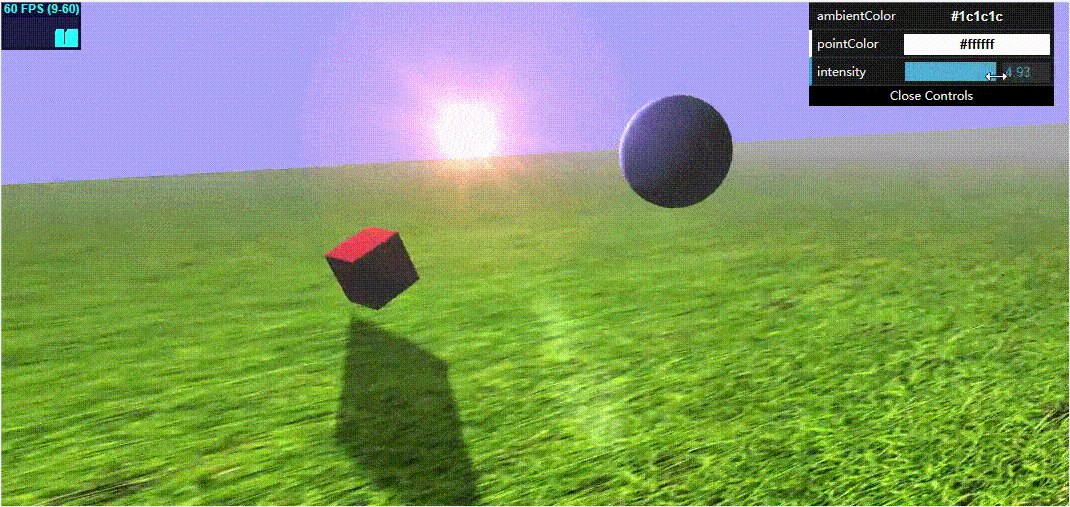
类似你直接朝着太阳拍照时就会出现镜头光晕效果。

光晕属性:

参数 描述
texture(纹理) 纹理就是一个图片,用来决定光晕的形状
size(尺寸) 指定光晕大小。如果指定为-1,那么将使用纹理本身的大小
distance(距离) 从光源(0)到摄像机(1)的距离。
blending(混合) 可以为光晕提供多种材质。混合模式决定了如何将它们混合在一起。
color(颜色) 光晕的颜色

示例:

1
2
3
4
5
6
7
8
9
10
11
12
13
14
15
16
17
18
19
20
21
22
23
24
25
26
27
28
29
30
31
32
33
34
35
36
37
38
39
40
41
42
43
44
45
46
47
48
49
50
51
52
53
54
55
56
57
58
59
60
61
62
63
64
65
66
67
68
69
70
71
72
73
74
75
76
77
78
79
80
81
82
83
84
85
86
87
88
89
90
91
92
93
94
95
96
97
98
99
100
101
102
103
104
105
106
107
108
109
110
111
112
113
114
115
116
117
118
119
120
121
122
123
124
125
126
127
128
129
130
131
132
133
134
135
136
137
138
139
140
141
142
143
144
145
146
147
148
149
150
151
152
153
154
155
156
157
158
159
160
161
162
163
164
165
166
167
168
169
170
171
172
173
174
175
176
177
178
179
180
181
182
183
184
<!-- chapter-03-07.html -->
<!DOCTYPE html>
<html>
<head>
<title>Lensflarest</title>
<script type="text/javascript" src="../libs/three.js"></script>
<script type="text/javascript" src="../libs/stats.js"></script>
<script type="text/javascript" src="../libs/dat.gui.js"></script>
<style>
body {
margin: 0;
overflow: hidden;
}
</style>
</head>
<body>

<div id="Stats-output">
</div>

<div id="WebGL-output">
</div>

<script type="text/javascript">
function init() {
var stats = initStats();
var scene = new THREE.Scene();
scene.fog = new THREE.Fog(0xaaaaaa, 0.010, 200); // 添加雾化效果

var camera = new THREE.PerspectiveCamera(45, window.innerWidth / window.innerHeight, 0.1, 1000);

var renderer = new THREE.WebGLRenderer({antialias: true, alpha: true});
renderer.setClearColor(new THREE.Color(0xaaaaff, 1.0));
renderer.setSize(window.innerWidth, window.innerHeight);
renderer.shadowMapEnabled = true;

// 创建草地地面
var textureGrass = THREE.ImageUtils.loadTexture("../assets/textures/ground/grasslight-big.jpg");
textureGrass.wrapS = THREE.RepeatWrapping;
textureGrass.wrapT = THREE.RepeatWrapping;
textureGrass.repeat.set(4, 4);
var planeGeometry = new THREE.PlaneGeometry(1000, 200, 20, 20);
var planeMaterial = new THREE.MeshLambertMaterial({map: textureGrass});
var plane = new THREE.Mesh(planeGeometry, planeMaterial);
plane.receiveShadow = true;
plane.rotation.x = -0.5 * Math.PI;
plane.position.x = 15;
plane.position.y = 0;
plane.position.z = 0;
scene.add(plane);

// 创建立方体
var cubeGeometry = new THREE.BoxGeometry(4, 4, 4);
var cubeMaterial = new THREE.MeshLambertMaterial({color: 0xff3333});
var cube = new THREE.Mesh(cubeGeometry, cubeMaterial);
cube.castShadow = true;
cube.position.x = -4;
cube.position.y = 3;
cube.position.z = 0;
scene.add(cube);

// 创建球体
var sphereGeometry = new THREE.SphereGeometry(4, 25, 25);
var sphereMaterial = new THREE.MeshLambertMaterial({color: 0x7777ff});
var sphere = new THREE.Mesh(sphereGeometry, sphereMaterial);
sphere.position.x = 10;
sphere.position.y = 5;
sphere.position.z = 10;
sphere.castShadow = true;
scene.add(sphere);

camera.position.x = -20;
camera.position.y = 15;
camera.position.z = 45;
camera.lookAt(new THREE.Vector3(10, 0, 0));

// 添加环境光
var ambiColor = "#1c1c1c";
var ambientLight = new THREE.AmbientLight(ambiColor);
scene.add(ambientLight);

// 添加聚光灯
var spotLight0 = new THREE.SpotLight(0xcccccc);
spotLight0.position.set(-40, 60, -10);
spotLight0.lookAt(plane);
scene.add(spotLight0);

// 添加平行光
var pointColor = "#ffffff";
var spotLight = new THREE.DirectionalLight(pointColor);
spotLight.position.set(30, 10, -50);
spotLight.castShadow = true;
spotLight.shadowCameraNear = 0.1;
spotLight.shadowCameraFar = 100;
spotLight.shadowCameraFov = 50;
spotLight.target = plane;
spotLight.distance = 0;
spotLight.shadowCameraNear = 2;
spotLight.shadowCameraFar = 200;
spotLight.shadowCameraLeft = -100;
spotLight.shadowCameraRight = 100;
spotLight.shadowCameraTop = 100;
spotLight.shadowCameraBottom = -100;
spotLight.shadowMapWidth = 2048;
spotLight.shadowMapHeight = 2048;
scene.add(spotLight);

document.getElementById("WebGL-output").appendChild(renderer.domElement);

var controls = new function () {
this.ambientColor = ambiColor;
this.pointColor = pointColor;
this.intensity = 0.1;
};

var gui = new dat.GUI();
gui.addColor(controls, 'ambientColor').onChange(function (e) {
ambientLight.color = new THREE.Color(e);
});

gui.addColor(controls, 'pointColor').onChange(function (e) {
spotLight.color = new THREE.Color(e);
});

gui.add(controls, 'intensity', 0, 5).onChange(function (e) {
spotLight.intensity = e;
});

// 创建光晕纹理
var textureFlare0 = THREE.ImageUtils.loadTexture("../assets/textures/lensflare/lensflare0.png");
// 创建镜头光晕,把它放在光源处(距离为0)
var flareColor = new THREE.Color(0xffaacc);
var lensFlare = new THREE.LensFlare(textureFlare0, 350, 0.0, THREE.AdditiveBlending, flareColor);
// 光源到摄像机附近添加新的光晕(使用的很淡的纹理),通过上面主光晕对象的add方法添加,增强表现效果,可以屏蔽对比。
var textureFlare3 = THREE.ImageUtils.loadTexture("../assets/textures/lensflare/lensflare3.png");
lensFlare.add(textureFlare3, 60, 0.6, THREE.AdditiveBlending);
lensFlare.add(textureFlare3, 70, 0.7, THREE.AdditiveBlending);
lensFlare.add(textureFlare3, 120, 0.9, THREE.AdditiveBlending);
lensFlare.add(textureFlare3, 70, 1.0, THREE.AdditiveBlending);
lensFlare.position.copy(spotLight.position);
scene.add(lensFlare);

render();

var step = 0;
function render() {
stats.update();
cube.rotation.x += 0.03;
cube.rotation.y += 0.03;
cube.rotation.z += 0.03;

step += 0.03;
sphere.position.x = 20 + ( 10 * (Math.cos(step)));
sphere.position.y = 2 + ( 10 * Math.abs(Math.sin(step)));

requestAnimationFrame(render);
renderer.render(scene, camera);
}

function initStats() {
var stats = new Stats();
stats.setMode(0); // 0: fps, 1: ms

// Align top-left
stats.domElement.style.position = 'absolute';
stats.domElement.style.left = '0px';
stats.domElement.style.top = '0px';
document.getElementById("Stats-output").appendChild(stats.domElement);
return stats;
}
};

window.onload = init;

// 改变窗口大小后适配
function onResize() {
camera.aspect = window.innerWidth / window.innerHeight;
camera.updateProjectionMatrix();
renderer.setSize(window.innerWidth, window.innerHeight);
}
window.addEventListener('resize', onResize, false);
</script>
</body>
</html>

效果: