logo头像
Snippet 博客主题

threejs材质

前言

前面简单的介绍了材质,你已经了解到材质结合几何体就可以创建网格,网格对象才可以添加到Threejs渲染的场景中。材质就像物体的皮肤,决定了几何体的外表。如,几何体看起来是否像金属、透明与否,或者显示为线框。

threejs提供的材质:

名称 描述
MeshBasicMaterial(网格基础材质) 用于给几何体赋予一种简单的颜色,可显示几何体的线框
MeshDepthMaterial(网格深度材质) 这个材质使用从摄像机到网格的距离来决定如何给网格上色
MeshNormalMaterial(网格法向材质) 根据法向量计算物体表面的颜色
MeshFaceMaterial(网格面材质) 这是一个容器,可以为几何体的各个表面指定不同的材质
MeshLambertMaterial(网格Lambert材质) 这是一种考虑光照影响的材质,用于创建暗淡的、不光亮的物体
MeshPhongMaterial(网格Phong材质) 也是一种考虑光照影响的材质,不过它用于创建光亮的物体
ShaderMaterial(着色器材质) 可以使用自定义的着色器程序,直接控制顶点的放置方式以及像素的着色方式
LineBasicMaterial(直线基础材质) 用于THREE.Line(直线)几何体,用来创建着色的直线
LineDashMaterial(虚线材质) 同上,但允许创建出一种虚线的效果
下面这些特殊材质不在本节讨论,后续章节再讨论
RawShaderMaterial 一种特殊的材质,只能和BufferedGeometry一起使用。会在后面【自定义着色器】那节使用。
SpriteCanvasMaterial 用于给单个点设置样式,在后面【粒子、精灵和点云】那节再讨论
SpriteMaterial 用于给单个点设置样式,在后面【粒子、精灵和点云】那节再讨论
PointCloudMaterial 用于给单个点设置样式,在后面【粒子、精灵和点云】那节再讨论

材质的共有属性

Threejs提供了一个材质基类THREE.Material,它列出了所有的共有属性。我们把它分为了下面3类。

请注意,本节不会讨论材质关于纹理和贴图的相关属性以及与动画相关的特殊属性,这些后面再详细讨论。

1. 基础属性

最常用的,通过这些属性,可以控制物体的不透明度、是否可见以及如何被引用(id或name)。

属性 描述
id(标志符) 用来标识材质,在创建时自动赋值。第一个材质的值为0,每新增一个值加1
uuid(唯一ID) 这是生成的唯一ID,在内部使用
name(名称) 通过这个属性可以给材质一个名称,用于调试标识
opacity(透明度) 定义物体透明度,赋值范围0~1
transparent(是否透明) 如果为true,会使用指定的透明度为0的渲染物体。如果设置为false,这个物体就不透明(着色更明亮些)。如果使用alpha通道的纹理,该属性就应该设置为true
overdraw(过度描绘) 当使用THREE.CanvasRender渲染器时,多边形会被渲染得稍微大些。如果两个多边形边缘有明显间隙时,可以将这个属性设置为true
visible(是否可见) 材质是否可见
side(侧面) 定义几何体那个面使用材质,有前面/外侧(THREE.FrontSide)是默认值,后面/内侧(THREE.BackSide),双侧(THREE.DoubleSide),即材质应用到物体得内外两侧
needsUpdate(是否更新) 对于材质的某些修改(threejs默认哪些不会发生变化的属性),你需要告诉threejs材质已经修改了。如果设置为true,会使用新材质属性更新它的缓存

2. 融合属性

每个物体都有一系列的融合属性。这些属性决定了物体如何与背景融合。即两种颜色值混合,得到新的颜色值。

属性 描述
blending(融合) 标准融合方式,一般选择THREE.NormalBlending,这种模式下只显示材质的上层
blendsrc(融合源) 除了使用标准融合模式外,还可以使用blendsrc、blenddst、blendequation来创建自定义的融合模式。这个属性定义源的融合方式,默认值THREE.SrcAlphaFactor,即使用alpha通道进行融合
blenddst(融合目标) 定义目标的融合方式,默认值THREE.OneMinusSrcAlphaFactor,即目标也使用源的alpha通道进行融合,只是使用的值是1
blendequation(融合公式) 定义如何使用blendsrc和blenddst的值。默认为使它们相加(AddEquation)

3. 高级属性

可以控制底层的WebGL上下文对象渲染物体的方式。大多数情况下不需要使用这些属性。这里不深入讨论,如果想了解内部工作细节,可以查看我CSDN博客里OpenGL相关介绍。

属性 描述
depthTest 深度测试,控制是否使用像素深度来计算新像素的值
polygonOffset、polygonOffsetFactor和polygonOffsetUnits 可以控制WebGL的POLYGON_OFFSET_FILL特性。详情参考OpenGL规范
alphatest 如果某个像素的alpha值小于该值,那么该像素不会显示出来。可以使用这个属性移除一些与透明度相关的毛边

Threejs提供的材质

1. 简单材质

THREE.MeshBasicMaterial

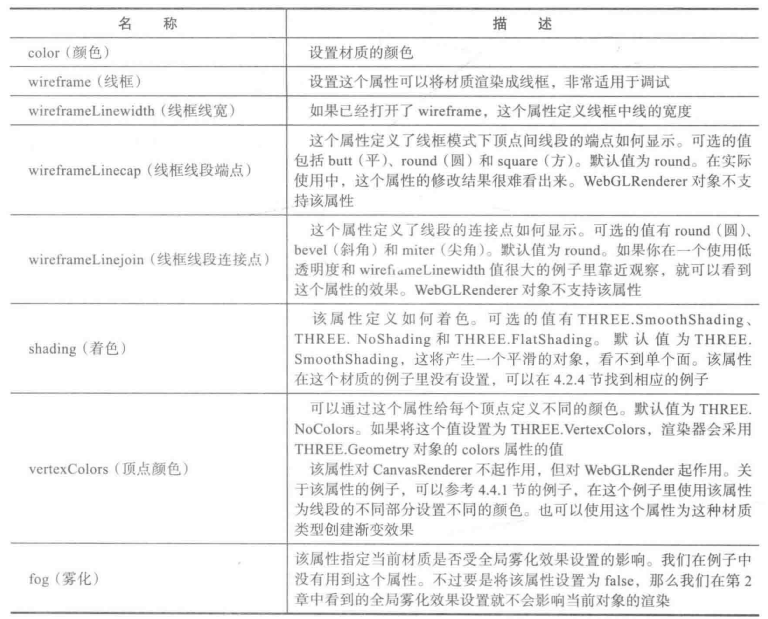
这种材质不考虑场景中光照的影响,主要用于绘制简单的平面多边形而且可以显示几何体线框。除了上面提及的共有属性之外,还可以设置下面所列的这些属性:

THREE.MeshDepthMaterial

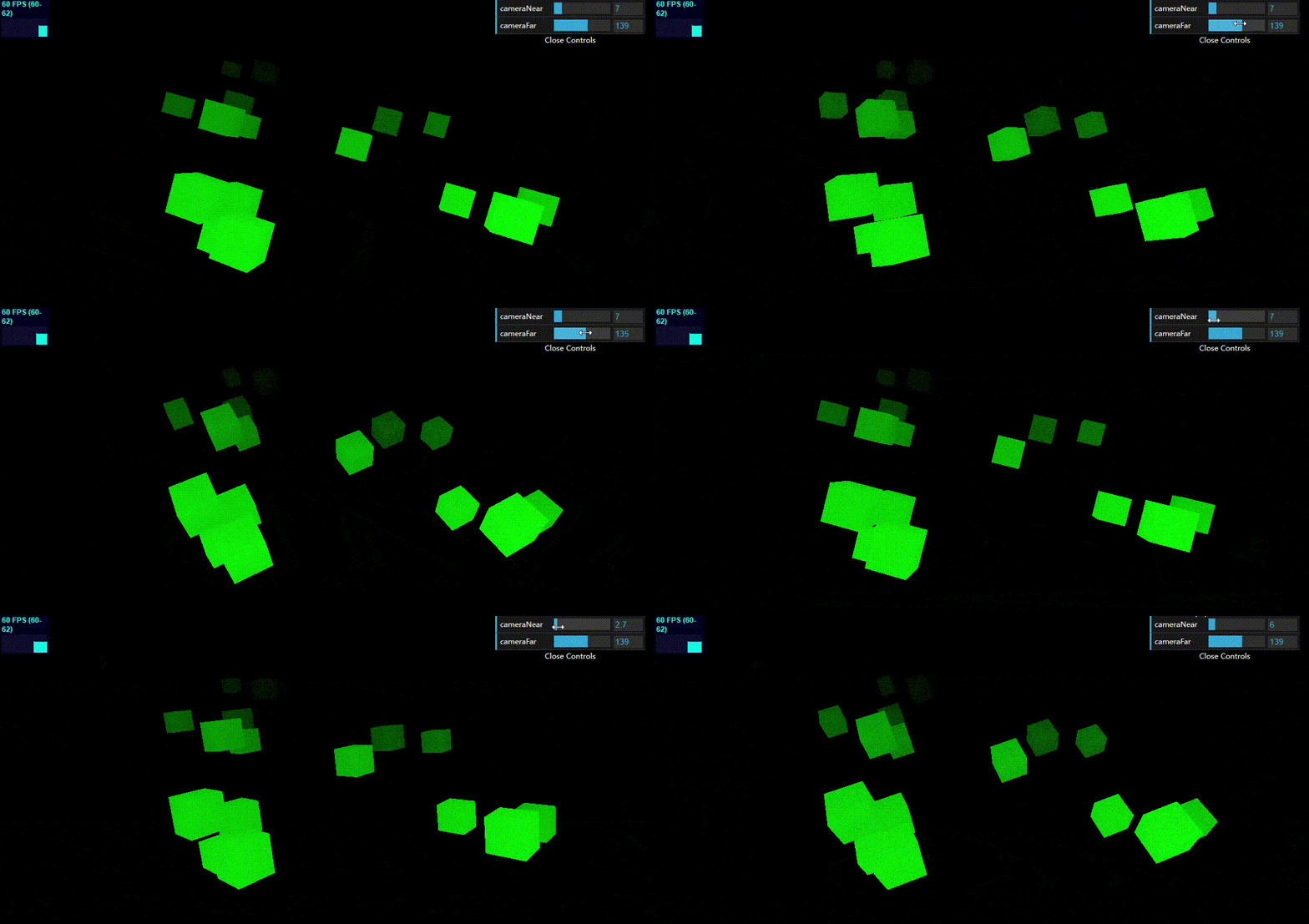
这种材质外观不是由光照或某个材质属性决定,而是由物体到摄像机得距离决定的。一般将这种材质与其它材质结合一起使用(这也是材质融合起作用的地方),从而很容易创建出渐变效果。

额外属性:

名称 描述
wireframe 该属性指定是否显示线框
wireframeLineWidth 该属性指定线框的宽度
1
2
3
4
5
6
7
8
9
10
11
12
13
14
15
16
17
18
19
20
21
22
23
24
25
26
27
28
29
30
31
32
33
34
35
36
37
38
39
40
41
42
43
44
45
46
47
48
49
50
51
52
53
54
55
56
57
58
59
60
61
62
63
64
65
66
67
68
69
70
71
72
73
74
75
76
77
78
79
80
81
82
83
84
85
86
87
88
89
90
91
92
93
94
95
96
97
98
99
100
101
102
103
104
105
106
107
108
109
110
111
112
113
114
115
116
117
118
119
120
121
122
123
<!-- chapter-04-01.html -->
<!DOCTYPE html>
<html>
<head>
<title>MeshDepth-Combined Material</title>
<script type="text/javascript" src="../libs/three.js"></script>
<script type="text/javascript" src="../libs/stats.js"></script>
<script type="text/javascript" src="../libs/dat.gui.js"></script>
<style>
body {
margin: 0;
overflow: hidden;
}
</style>
</head>
<body>

<div id="Stats-output">
</div>

<div id="WebGL-output">
</div>

<script type="text/javascript">
function init() {
var stats = initStats();

var scene = new THREE.Scene();
var camera = new THREE.PerspectiveCamera(45, window.innerWidth / window.innerHeight, 10, 130);

var renderer = new THREE.WebGLRenderer();
renderer.sortObjects = false; // 物体的渲染顺序由他们添加到场景中的顺序所决定(默认是根据它们距离摄像机的空间位置来排序的)
renderer.setClearColor(new THREE.Color(0x00000, 1.0));
renderer.setSize(window.innerWidth, window.innerHeight);
renderer.shadowMapEnabled = true;

camera.position.x = -50;
camera.position.y = 40;
camera.position.z = 50;
camera.near = 7;
camera.far = 139;
camera.lookAt(scene.position);
document.getElementById("WebGL-output").appendChild(renderer.domElement);

var controls = new function () {
// 通过设置摄像机远、近平面距离来观察深度材质物体的表现
this.cameraNear = camera.near;
this.cameraFar = camera.far;

this.addCube = function () {
var cubeSize = Math.ceil(3 + (Math.random() * 3));
// 创建立方几何体
var cubeGeometry = new THREE.BoxGeometry(cubeSize, cubeSize, cubeSize);

// 创建深度材质和基础材质两种材质混合
var cubeMaterial = new THREE.MeshDepthMaterial();
var colorMaterial = new THREE.MeshBasicMaterial({
color: 0x00ff00,
transparent: true,
blending: THREE.MultiplyBlending
});
var cube = new THREE.SceneUtils.createMultiMaterialObject(cubeGeometry, [colorMaterial, cubeMaterial]); // 多种材质创建网格
cube.children[1].scale.set(0.99, 0.99, 0.99); // 避免两个完全相同网格创建在同一位置时可能闪烁的现象
cube.castShadow = true;

cube.position.x = -60 + Math.round((Math.random() * 100));
cube.position.y = Math.round((Math.random() * 10));
cube.position.z = -100 + Math.round((Math.random() * 150));
scene.add(cube);
};
};

var gui = new dat.GUI();
gui.add(controls, 'cameraNear', 0, 50).onChange(function (e) {
camera.near = e;
});
gui.add(controls, 'cameraFar', 50, 200).onChange(function (e) {
camera.far = e;
});

var i = 0;
while (i < 20) {
controls.addCube();
i++;
}

render();
function render() {
stats.update();
scene.traverse(function (e) {
if (e instanceof THREE.Mesh) {
e.rotation.x += 0.02;
e.rotation.y += 0.02;
e.rotation.z += 0.02;
}
});

requestAnimationFrame(render);
renderer.render(scene, camera);
}

function initStats() {
var stats = new Stats();
stats.setMode(0); // 0: fps, 1: ms
stats.domElement.style.position = 'absolute';
stats.domElement.style.left = '0px';
stats.domElement.style.top = '0px';
document.getElementById("Stats-output").appendChild(stats.domElement);
return stats;
}
}
window.onload = init;

// 改变窗口大小后适配
function onResize() {
camera.aspect = window.innerWidth / window.innerHeight;
camera.updateProjectionMatrix();
renderer.setSize(window.innerWidth, window.innerHeight);
}
window.addEventListener('resize', onResize, false);
</script>
</body>
</html>

THREE.MeshNormalMaterial

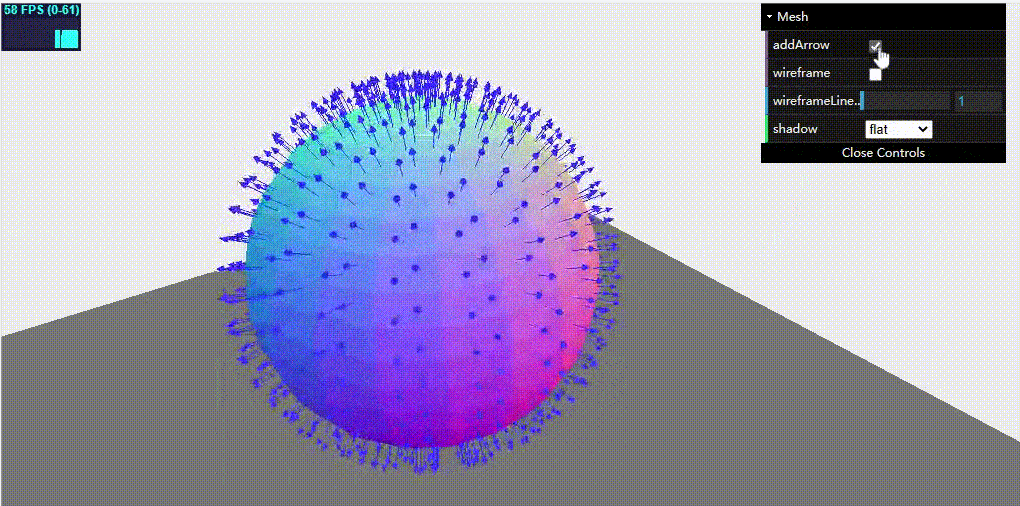
这种材质网格的每一个面颜色都稍有不同,每一个面的颜色由从该面向外指的法向量计算得到的。所谓法向量是指与面垂直的向量。

法向量应用很广泛,它可以决定光的反射,可以用于将纹理映射到三维模型上。幸运的是具体怎么计算Threejs库内部已经帮我们处理了,我们不需要自己计算。

额外属性:

名称 描述
wireframe 该属性指定是否显示线框
wireframeLinewidth 该属性指定线框的宽度
shading 该属性用来设置着色方法: THREE.FlatShading表示平面着色,THREE.SmoothShading表示平滑着色
1
2
3
4
5
6
7
8
9
10
11
12
13
14
15
16
17
18
19
20
21
22
23
24
25
26
27
28
29
30
31
32
33
34
35
36
37
38
39
40
41
42
43
44
45
46
47
48
49
50
51
52
53
54
55
56
57
58
59
60
61
62
63
64
65
66
67
68
69
70
71
72
73
74
75
76
77
78
79
80
81
82
83
84
85
86
87
88
89
90
91
92
93
94
95
96
97
98
99
100
101
102
103
104
105
106
107
108
109
110
111
112
113
114
115
116
117
118
119
120
121
122
123
124
125
126
127
128
129
130
131
132
133
134
135
136
137
138
139
140
141
142
143
144
145
146
147
148
149
150
151
152
153
154
155
156
157
158
159
160
161
162
163
164
165
166
167
168
169
170
171
<!-- chapter-04-02.html -->
<!DOCTYPE html>
<html>
<head>
<title>Mesh normal material</title>
<script type="text/javascript" src="../libs/three.js"></script>
<script type="text/javascript" src="../libs/stats.js"></script>
<script type="text/javascript" src="../libs/dat.gui.js"></script>
<script type="text/javascript" src="../libs/CanvasRenderer.js"></script>
<script type="text/javascript" src="../libs/Projector.js"></script>

<style>
body {
margin: 0;
overflow: hidden;
}
</style>
</head>
<body>

<div id="Stats-output">
</div>

<div id="WebGL-output">
</div>

<script type="text/javascript">
function init() {
var stats = initStats();

var scene = new THREE.Scene();
var camera = new THREE.PerspectiveCamera(45, window.innerWidth / window.innerHeight, 0.1, 1000);

var webGLRenderer = new THREE.WebGLRenderer();
webGLRenderer.setClearColor(new THREE.Color(0xEEEEEE, 1.0));
webGLRenderer.setSize(window.innerWidth, window.innerHeight);
webGLRenderer.shadowMapEnabled = true;
var renderer = webGLRenderer;

var groundGeom = new THREE.PlaneGeometry(100, 100, 4, 4);
var groundMesh = new THREE.Mesh(groundGeom, new THREE.MeshBasicMaterial({color: 0x777777}));
groundMesh.rotation.x = -Math.PI / 2;
groundMesh.position.y = -20;
scene.add(groundMesh);

// 添加法向材质球体
var sphereGeometry = new THREE.SphereGeometry(14, 20, 20);
var meshMaterial = new THREE.MeshNormalMaterial({color: 0x7777ff});
var sphere = new THREE.Mesh(sphereGeometry, meshMaterial);
sphere.position.x = 0;
sphere.position.y = 3;
sphere.position.z = 2;
scene.add(sphere);

camera.position.x = -20;
camera.position.y = 30;
camera.position.z = 40;
camera.lookAt(new THREE.Vector3(10, 0, 0));

var ambientLight = new THREE.AmbientLight(0x0c0c0c);
scene.add(ambientLight);

var spotLight = new THREE.SpotLight(0xffffff);
spotLight.position.set(-40, 60, -10);
spotLight.castShadow = true;
scene.add(spotLight);
document.getElementById("WebGL-output").appendChild(renderer.domElement);

var controls = new function () {
this.wireframe = meshMaterial.wireframe;
this.wireframeLinewidth = meshMaterial.wireframeLinewidth;
this.shadow = "flat";
this.addArrow = false;
};

var gui = new dat.GUI();
var spGui = gui.addFolder("Mesh");
spGui.add(controls, 'addArrow').onChange(function (e) {
if(e) {
addArrow(sphere);
} else {
var oldPos = sphere.position.clone();
scene.remove(sphere);
sphere = new THREE.Mesh(sphere.geometry.clone(), meshMaterial);
sphere.position = oldPos;
scene.add(sphere);
meshMaterial.needsUpdate = true;
}
});

spGui.add(controls, 'wireframe').onChange(function (e) {
meshMaterial.wireframe = e
});

spGui.add(controls, 'wireframeLinewidth', 0, 20).onChange(function (e) {
meshMaterial.wireframeLinewidth = e
});

spGui.add(controls, 'shadow', ["flat", "smooth"]).onChange(function (e) {
switch (e) {
case "flat":
// https://github.com/mrdoob/three.js/issues/1929
meshMaterial.shading = THREE.FlatShading; // 平面着色
break;
case "smooth":
meshMaterial.shading = THREE.SmoothShading; // 平滑着色,更加光滑
break;
}

var oldPos = sphere.position.clone();
scene.remove(sphere);
sphere = new THREE.Mesh(sphere.geometry.clone(), meshMaterial);
sphere.position = oldPos;
scene.add(sphere);
meshMaterial.needsUpdate = true;
});

// 为几何体每个面添加法向量标志
function addArrow(sphere) {
for (var f = 0, fl = sphere.geometry.faces.length; f < fl; f++) {
var face = sphere.geometry.faces[f];
var centroid = new THREE.Vector3(0, 0, 0);
// 面的3个顶点相加再除以3来计算中心
centroid.add(sphere.geometry.vertices[face.a]);
centroid.add(sphere.geometry.vertices[face.b]);
centroid.add(sphere.geometry.vertices[face.c]);
centroid.divideScalar(3);

var arrow = new THREE.ArrowHelper(
face.normal,
centroid,
2,
0x3333FF,
0.5,
0.5);
sphere.add(arrow);
}
}

var step = 0;
render();
function render() {
stats.update();
sphere.rotation.y = step += 0.01;
requestAnimationFrame(render);
renderer.render(scene, camera);
}

function initStats() {
var stats = new Stats();
stats.setMode(0); // 0: fps, 1: ms
stats.domElement.style.position = 'absolute';
stats.domElement.style.left = '0px';
stats.domElement.style.top = '0px';
document.getElementById("Stats-output").appendChild(stats.domElement);
return stats;
}
};

window.onload = init;

// 改变窗口大小后适配
function onResize() {
camera.aspect = window.innerWidth / window.innerHeight;
camera.updateProjectionMatrix();
renderer.setSize(window.innerWidth, window.innerHeight);
}
window.addEventListener('resize', onResize, false);
</script>
</body>
</html>

THREE.MeshFaceMaterial

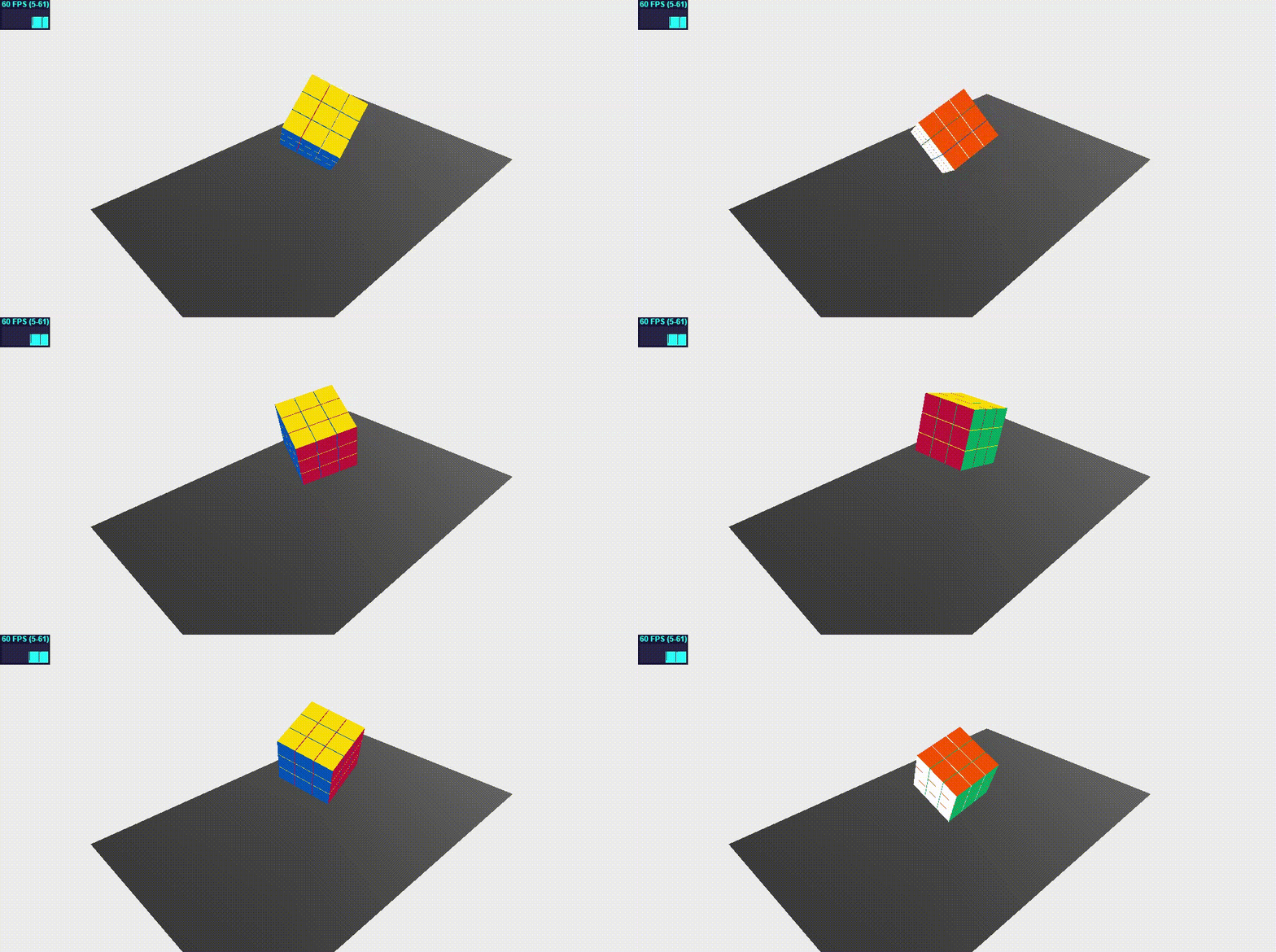
这种材质并不是一种真正的材质,更像是一种材质容器。它可以给几何体的每个面指定不同的材质。例如立方体的12个面(注意threejs面的基础单元是三角形),你可以用这种材质给它每个面指定一种材质。

下面使用这种材质创建一个立方魔方:

1
2
3
4
5
6
7
8
9
10
11
12
13
14
15
16
17
18
19
20
21
22
23
24
25
26
27
28
29
30
31
32
33
34
35
36
37
38
39
40
41
42
43
44
45
46
47
48
49
50
51
52
53
54
55
56
57
58
59
60
61
62
63
64
65
66
67
68
69
70
71
72
73
74
75
76
77
78
79
80
81
82
83
84
85
86
87
88
89
90
91
92
93
94
95
96
97
98
99
100
101
102
103
104
105
106
107
108
109
110
111
112
113
<!-- chapter-04-03.html -->
<!DOCTYPE html>
<html>
<head>
<title>Mesh face material</title>
<script type="text/javascript" src="../libs/three.js"></script>
<script type="text/javascript" src="../libs/stats.js"></script>
<script type="text/javascript" src="../libs/dat.gui.js"></script>
<style>
body {
margin: 0;
overflow: hidden;
}
</style>
</head>
<body>

<div id="Stats-output">
</div>

<div id="WebGL-output">
</div>

<script type="text/javascript">
function init() {
var stats = initStats();
var scene = new THREE.Scene();
var camera = new THREE.PerspectiveCamera(45, window.innerWidth / window.innerHeight, 0.1, 1000);

var renderer = new THREE.WebGLRenderer();
renderer.setClearColor(new THREE.Color(0xEEEEEE, 1.0));
renderer.setSize(window.innerWidth, window.innerHeight);
renderer.shadowMapEnabled = false;

var planeGeometry = new THREE.PlaneGeometry(60, 40, 1, 1);
var planeMaterial = new THREE.MeshLambertMaterial({color: 0xffffff});
var plane = new THREE.Mesh(planeGeometry, planeMaterial);
plane.receiveShadow = true;
plane.rotation.x = -0.5 * Math.PI;
plane.position.x = 0;
plane.position.y = -2;
plane.position.z = 0;
scene.add(plane);

camera.position.x = -40;
camera.position.y = 40;
camera.position.z = 40;
camera.lookAt(scene.position);

var spotLight = new THREE.SpotLight(0xffffff);
spotLight.position.set(-40, 60, -10);
spotLight.castShadow = true;
scene.add(spotLight);
document.getElementById("WebGL-output").appendChild(renderer.domElement);

// 创建一个网格父对象(组)用来保存所有的方块网格
var group = new THREE.Mesh();
// 使用网格面材质指定方块每个面材质(默认通过数组下标对应面的materialIndex属性)
// 注意方块有12个三角形面,为什么下面只指定了6种材质,是因为默认一个面的2个三角形面的materialIndex是相等的(把每个面的materialIndex属性打印出来就知道了)
var mats = [];
mats.push(new THREE.MeshBasicMaterial({color: 0x009e60}));
mats.push(new THREE.MeshBasicMaterial({color: 0x0051ba}));
mats.push(new THREE.MeshBasicMaterial({color: 0xffd500}));
mats.push(new THREE.MeshBasicMaterial({color: 0xff5800}));
mats.push(new THREE.MeshBasicMaterial({color: 0xC41E3A}));
mats.push(new THREE.MeshBasicMaterial({color: 0xffffff}));
var faceMaterial = new THREE.MeshFaceMaterial(mats);
// 使用网格面材质创建魔方
for (var x = 0; x < 3; x++) {
for (var y = 0; y < 3; y++) {
for (var z = 0; z < 3; z++) {
var cubeGeom = new THREE.BoxGeometry(2.9, 2.9, 2.9);
var cube = new THREE.Mesh(cubeGeom, faceMaterial);
cube.position.set(x * 3 - 3, y * 3, z * 3 - 3);
group.add(cube);
}
}
}
scene.add(group);
group.translateY(8);

render();
function render() {
stats.update();
group.rotation.x += 0.02;
group.rotation.y += 0.02;
group.rotation.z += 0.02;
requestAnimationFrame(render);
renderer.render(scene, camera);
}

function initStats() {
var stats = new Stats();
stats.setMode(0); // 0: fps, 1: ms
stats.domElement.style.position = 'absolute';
stats.domElement.style.left = '0px';
stats.domElement.style.top = '0px';
document.getElementById("Stats-output").appendChild(stats.domElement);
return stats;
}
}
window.onload = init;

// 改变窗口大小后适配
function onResize() {
camera.aspect = window.innerWidth / window.innerHeight;
camera.updateProjectionMatrix();
renderer.setSize(window.innerWidth, window.innerHeight);
}
window.addEventListener('resize', onResize, false);
</script>
</body>
</html>

2. 高级材质

THREE.MeshLambertMaterial

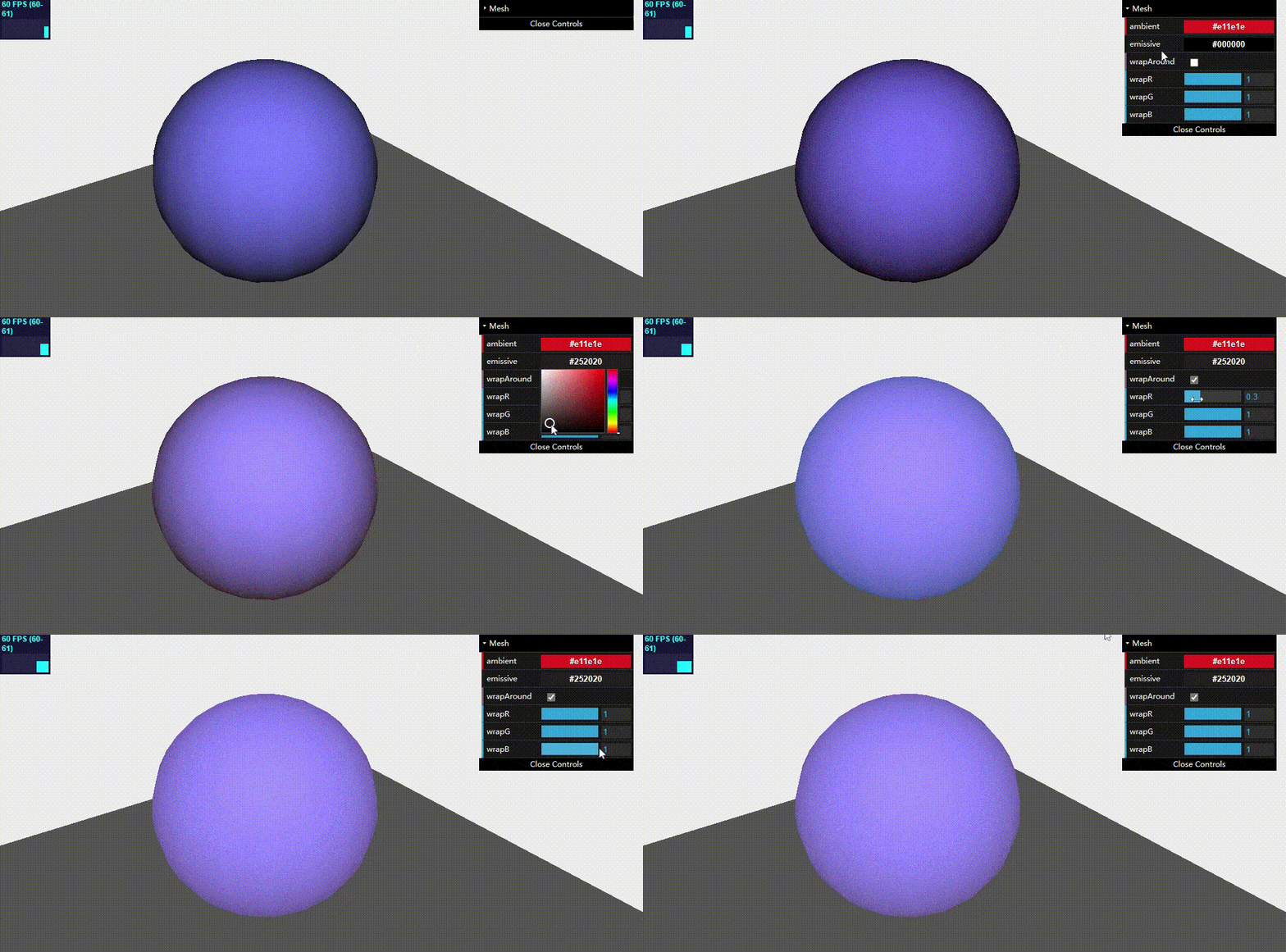
这种材质可以用来创建暗淡的并不光亮的表面,而且会对场景中的光源产生反应。

除了共有属性外,它还有一些独有的属性:

名称 描述
ambient(环境色) 和环境光源一起使用,这个颜色会与环境光颜色相乘。默认值为白色
emissive(发射颜色) 这个该材质发射的颜色。它其实并不像光源,只是一种纯粹的、不受其它光照影响的颜色。默认为黑色
wrapAround 如果设置为true,则启动半lambert光照技术。可以使光下降得更微妙,柔和并且分布更加均匀
wrapRGB 当wrapAround设置为true时,可以使用THREE.Vector3来控制光下降得速度
1
2
3
4
5
6
7
8
9
10
11
12
13
14
15
16
17
18
19
20
21
22
23
24
25
26
27
28
29
30
31
32
33
34
35
36
37
38
39
40
41
42
43
44
45
46
47
48
49
50
51
52
53
54
55
56
57
58
59
60
61
62
63
64
65
66
67
68
69
70
71
72
73
74
75
76
77
78
79
80
81
82
83
84
85
86
87
88
89
90
91
92
93
94
95
96
97
98
99
100
101
102
103
104
105
106
107
108
109
110
111
112
113
114
115
116
117
118
119
120
121
122
123
124
125
126
127
128
129
130
<!-- chapter-04-04.html -->
<!DOCTYPE html>
<html>
<head>
<title>Mesh Lambert material</title>
<script type="text/javascript" src="../libs/three.js"></script>
<script type="text/javascript" src="../libs/stats.js"></script>
<script type="text/javascript" src="../libs/dat.gui.js"></script>
<script type="text/javascript" src="../libs/CanvasRenderer.js"></script>
<script type="text/javascript" src="../libs/Projector.js"></script>
<style>
body {
margin: 0;
overflow: hidden;
}
</style>
</head>
<body>

<div id="Stats-output">
</div>
<div id="WebGL-output">
</div>

<script type="text/javascript">
function init() {
var stats = initStats();
var scene = new THREE.Scene();
var camera = new THREE.PerspectiveCamera(45, window.innerWidth / window.innerHeight, 0.1, 1000);

var renderer = new THREE.WebGLRenderer();
renderer.setClearColor(new THREE.Color(0xEEEEEE, 1.0));
renderer.setSize(window.innerWidth, window.innerHeight);
renderer.shadowMapEnabled = true;

var groundGeom = new THREE.PlaneGeometry(100, 100, 4, 4);
var groundMesh = new THREE.Mesh(groundGeom, new THREE.MeshBasicMaterial({color: 0x555555}));
groundMesh.rotation.x = -Math.PI / 2;
groundMesh.position.y = -20;
scene.add(groundMesh);

// 创建Lambert材质的球体
var sphereGeometry = new THREE.SphereGeometry(14, 20, 20);
var meshMaterial = new THREE.MeshLambertMaterial({color: 0x7777ff});
var sphere = new THREE.Mesh(sphereGeometry, meshMaterial);
sphere.position.x = 0;
sphere.position.y = 3;
sphere.position.z = 2;
scene.add(sphere);

camera.position.x = -20;
camera.position.y = 30;
camera.position.z = 40;
camera.lookAt(new THREE.Vector3(10, 0, 0));

// 环境光
var ambientLight = new THREE.AmbientLight(0x0c0c0c);
scene.add(ambientLight);

// 聚光灯
var spotLight = new THREE.SpotLight(0xffffff);
spotLight.position.set(-30, 60, 60);
spotLight.castShadow = true;
scene.add(spotLight);
document.getElementById("WebGL-output").appendChild(renderer.domElement);

var controls = new function () {
this.emissive = meshMaterial.emissive.getHex(); // 该材质的环境色属性
this.ambient = meshMaterial.ambient.getHex(); // 该材质的发射颜色属性
this.wrapAround = false; // 是否开启lambert光照技术
this.wrapR = 1;
this.wrapG = 1;
this.wrapB = 1;
};

var gui = new dat.GUI();
var spGui = gui.addFolder("Mesh");
spGui.addColor(controls, 'ambient').onChange(function (e) {
meshMaterial.ambient = new THREE.Color(e)
});

spGui.addColor(controls, 'emissive').onChange(function (e) {
meshMaterial.emissive = new THREE.Color(e)
});

spGui.add(controls, 'wrapAround').onChange(function (e) {
meshMaterial.wrapAround = e;
meshMaterial.needsUpdate = true;
});

spGui.add(controls, 'wrapR', 0, 1).step(0.01).onChange(function (e) {
meshMaterial.wrapRGB.x = e;
});
spGui.add(controls, 'wrapG', 0, 1).step(0.01).onChange(function (e) {
meshMaterial.wrapRGB.y = e;
});
spGui.add(controls, 'wrapB', 0, 1).step(0.01).onChange(function (e) {
meshMaterial.wrapRGB.z = e;
});

render();
function render() {
stats.update();
sphere.rotation.y += 0.01;
requestAnimationFrame(render);
renderer.render(scene, camera);
}

function initStats() {
var stats = new Stats();
stats.setMode(0); // 0: fps, 1: ms
stats.domElement.style.position = 'absolute';
stats.domElement.style.left = '0px';
stats.domElement.style.top = '0px';
document.getElementById("Stats-output").appendChild(stats.domElement);
return stats;
}
}
window.onload = init;

// 改变窗口大小后适配
function onResize() {
camera.aspect = window.innerWidth / window.innerHeight;
camera.updateProjectionMatrix();
renderer.setSize(window.innerWidth, window.innerHeight);
}
window.addEventListener('resize', onResize, false);
</script>
</body>
</html>

THREE.MeshPhongMaterial

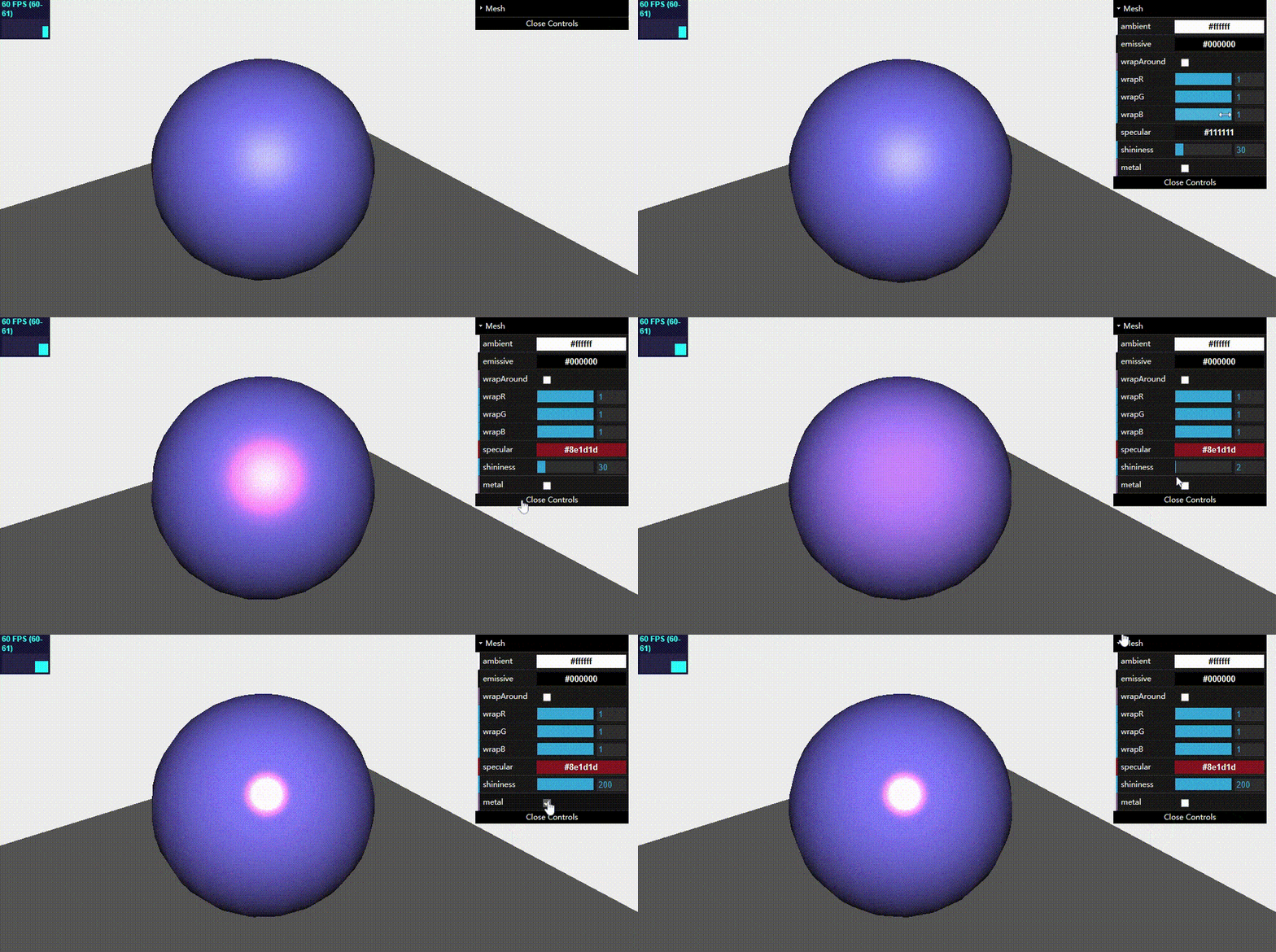
这种材质可以创建一种光亮的材质,和上面一样,也会对场景中的光源产生反应。

除了共有属性外,这种材质比较有意义的属性如下:

名称 描述
ambient(环境色) 和环境光源一起使用,这个颜色会与环境光颜色相乘。默认值为白色
emissive(发射颜色) 这个该材质发射的颜色。它其实并不像光源,只是一种纯粹的、不受其它光照影响的颜色。默认为黑色
wrapAround 如果设置为true,则启动半lambert光照技术。可以使光下降得更微妙,柔和并且分布更加均匀
wrapRGB 当wrapAround设置为true时,可以使用THREE.Vector3来控制光下降得速度
======以上同上==== === ==========================================================================
specular 该属性指定材质的光亮程度及高光部分的颜色。如果将它设置成与color属性相同颜色,将会得到一个更加类似金属的材质。如果设置为灰色,材质将变得更像塑料
shininess 该属性指定镜面高光部分的亮度。默认值为30
metal 如果设置为true,会使用不同的方式计算像素的颜色,使物体看起来更像金属。要注意的是,这个效果非常小
1
2
3
4
5
6
7
8
9
10
11
12
13
14
15
16
17
18
19
20
21
22
23
24
25
26
27
28
29
30
31
32
33
34
35
36
37
38
39
40
41
42
43
44
45
46
47
48
49
50
51
52
53
54
55
56
57
58
59
60
61
62
63
64
65
66
67
68
69
70
71
72
73
74
75
76
77
78
79
80
81
82
83
84
85
86
87
88
89
90
91
92
93
94
95
96
97
98
99
100
101
102
103
104
105
106
107
108
109
110
111
112
113
114
115
116
117
118
119
120
121
122
123
124
125
126
127
128
129
130
131
132
133
134
135
136
137
138
139
140
141
142
143
144
145
146
147
<!-- chapter-04-05.html -->
<!DOCTYPE html>
<html>
<head>
<title>Mesh Phong material</title>
<script type="text/javascript" src="../libs/three.js"></script>
<script type="text/javascript" src="../libs/stats.js"></script>
<script type="text/javascript" src="../libs/dat.gui.js"></script>
<script type="text/javascript" src="../libs/CanvasRenderer.js"></script>
<script type="text/javascript" src="../libs/Projector.js"></script>
<style>
body {
margin: 0;
overflow: hidden;
}
</style>
</head>
<body>

<div id="Stats-output">
</div>
<div id="WebGL-output">
</div>

<script type="text/javascript">
function init() {
var stats = initStats();
var scene = new THREE.Scene();
var camera = new THREE.PerspectiveCamera(45, window.innerWidth / window.innerHeight, 0.1, 1000);

var renderer = new THREE.WebGLRenderer();
renderer.setClearColor(new THREE.Color(0xEEEEEE, 1.0));
renderer.setSize(window.innerWidth, window.innerHeight);
renderer.shadowMapEnabled = true;

var groundGeom = new THREE.PlaneGeometry(100, 100, 4, 4);
var groundMesh = new THREE.Mesh(groundGeom, new THREE.MeshBasicMaterial({color: 0x555555}));
groundMesh.rotation.x = -Math.PI / 2;
groundMesh.position.y = -20;
scene.add(groundMesh);

// 创建Phong材质的球体
var sphereGeometry = new THREE.SphereGeometry(14, 20, 20);
var meshMaterial = new THREE.MeshPhongMaterial({color: 0x7777ff});
var sphere = new THREE.Mesh(sphereGeometry, meshMaterial);
sphere.position.x = 0;
sphere.position.y = 3;
sphere.position.z = 2;
scene.add(sphere);

camera.position.x = -20;
camera.position.y = 30;
camera.position.z = 40;
camera.lookAt(new THREE.Vector3(10, 0, 0));

// 环境光
var ambientLight = new THREE.AmbientLight(0x0c0c0c);
scene.add(ambientLight);

// 聚光灯
var spotLight = new THREE.SpotLight(0xffffff);
spotLight.position.set(-30, 60, 60);
spotLight.castShadow = true;
scene.add(spotLight);
document.getElementById("WebGL-output").appendChild(renderer.domElement);

var controls = new function () {
this.emissive = meshMaterial.emissive.getHex(); // 该材质的环境色属性
this.ambient = meshMaterial.ambient.getHex(); // 该材质的发射颜色属性
this.wrapAround = false; // 是否开启lambert光照技术
this.wrapR = 1;
this.wrapG = 1;
this.wrapB = 1;

this.specular = meshMaterial.specular.getHex();
this.shininess = meshMaterial.shininess;
this.metal = false;
};

var gui = new dat.GUI();
var spGui = gui.addFolder("Mesh");
spGui.addColor(controls, 'ambient').onChange(function (e) {
meshMaterial.ambient = new THREE.Color(e)
});

spGui.addColor(controls, 'emissive').onChange(function (e) {
meshMaterial.emissive = new THREE.Color(e)
});

spGui.add(controls, 'wrapAround').onChange(function (e) {
meshMaterial.wrapAround = e;
meshMaterial.needsUpdate = true;
});

spGui.add(controls, 'wrapR', 0, 1).step(0.01).onChange(function (e) {
meshMaterial.wrapRGB.x = e;
});
spGui.add(controls, 'wrapG', 0, 1).step(0.01).onChange(function (e) {
meshMaterial.wrapRGB.y = e;
});
spGui.add(controls, 'wrapB', 0, 1).step(0.01).onChange(function (e) {
meshMaterial.wrapRGB.z = e;
});

spGui.addColor(controls, 'specular').onChange(function (e) {
meshMaterial.specular = new THREE.Color(e)
});

spGui.add(controls, 'shininess', 0, 200).onChange(function (e) {
meshMaterial.shininess = e
});

spGui.add(controls, 'metal').onChange(function (e) {
meshMaterial.metal = e;
meshMaterial.needsUpdate = true;
});

render();
function render() {
stats.update();
sphere.rotation.y += 0.01;
requestAnimationFrame(render);
renderer.render(scene, camera);
}

function initStats() {
var stats = new Stats();
stats.setMode(0); // 0: fps, 1: ms
stats.domElement.style.position = 'absolute';
stats.domElement.style.left = '0px';
stats.domElement.style.top = '0px';
document.getElementById("Stats-output").appendChild(stats.domElement);
return stats;
}
}
window.onload = init;

// 改变窗口大小后适配
function onResize() {
camera.aspect = window.innerWidth / window.innerHeight;
camera.updateProjectionMatrix();
renderer.setSize(window.innerWidth, window.innerHeight);
}
window.addEventListener('resize', onResize, false);
</script>
</body>
</html>

THREE.ShaderMaterial

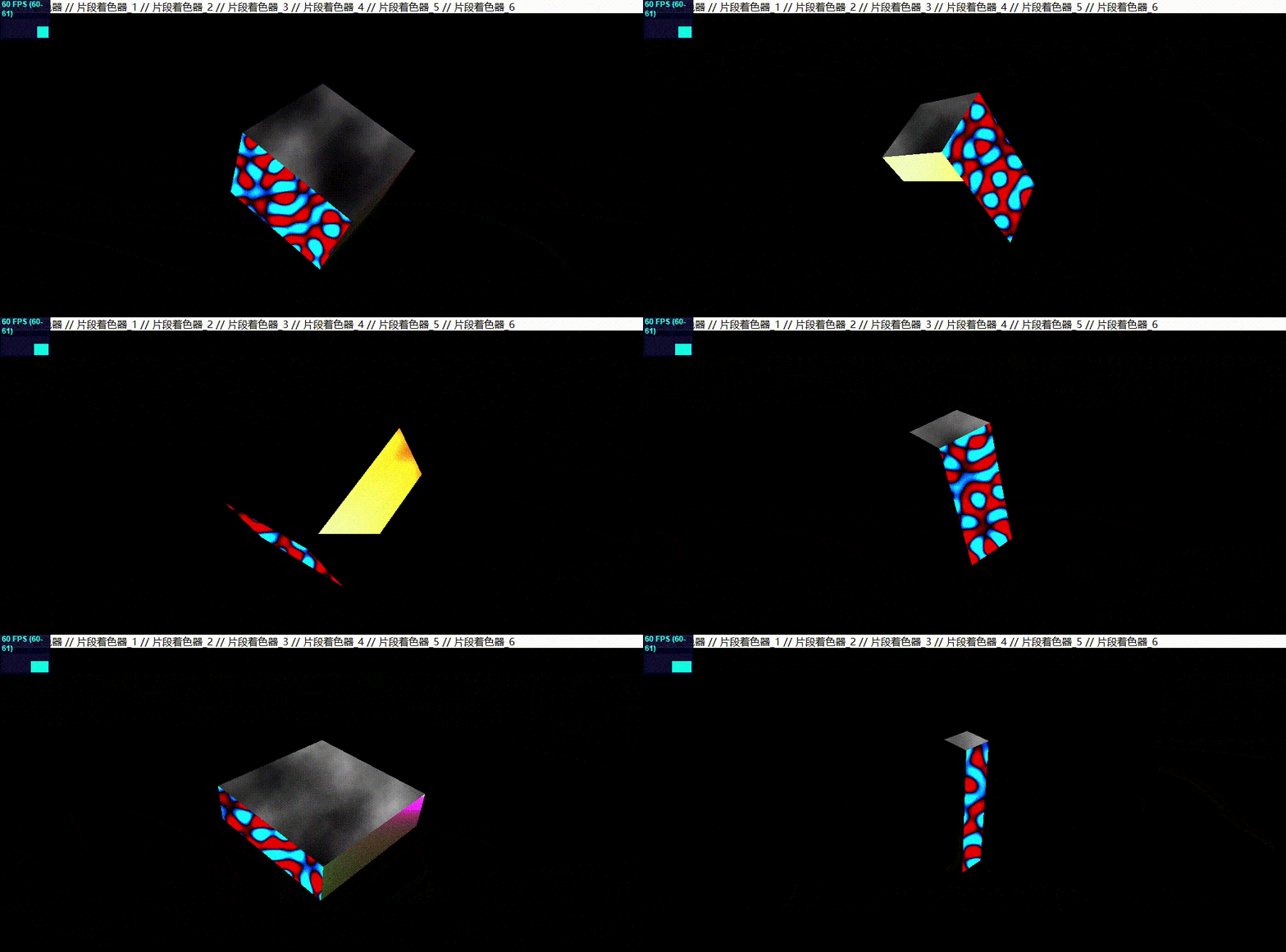
这种材质可以自己定制着色器,直接在WebGL环境运行。要使用这种材质,必须传入两个不同的着色器:

  • vertexShader:顶点着色器,它会在几何体每一个顶点上执行。可以用它改变顶点位置来对几何体进行变换。
  • fragmentShader:片段着色器,它会在几何体的每一个片段上执行。片段通常指单独的像素,将顶点着色器传递来的数据进行计算得出需要绘制的像素颜色值。

着色器材质几个特别的属性:

名称 描述
vertexShader 顶点着色器
fragmentShader 片段着色器
uniforms 通过这个属性可以向你的着色器发消息
defines 可以用来设置着色器程序里的一些额外的全局变量
attributes 该属性可以修改每个顶点和片段数据,通常用来传递位置数据和法向量相关数据。
lights 该属性定义光照数据是否传递给着色器。默认为false

这里主要是简单介绍着色器材质如何使用,关于着色器程序相关详情后续单独介绍。

1
2
3
4
5
6
7
8
9
10
11
12
13
14
15
16
17
18
19
20
21
22
23
24
25
26
27
28
29
30
31
32
33
34
35
36
37
38
39
40
41
42
43
44
45
46
47
48
49
50
51
52
53
54
55
56
57
58
59
60
61
62
63
64
65
66
67
68
69
70
71
72
73
74
75
76
77
78
79
80
81
82
83
84
85
86
87
88
89
90
91
92
93
94
95
96
97
98
99
100
101
102
103
104
105
106
107
108
109
110
111
112
113
114
115
116
117
118
119
120
121
122
123
124
125
126
127
128
129
130
131
132
133
134
135
136
137
138
139
140
141
142
143
144
145
146
147
148
149
150
151
152
153
154
155
156
157
158
159
160
161
162
163
164
165
166
167
168
169
170
171
172
173
174
175
176
177
178
179
180
181
182
183
184
185
186
187
188
189
190
191
192
193
194
195
196
197
198
199
200
201
202
203
204
205
206
207
208
209
210
211
212
213
214
215
216
217
218
219
220
221
222
223
224
225
226
227
228
229
230
231
232
233
234
235
236
237
238
239
240
241
242
243
244
245
246
247
248
249
250
251
252
253
254
255
256
257
258
259
260
261
262
263
264
265
266
267
268
269
270
271
272
273
274
275
276
277
278
279
280
281
282
283
284
285
286
287
288
289
290
291
292
293
294
295
296
297
298
299
300
301
302
303
304
305
306
307
308
309
310
311
312
313
314
315
316
317
318
319
320
321
322
323
324
325
326
327
328
329
330
331
332
333
334
335
336
337
338
339
340
341
342
343
344
345
346
347
348
349
350
351
352
353
354
355
356
357
358
359
360
361
362
363
364
365
366
367
368
369
370
371
372
373
374
375
376
377
378
379
380
381
382
383
384
385
386
387
388
389
390
391
392
393
394
395
396
397
398
399
400
401
402
403
404
405
406
407
408
409
410
411
<!-- chapter-04-06.html -->
<!DOCTYPE html>
<html>
<head>
<title>Shader material</title>
<script type="text/javascript" src="../libs/three.js"></script>
<script type="text/javascript" src="../libs/stats.js"></script>
<script type="text/javascript" src="../libs/dat.gui.js"></script>
<style>
body {
margin: 0;
overflow: hidden;
}
</style>
</head>
<body>

// 顶点着色器
<script id="vertex-shader" type="x-shader/x-vertex">
uniform float time;
varying vec2 vUv;

void main()
{
vec3 posChanged = position;
posChanged.x = posChanged.x*(abs(sin(time*1.0)));
posChanged.y = posChanged.y*(abs(cos(time*1.0)));
posChanged.z = posChanged.z*(abs(sin(time*1.0)));
//gl_Position = projectionMatrix * modelViewMatrix * vec4(position*(abs(sin(time)/2.0)+0.5),1.0);
gl_Position = projectionMatrix * modelViewMatrix * vec4(posChanged,1.0);
}
</script>

// 片段着色器_1
<script id="fragment-shader-1" type="x-shader/x-fragment">
precision highp float;
uniform float time;
uniform float alpha;
uniform vec2 resolution;
varying vec2 vUv;

void main2(void)
{
vec2 position = vUv;
float red = 1.0;
float green = 0.25 + sin(time) * 0.25;
float blue = 0.0;
vec3 rgb = vec3(red, green, blue);
vec4 color = vec4(rgb, alpha);
gl_FragColor = color;
}

#define PI 3.14159
#define TWO_PI (PI*2.0)
#define N 68.5

void main(void)
{
vec2 center = (gl_FragCoord.xy);
center.x=-10.12*sin(time/200.0);
center.y=-10.12*cos(time/200.0);

vec2 v = (gl_FragCoord.xy - resolution/20.0) / min(resolution.y,resolution.x) * 15.0;
v.x=v.x-10.0;
v.y=v.y-200.0;
float col = 0.0;

for(float i = 0.0; i < N; i++)
{
float a = i * (TWO_PI/N) * 61.95;
col += cos(TWO_PI*(v.y * cos(a) + v.x * sin(a) + sin(time*0.004)*100.0 ));
}

col /= 5.0;

gl_FragColor = vec4(col*1.0, -col*1.0,-col*4.0, 1.0);
}
</script>

// 片段着色器_2
<script id="fragment-shader-2" type="x-shader/x-fragment">
// from http://glsl.heroku.com/e#7906.0
uniform float time;
uniform vec2 resolution;

#define CGFloat float
#define M_PI 3.14159265359

vec3 hsvtorgb(float h, float s, float v)
{
float c = v * s;
h = mod((h * 6.0), 6.0);
float x = c * (1.0 - abs(mod(h, 2.0) - 1.0));
vec3 color;

if (0.0 <= h && h < 1.0)
{
color = vec3(c, x, 0.0);
}
else if (1.0 <= h && h < 2.0)
{
color = vec3(x, c, 0.0);
}
else if (2.0 <= h && h < 3.0)
{
color = vec3(0.0, c, x);
}
else if (3.0 <= h && h < 4.0)
{
color = vec3(0.0, x, c);
}
else if (4.0 <= h && h < 5.0)
{
color = vec3(x, 0.0, c);
}
else if (5.0 <= h && h < 6.0)
{
color = vec3(c, 0.0, x);
}
else
{
color = vec3(0.0);
}

color += v - c;

return color;
}

void main(void)
{
vec2 position = (gl_FragCoord.xy - 0.5 * resolution) / resolution.y;
float x = position.x;
float y = position.y;

CGFloat a = atan(x, y);

CGFloat d = sqrt(x*x+y*y);
CGFloat d0 = 0.5*(sin(d-time)+1.5)*d;
CGFloat d1 = 5.0;

CGFloat u = mod(a*d1+sin(d*10.0+time), M_PI*2.0)/M_PI*0.5 - 0.5;
CGFloat v = mod(pow(d0*4.0, 0.75),1.0) - 0.5;

CGFloat dd = sqrt(u*u+v*v);

CGFloat aa = atan(u, v);

CGFloat uu = mod(aa*3.0+3.0*cos(dd*30.0-time), M_PI*2.0)/M_PI*0.5 - 0.5;
// CGFloat vv = mod(dd*4.0,1.0) - 0.5;

CGFloat d2 = sqrt(uu*uu+v*v)*1.5;

gl_FragColor = vec4( hsvtorgb(dd+time*0.5/d1, sin(dd*time), d2), 1.0 );
}
</script>

// 片段着色器_3
<script id="fragment-shader-3" type="x-shader/x-fragment">
uniform vec2 resolution;
uniform float time;

vec2 rand(vec2 pos)
{
return fract( 0.00005 * (pow(pos+2.0, pos.yx + 1.0) * 22222.0));
}
vec2 rand2(vec2 pos)
{
return rand(rand(pos));
}

float softnoise(vec2 pos, float scale)
{
vec2 smplpos = pos * scale;
float c0 = rand2((floor(smplpos) + vec2(0.0, 0.0)) / scale).x;
float c1 = rand2((floor(smplpos) + vec2(1.0, 0.0)) / scale).x;
float c2 = rand2((floor(smplpos) + vec2(0.0, 1.0)) / scale).x;
float c3 = rand2((floor(smplpos) + vec2(1.0, 1.0)) / scale).x;

vec2 a = fract(smplpos);
return mix(
mix(c0, c1, smoothstep(0.0, 1.0, a.x)),
mix(c2, c3, smoothstep(0.0, 1.0, a.x)),
smoothstep(0.0, 1.0, a.y));
}

void main(void)
{
vec2 pos = gl_FragCoord.xy / resolution.y;
pos.x += time * 0.1;
float color = 0.0;
float s = 1.0;
for(int i = 0; i < 8; i++)
{
color += softnoise(pos+vec2(i)*0.02, s * 4.0) / s / 2.0;
s *= 2.0;
}
gl_FragColor = vec4(color);
}
</script>

// 片段着色器_4
<script id="fragment-shader-4" type="x-shader/x-fragment">
uniform float time;
uniform vec2 resolution;

vec2 rand(vec2 pos)
{
return
fract(
(
pow(
pos+2.0,
pos.yx+2.0
)*555555.0
)
);
}

vec2 rand2(vec2 pos)
{
return rand(rand(pos));
}

float softnoise(vec2 pos, float scale) {
vec2 smplpos = pos * scale;
float c0 = rand2((floor(smplpos) + vec2(0.0, 0.0)) / scale).x;
float c1 = rand2((floor(smplpos) + vec2(1.0, 0.0)) / scale).x;
float c2 = rand2((floor(smplpos) + vec2(0.0, 1.0)) / scale).x;
float c3 = rand2((floor(smplpos) + vec2(1.0, 1.0)) / scale).x;

vec2 a = fract(smplpos);
return mix(mix(c0, c1, smoothstep(0.0, 1.0, a.x)),
mix(c2, c3, smoothstep(0.0, 1.0, a.x)),
smoothstep(0.0, 1.0, a.x));
}

void main( void ) {
vec2 pos = gl_FragCoord.xy / resolution.y - time * 0.4;
float color = 0.0;
float s = 1.0;
for (int i = 0; i < 6; ++i) {
color += softnoise(pos + vec2(0.01 * float(i)), s * 4.0) / s / 2.0;
s *= 2.0;
}
gl_FragColor = vec4(color,mix(color,cos(color),sin(color)),color,1);
}
</script>

// 片段着色器_5
<script id="fragment-shader-5" type="x-shader/x-fragment">
uniform float time;
uniform vec2 resolution;

// tie nd die by Snoep Games.
void main( void ) {
vec3 color = vec3(1.0, 0., 0.);
vec2 pos = (( 1.4 * gl_FragCoord.xy - resolution.xy) / resolution.xx)*1.5;
float r=sqrt(pos.x*pos.x+pos.y*pos.y)/15.0;
float size1=2.0*cos(time/60.0);
float size2=2.5*sin(time/12.1);

float rot1=13.00; //82.0+16.0*sin(time/4.0);
float rot2=-50.00; //82.0+16.0*sin(time/8.0);
float t=sin(time);
float a = (60.0)*sin(rot1*atan(pos.x-size1*pos.y/r,pos.y+size1*pos.x/r)+time);
a += 200.0*acos(pos.x*2.0+cos(time/2.0))+asin(pos.y*5.0+sin(time/2.0));
a=a*(r/50.0);
a=200.0*sin(a*5.0)*(r/30.0);
if(a>5.0) a=a/200.0;
if(a<0.5) a=a*22.5;
gl_FragColor = vec4( cos(a/20.0),a*cos(a/200.0),sin(a/8.0), 1.0 );
}
</script>

// 片段着色器_6
<script id="fragment-shader-6" type="x-shader/x-fragment">
uniform float time;
uniform vec2 resolution;

void main( void )
{
vec2 uPos = ( gl_FragCoord.xy / resolution.xy );//normalize wrt y axis
//suPos -= vec2((resolution.x/resolution.y)/2.0, 0.0);//shift origin to center

uPos.x -= 1.0;
uPos.y -= 0.5;

vec3 color = vec3(0.0);
float vertColor = 2.0;
for( float i = 0.0; i < 15.0; ++i )
{
float t = time * (0.9);
uPos.y += sin( uPos.x*i + t+i/2.0 ) * 0.1;
float fTemp = abs(1.0 / uPos.y / 100.0);
vertColor += fTemp;
color += vec3( fTemp*(10.0-i)/10.0, fTemp*i/10.0, pow(fTemp,1.5)*1.5 );
}

vec4 color_final = vec4(color, 1.0);
gl_FragColor = color_final;
}
</script>

<div id="Stats-output">
</div>
<div id="WebGL-output">
</div>

<script type="text/javascript">
function init() {
var stats = initStats();
var scene = new THREE.Scene();
var camera = new THREE.PerspectiveCamera(45, window.innerWidth / window.innerHeight, 0.1, 1000);

var renderer = new THREE.WebGLRenderer();
renderer.setClearColor(new THREE.Color(0x000000, 1.0));
renderer.setSize(window.innerWidth, window.innerHeight);
renderer.shadowMapEnabled = true;

var cubeGeometry = new THREE.BoxGeometry(20, 20, 20);
// 创建6种着色器材质
var meshMaterial1 = createMaterial("vertex-shader", "fragment-shader-1");
var meshMaterial2 = createMaterial("vertex-shader", "fragment-shader-2");
var meshMaterial3 = createMaterial("vertex-shader", "fragment-shader-3");
var meshMaterial4 = createMaterial("vertex-shader", "fragment-shader-4");
var meshMaterial5 = createMaterial("vertex-shader", "fragment-shader-5");
var meshMaterial6 = createMaterial("vertex-shader", "fragment-shader-6");

// 每个面使用一种着色器材质
var material = new THREE.MeshFaceMaterial(
[meshMaterial1,
meshMaterial2,
meshMaterial3,
meshMaterial4,
meshMaterial5,
meshMaterial6]);
var cube = new THREE.Mesh(cubeGeometry, material);
scene.add(cube);

camera.position.x = 30;
camera.position.y = 30;
camera.position.z = 30;
camera.lookAt(new THREE.Vector3(0, 0, 0));

var ambientLight = new THREE.AmbientLight(0x0c0c0c);
scene.add(ambientLight);

var spotLight = new THREE.SpotLight(0xffffff);
spotLight.position.set(-40, 60, -10);
spotLight.castShadow = true;
scene.add(spotLight);
document.getElementById("WebGL-output").appendChild(renderer.domElement);

render();
var step = 0;
function render() {
stats.update();
cube.rotation.y = step += 0.01;
cube.rotation.x = step;
cube.rotation.z = step;

// 通过uniforms属性给着色器传递数据
cube.material.materials.forEach(function (e) {
e.uniforms.time.value += 0.01;
});

requestAnimationFrame(render);
renderer.render(scene, camera);
}

function initStats() {
var stats = new Stats();
stats.setMode(0); // 0: fps, 1: ms
stats.domElement.style.position = 'absolute';
stats.domElement.style.left = '0px';
stats.domElement.style.top = '0px';
document.getElementById("Stats-output").appendChild(stats.domElement);
return stats;
}

// 创建着色器材质
function createMaterial(vertexShader, fragmentShader) {
var vertShader = document.getElementById(vertexShader).innerHTML;
var fragShader = document.getElementById(fragmentShader).innerHTML;

var attributes = {};
var uniforms = {
time: {type: 'f', value: 0.2},
scale: {type: 'f', value: 0.2},
alpha: {type: 'f', value: 0.6},
resolution: {type: "v2", value: new THREE.Vector2()}
};

uniforms.resolution.value.x = window.innerWidth;
uniforms.resolution.value.y = window.innerHeight;

var meshMaterial = new THREE.ShaderMaterial({
uniforms: uniforms, // 传递数据给内部着色器程序(共享内存差不多意思)
attributes: attributes,
vertexShader: vertShader,
fragmentShader: fragShader,
transparent: true
});
return meshMaterial;
}
}
window.onload = init;
</script>
</body>
</html>

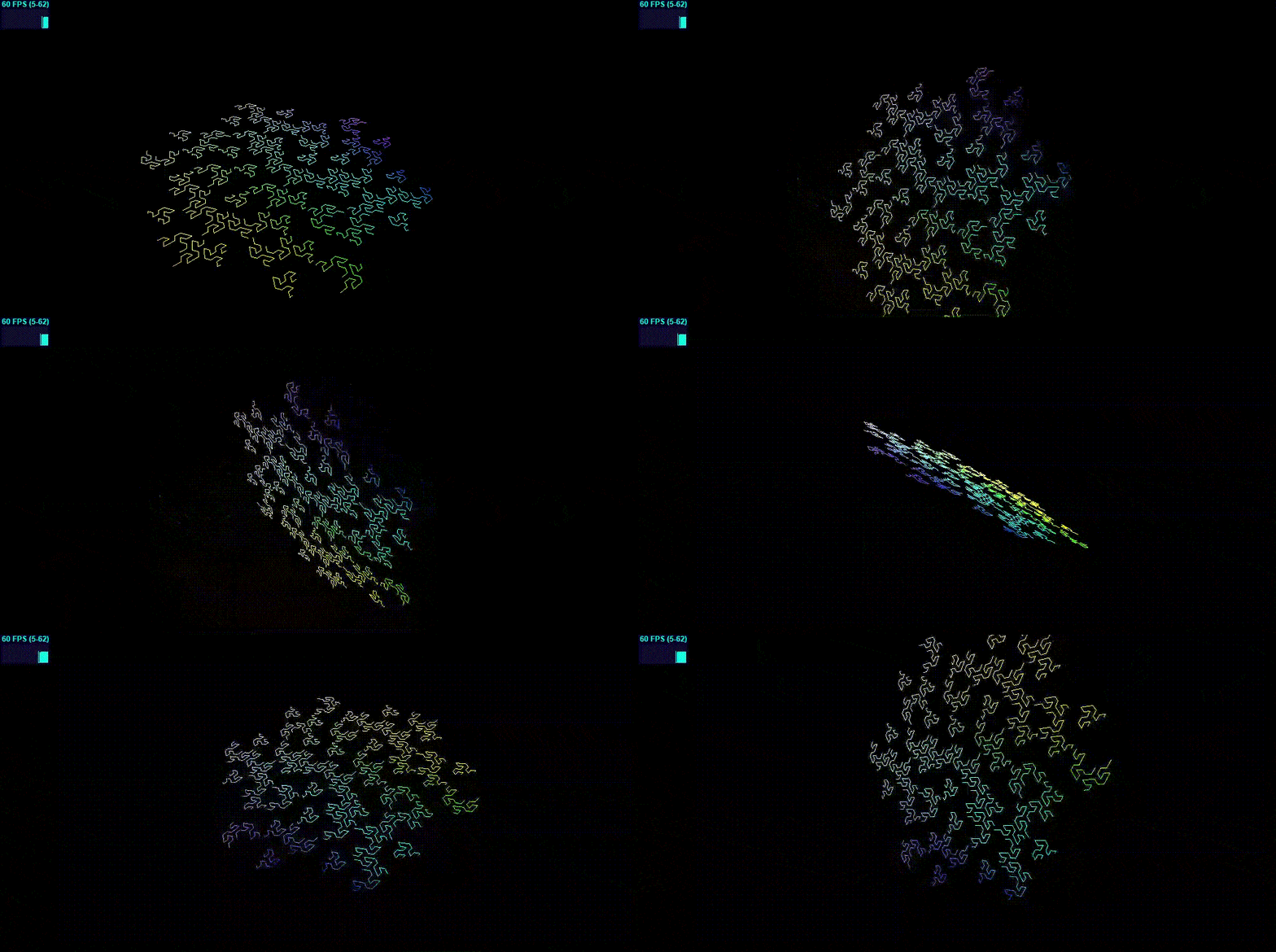
3. 线性几何体的材质

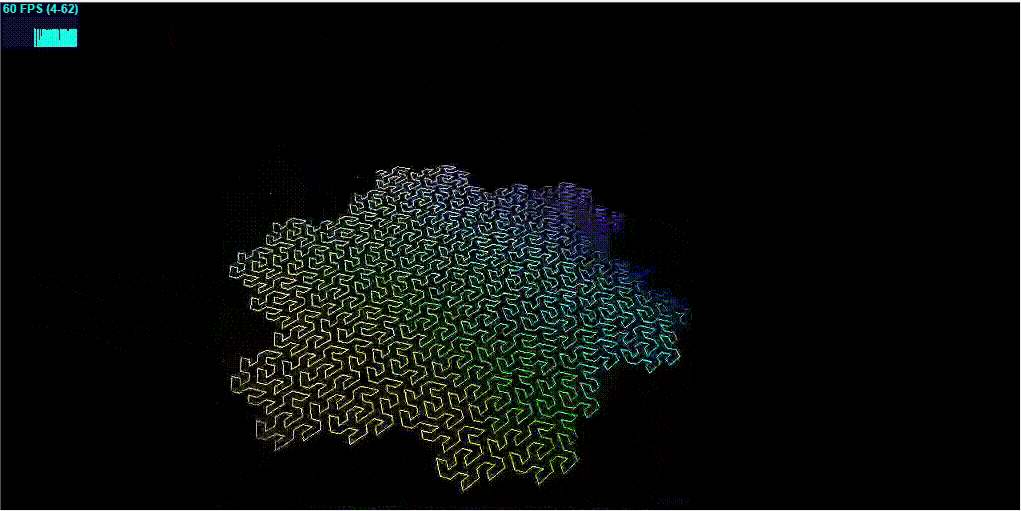
这些材质只能用于特定的几何体: THREE.Line线段。线段由顶点组成,不包含任何面。THREE.js库提供了两种可用于线段的材质,如下:

  • THREE.LineBasicMaterial:用于线段基础材质,可设置colors、linewidth、linecap和linejoin属性。
  • THREE.LineDashedMaterial:属性同上,只是多了可以创建虚线效果属性。

THREE.LineBasicMaterial

1
2
3
4
5
6
7
8
9
10
11
12
13
14
15
16
17
18
19
20
21
22
23
24
25
26
27
28
29
30
31
32
33
34
35
36
37
38
39
40
41
42
43
44
45
46
47
48
49
50
51
52
53
54
55
56
57
58
59
60
61
62
63
64
65
66
67
68
69
70
71
72
73
74
75
76
77
78
79
80
81
82
83
84
85
86
87
88
89
90
91
92
93
94
95
96
97
98
99
100
101
102
103
104
105
106
107
108
109
110
111
112
113
114
115
116
117
118
119
120
121
122
123
124
125
126
127
128
129
130
131
132
133
134
135
136
137
138
139
140
141
142
143
144
145
146
147
148
149
150
151
152
153
154
155
156
157
158
159
160
161
162
163
164
165
166
167
168
169
170
171
172
173
174
175
176
177
178
179
180
181
182
183
184
185
186
187
188
189
190
191
192
193
194
195
196
197
198
199
200
<!-- chapter-04-07.html -->
<!DOCTYPE html>
<html>
<head>
<title>Line Basic material</title>
<script type="text/javascript" src="../libs/three.js"></script>
<script type="text/javascript" src="../libs/stats.js"></script>
<style>
body {
margin: 0;
overflow: hidden;
}
</style>
</head>
<body>

<div id="Stats-output">
</div>
<div id="WebGL-output">
</div>

<script type="text/javascript">
function init() {
var stats = initStats();
var scene = new THREE.Scene();
var camera = new THREE.PerspectiveCamera(45, window.innerWidth / window.innerHeight, 0.1, 1000);

var renderer = new THREE.WebGLRenderer();
renderer.setClearColor(new THREE.Color(0x000000, 1.0));
renderer.setSize(window.innerWidth, window.innerHeight);
renderer.shadowMapEnabled = true;

camera.position.x = -30;
camera.position.y = 40;
camera.position.z = 30;
camera.lookAt(scene.position);

var ambientLight = new THREE.AmbientLight(0x0c0c0c);
scene.add(ambientLight);

var spotLight = new THREE.SpotLight(0xffffff);
spotLight.position.set(-40, 60, -10);
spotLight.castShadow = true;
scene.add(spotLight);

// 获取一些(x,y)坐标,返回一个gosper曲线
var points = gosper(4, 60);

// 使用上面曲线坐标点创建一个几何体对象,设置对应顶点和颜色属性
var lines = new THREE.Geometry();
var colors = [];
var i = 0;
points.forEach(function (e) {
lines.vertices.push(new THREE.Vector3(e.x, e.z, e.y));
colors[i] = new THREE.Color(0xffffff);
colors[i].setHSL(e.x / 100 + 0.5, ( e.y * 20 ) / 300, 0.8);
i++;
});
lines.colors = colors;

// 创建线段基础材质
var material = new THREE.LineBasicMaterial({
opacity: 1.0,
linewidth: 1,
vertexColors: THREE.VertexColors
});

// 创建线段网格
var line = new THREE.Line(lines, material);
line.position.set(25, -30, -60);
scene.add(line);

document.getElementById("WebGL-output").appendChild(renderer.domElement);

render();
function render() {
stats.update();
line.rotation.z += 0.01;
requestAnimationFrame(render);
renderer.render(scene, camera);
}

// 获取gosper曲线(参考:http://en.wikipedia.org/wiki/Gosper_curve)
function gosper(a, b) {
var turtle = [0, 0, 0];
var points = [];
var count = 0;
rg(a, b, turtle);
return points;

function rt(x) {
turtle[2] += x;
}

function lt(x) {
turtle[2] -= x;
}

function fd(dist) {
//ctx.beginPath();
points.push({x: turtle[0], y: turtle[1], z: Math.sin(count) * 5});
//ctx.moveTo(turtle[0], turtle[1]);

var dir = turtle[2] * (Math.PI / 180);
turtle[0] += Math.cos(dir) * dist;
turtle[1] += Math.sin(dir) * dist;

points.push({x: turtle[0], y: turtle[1], z: Math.sin(count) * 5});
//ctx.lineTo(turtle[0], turtle[1]);
//ctx.stroke();
}

function rg(st, ln, turtle) {
st--;
ln = ln / 2.6457;
if (st > 0) {
//ctx.strokeStyle = '#111';
rg(st, ln, turtle);
rt(60);
gl(st, ln, turtle);
rt(120);
gl(st, ln, turtle);
lt(60);
rg(st, ln, turtle);
lt(120);
rg(st, ln, turtle);
rg(st, ln, turtle);
lt(60);
gl(st, ln, turtle);
rt(60);
}
if (st == 0) {
fd(ln);
rt(60);
fd(ln);
rt(120);
fd(ln);
lt(60);
fd(ln);
lt(120);
fd(ln);
fd(ln);
lt(60);
fd(ln);
rt(60)
}
}

function gl(st, ln, turtle) {
st--;
ln = ln / 2.6457;
if (st > 0) {
//ctx.strokeStyle = '#555';
lt(60);
rg(st, ln, turtle);
rt(60);
gl(st, ln, turtle);
gl(st, ln, turtle);
rt(120);
gl(st, ln, turtle);
rt(60);
rg(st, ln, turtle);
lt(120);
rg(st, ln, turtle);
lt(60);
gl(st, ln, turtle);
}
if (st == 0) {
lt(60);
fd(ln);
rt(60);
fd(ln);
fd(ln);
rt(120);
fd(ln);
rt(60);
fd(ln);
lt(120);
fd(ln);
lt(60);
fd(ln);
}
}
}

function initStats() {
var stats = new Stats();
stats.setMode(0); // 0: fps, 1: ms
stats.domElement.style.position = 'absolute';
stats.domElement.style.left = '0px';
stats.domElement.style.top = '0px';
document.getElementById("Stats-output").appendChild(stats.domElement);
return stats;
}
};

window.onload = init;
</script>
</body>
</html>

THREE.LineDashedMaterial

这种材质与上面THREE.LineBasicMaterial一样的属性,还有几个额外的属性,可用来定义虚线的宽度和虚线之间的间隙的宽度。

名称 描述
scale 缩放dashSize和gapSize。如果scale值小于1,dashSize和gapSize就会增大,如果大于1,dashSize和gapSize就会减小
dashSize 虚线的长度
gapSize 虚线间隔的宽度
1
2
3
4
5
6
7
8
9
10
11
12
13
14
15
16
17
18
19
20
21
22
23
24
25
26
27
28
29
30
31
32
33
34
35
36
37
38
39
40
41
42
43
44
45
46
47
48
49
50
51
52
53
54
55
56
57
58
59
60
61
62
63
64
65
66
67
68
69
70
71
72
73
74
75
76
77
78
79
80
81
82
83
84
85
86
87
88
89
90
91
92
93
94
95
96
97
98
99
100
101
102
103
104
105
106
107
108
109
110
111
112
113
114
115
116
117
118
119
120
121
122
123
124
125
126
127
128
129
130
131
132
133
134
135
136
137
138
139
140
141
142
143
144
145
146
147
148
149
150
151
152
153
154
155
156
157
158
159
160
161
162
163
164
165
166
167
168
169
170
171
172
173
174
175
176
177
178
179
180
181
182
183
184
185
186
187
188
189
190
191
192
193
194
195
196
197
198
199
200
201
202
<!-- chapter-04-08.html -->
<!DOCTYPE html>
<html>
<head>
<title>Line material Dashed</title>
<script type="text/javascript" src="../libs/three.js"></script>
<script type="text/javascript" src="../libs/stats.js"></script>
<style>
body {
margin: 0;
overflow: hidden;
}
</style>
</head>
<body>

<div id="Stats-output">
</div>
<div id="WebGL-output">
</div>

<script type="text/javascript">
function init() {
var stats = initStats();

var scene = new THREE.Scene();
var camera = new THREE.PerspectiveCamera(45, window.innerWidth / window.innerHeight, 0.1, 1000);

var renderer = new THREE.WebGLRenderer();
renderer.setClearColor(new THREE.Color(0x000000, 1.0));
renderer.setSize(window.innerWidth, window.innerHeight);
renderer.shadowMapEnabled = true;

camera.position.x = -30;
camera.position.y = 40;
camera.position.z = 30;
camera.lookAt(scene.position);

var ambientLight = new THREE.AmbientLight(0x0c0c0c);
scene.add(ambientLight);

var spotLight = new THREE.SpotLight(0xffffff);
spotLight.position.set(-40, 60, -10);
spotLight.castShadow = true;
scene.add(spotLight);

// 创建gosper曲线几何体,设置对应顶点和颜色
var points = gosper(4, 60);
var lines = new THREE.Geometry();
var colors = [];
var i = 0;
points.forEach(function (e) {
lines.vertices.push(new THREE.Vector3(e.x, e.z, e.y));
colors[i] = new THREE.Color(0xffffff);
colors[i].setHSL(e.x / 100 + 0.5, ( e.y * 20 ) / 300, 0.8);
i++;
});
lines.colors = colors;
lines.computeLineDistances(); // 与上面的区别,这里要加这个。用来计算线段顶点之间的距离,不然间隔就不会正确显示。

// 创建虚线材质
var material = new THREE.LineDashedMaterial({
vertexColors: true,
color: 0xffffff,
dashSize: 2,
gapSize: 2,
scale: 0.1
});

// 创建虚线网格对象
var line = new THREE.Line(lines, material);
line.position.set(25, -30, -60);
scene.add(line);

document.getElementById("WebGL-output").appendChild(renderer.domElement);

render();
function render() {
stats.update();
line.rotation.z += 0.01;
requestAnimationFrame(render);
renderer.render(scene, camera);
}

// 同上例
function gosper(a, b) {
var turtle = [0, 0, 0];
var points = [];
var count = 0;
rg(a, b, turtle);
return points;

function rt(x) {
turtle[2] += x;
}

function lt(x) {
turtle[2] -= x;
}

function fd(dist) {
// ctx.beginPath();
points.push({x: turtle[0], y: turtle[1], z: Math.sin(count) * 5});
// ctx.moveTo(turtle[0], turtle[1]);

var dir = turtle[2] * (Math.PI / 180);
turtle[0] += Math.cos(dir) * dist;
turtle[1] += Math.sin(dir) * dist;

points.push({x: turtle[0], y: turtle[1], z: Math.sin(count) * 5});
// ctx.lineTo(turtle[0], turtle[1]);
// ctx.stroke();
}

function rg(st, ln, turtle) {
st--;
ln = ln / 2.6457;
if (st > 0) {
// ctx.strokeStyle = '#111';
rg(st, ln, turtle);
rt(60);
gl(st, ln, turtle);
rt(120);
gl(st, ln, turtle);
lt(60);
rg(st, ln, turtle);
lt(120);
rg(st, ln, turtle);
rg(st, ln, turtle);
lt(60);
gl(st, ln, turtle);
rt(60);
}
if (st == 0) {
fd(ln);
rt(60);
fd(ln);
rt(120);
fd(ln);
lt(60);
fd(ln);
lt(120);
fd(ln);
fd(ln);
lt(60);
fd(ln);
rt(60)
}
}

function gl(st, ln, turtle) {
st--;
ln = ln / 2.6457;
if (st > 0) {
// ctx.strokeStyle = '#555';
lt(60);
rg(st, ln, turtle);
rt(60);
gl(st, ln, turtle);
gl(st, ln, turtle);
rt(120);
gl(st, ln, turtle);
rt(60);
rg(st, ln, turtle);
lt(120);
rg(st, ln, turtle);
lt(60);
gl(st, ln, turtle);
}
if (st == 0) {
lt(60);
fd(ln);
rt(60);
fd(ln);
fd(ln);
rt(120);
fd(ln);
rt(60);
fd(ln);
lt(120);
fd(ln);
lt(60);
fd(ln);
}
}
}

function initStats() {
var stats = new Stats();
stats.setMode(0); // 0: fps, 1: ms
stats.domElement.style.position = 'absolute';
stats.domElement.style.left = '0px';
stats.domElement.style.top = '0px';
document.getElementById("Stats-output").appendChild(stats.domElement);
return stats;
}
};

window.onload = init;
</script>
</body>
</html>