logo头像
Snippet 博客主题

threejs物理效果和声音

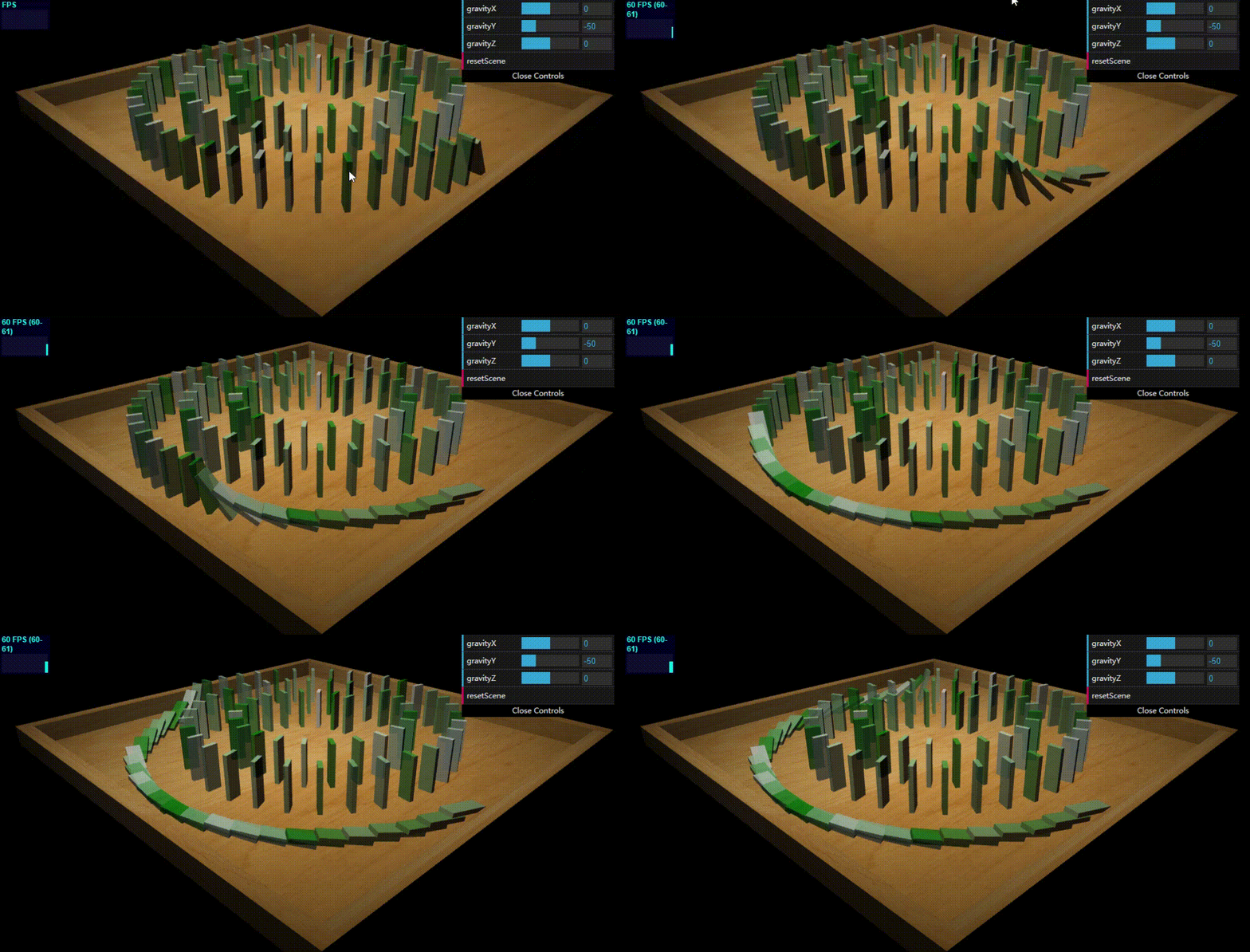
一、Threejs中如何创建物理场景

threejs中创建物理场景我们用它的扩展库:Physijs。它可以使场景中的对象有重力效果,可以相互碰撞,施加力之后可以移动,还可以通过合页和滑块在移动过程中在对象上施加约束。这个库是基于另一个著名物理引擎ammo.js实现的,它只是为了适配threejs对其包装了一层,因此Physijs只是一个包装器,所以它也可以与其它的物理引擎一起工作,在它的github代码仓中你也可以发现一个使用不同的物理引擎Cannon.js的分支版本。

创建物理场景步骤:

  1. 配置物理引擎,指定工作线程和使用的物理引擎。
  2. 创建物理场景并设置重力。
  3. 创建物理场景里的对象(使用Physijs包装的各种网格对象创建)。
  4. 执行物理场景。
1
2
3
4
5
6
7
8
9
10
11
12
13
14
15
16
17
18
19
20
21
22
23
24
25
26
27
28
29
30
31
32
33
34
35
36
37
38
39
40
41
42
43
44
45
46
47
48
49
50
51
52
53
54
55
56
57
58
59
60
61
62
63
64
65
66
67
68
69
70
71
72
73
74
75
76
77
78
79
80
81
82
83
84
85
86
87
88
89
90
91
92
93
94
95
96
97
98
99
100
101
102
103
104
105
106
107
108
109
110
111
112
113
114
115
116
117
118
119
120
121
122
123
124
125
126
127
128
129
130
131
132
133
134
135
136
137
138
139
140
141
142
143
144
145
146
147
148
149
150
151
152
153
154
155
156
157
158
159
160
161
162
163
164
165
166
167
168
169
170
171
172
173
<!-- chapter-12-01.html -->
<!DOCTYPE html>
<html>
<style>
body {
margin: 0;
overflow: hidden;
}
</style>

<head>
<title>Physijs</title>
<script type="text/javascript" src="../libs/three.js"></script>
<script type="text/javascript" src="../libs/stats.js"></script>
<script type="text/javascript" src="../libs/physi.js"></script>
<script type="text/javascript" src="../libs/chroma.js"></script>
<script type="text/javascript" src="../libs/dat.gui.js"></script>

<script type="text/javascript">
'use strict';
var scale = chroma.scale(['green', 'white']); // 指定的颜色之间创建色阶
// 1. 配置物理引擎
Physijs.scripts.worker = '../libs/physijs_worker.js'; // 指定后台worker线程,做CPU密集的物理计算,为了不卡主渲染线程。
Physijs.scripts.ammo = '../libs/ammo.js'; // 指定使用的物理引擎

var initScene, render, applyForce, setMousePosition, mouse_position,
ground_material, box_material,
renderer, render_stats, scene, ground, light, camera, box, boxes = [];

initScene = function () {
renderer = new THREE.WebGLRenderer({antialias: true});
renderer.setSize(window.innerWidth, window.innerHeight);
renderer.setClearColor(new THREE.Color(0x000000));
document.getElementById('viewport').appendChild(renderer.domElement);

render_stats = new Stats();
render_stats.domElement.style.position = 'absolute';
render_stats.domElement.style.top = '1px';
render_stats.domElement.style.zIndex = 100;
document.getElementById('viewport').appendChild(render_stats.domElement);
// 2. 创建物理场景并设置重力
scene = new Physijs.Scene;
scene.setGravity(new THREE.Vector3(0, -50, 0));

camera = new THREE.PerspectiveCamera(
35,
window.innerWidth / window.innerHeight,
1,
1000
);
camera.position.set(50, 30, 50);
camera.lookAt(new THREE.Vector3(10, 0, 10));
scene.add(camera);

light = new THREE.SpotLight(0xFFFFFF);
light.position.set(20, 100, 50);
scene.add(light);

// 3. 创建物理场景里的对象
createGround();

requestAnimationFrame(render);

var points = getPoints();
var stones = [];
var controls = new function () {
this.gravityX = 0;
this.gravityY = -50;
this.gravityZ = 0;

this.resetScene = function () {
scene.setGravity(new THREE.Vector3(controls.gravityX, controls.gravityY, controls.gravityZ));
stones.forEach(function (st) {
scene.remove(st)
});
stones = [];
points.forEach(function (point) {
var stoneGeom = new THREE.BoxGeometry(0.6, 6, 2);
var stone = new Physijs.BoxMesh(stoneGeom, Physijs.createMaterial(new THREE.MeshPhongMaterial(
{
color: scale(Math.random()).hex(),
transparent: true, opacity: 0.8,
})));
console.log(stone.position);
stone.position.copy(point);
stone.lookAt(scene.position); // 设置骨牌的朝向
stone.__dirtyRotation = true; // 告诉Physijs,骨牌对象的角度更新了
stone.position.y = 3.5;
scene.add(stone);
stones.push(stone);
});

// 推倒第一块骨牌
stones[0].rotation.x = 0.2;
stones[0].__dirtyRotation = true;
};
};

var gui = new dat.GUI();
gui.add(controls, 'gravityX', -100, 100);
gui.add(controls, 'gravityY', -100, 100);
gui.add(controls, 'gravityZ', -100, 100);
gui.add(controls, 'resetScene');
controls.resetScene();
};

render = function () {
requestAnimationFrame(render);
renderer.render(scene, camera);
render_stats.update();
// 4. 执行物理场景
scene.simulate();
};

// 得到骨牌的位置点
function getPoints() {
var points = [];
var r = 27;
var cX = 0;
var cY = 0;

var circleOffset = 0;
for (var i = 0; i < 1000; i += 6 + circleOffset) {

circleOffset = 4.5 * (i / 360);

var x = (r / 1440) * (1440 - i) * Math.cos(i * (Math.PI / 180)) + cX;
var z = (r / 1440) * (1440 - i) * Math.sin(i * (Math.PI / 180)) + cY;
var y = 0;

points.push(new THREE.Vector3(x, y, z));
}

return points;
}

// 5个物理网格盒子拼起来的地面
function createGround() {
var ground_material = Physijs.createMaterial(
new THREE.MeshPhongMaterial({map: THREE.ImageUtils.loadTexture('../assets/textures/general/wood-2.jpg')}),
.9, .3);

var ground = new Physijs.BoxMesh(new THREE.BoxGeometry(60, 1, 60), ground_material, 0); // 最后一个参数是重力,设置为0,是不然地面受重力影响下落。

var borderLeft = new Physijs.BoxMesh(new THREE.BoxGeometry(2, 3, 60), ground_material, 0);
borderLeft.position.x = -31;
borderLeft.position.y = 2;
ground.add(borderLeft);

var borderRight = new Physijs.BoxMesh(new THREE.BoxGeometry(2, 3, 60), ground_material, 0);
borderRight.position.x = 31;
borderRight.position.y = 2;
ground.add(borderRight);

var borderBottom = new Physijs.BoxMesh(new THREE.BoxGeometry(64, 3, 2), ground_material, 0);
borderBottom.position.z = 30;
borderBottom.position.y = 2;
ground.add(borderBottom);

var borderTop = new Physijs.BoxMesh(new THREE.BoxGeometry(64, 3, 2), ground_material, 0);
borderTop.position.z = -30;
borderTop.position.y = 2;
ground.add(borderTop);
scene.add(ground);
}
window.onload = initScene;
</script>
</head>

<body>
<div id="viewport"></div>
</body>
</html>


二、Physijs提供的包装几何体对象

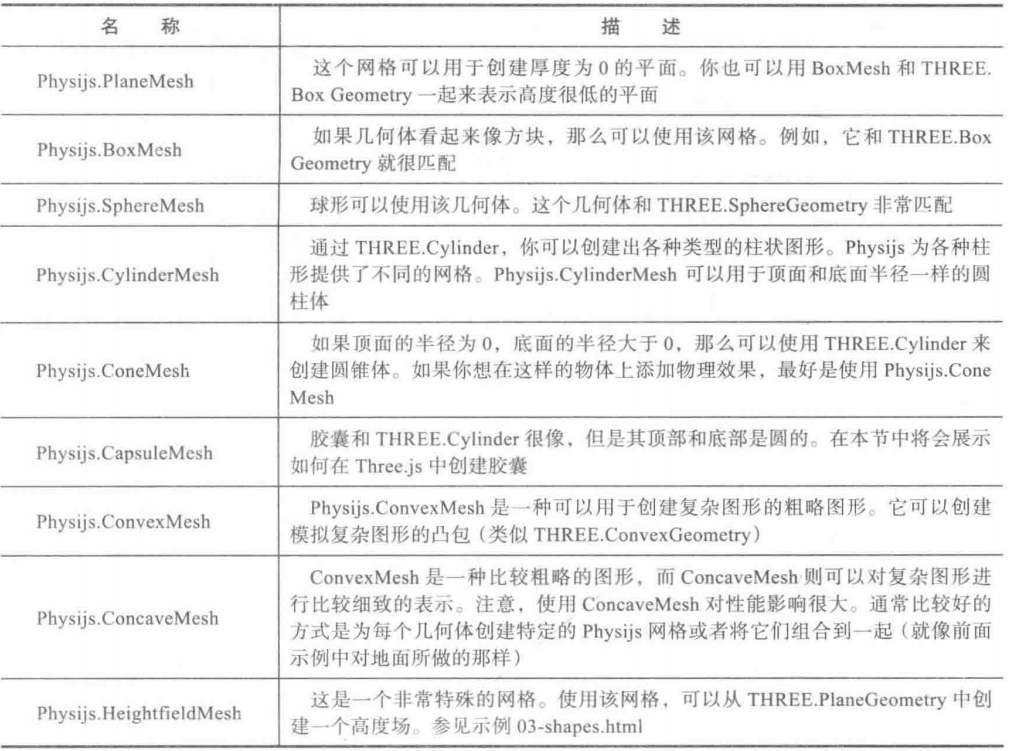
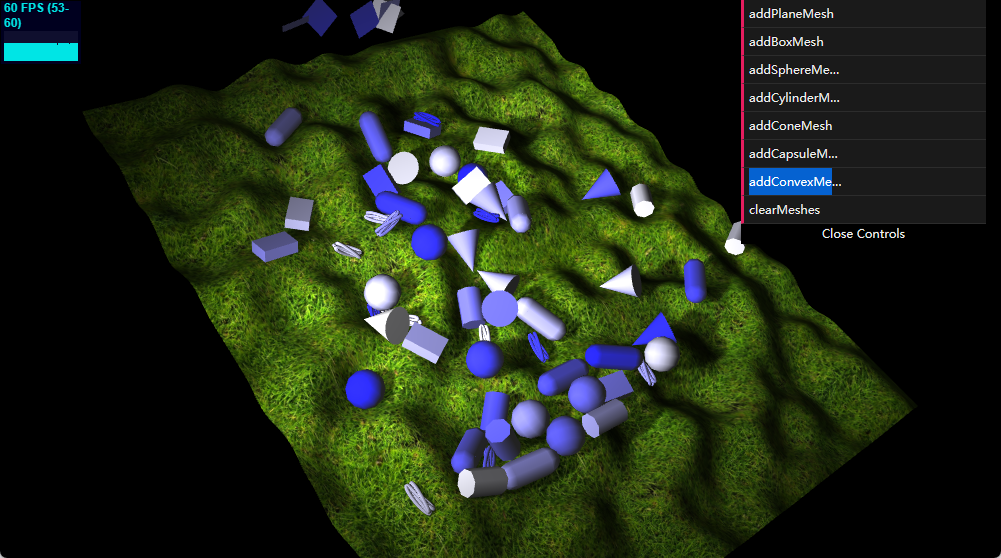
物理场景中添加网格对象,就是把THREE.Mesh换成Physijs.xxx包装的几何体网格,这样对象就会受物理的影响了。

1
2
3
4
5
6
7
8
9
10
11
12
13
14
15
16
17
18
19
20
21
22
23
24
25
26
27
28
29
30
31
32
33
34
35
36
37
38
39
40
41
42
43
44
45
46
47
48
49
50
51
52
53
54
55
56
57
58
59
60
61
62
63
64
65
66
67
68
69
70
71
72
73
74
75
76
77
78
79
80
81
82
83
84
85
86
87
88
89
90
91
92
93
94
95
96
97
98
99
100
101
102
103
104
105
106
107
108
109
110
111
112
113
114
115
116
117
118
119
120
121
122
123
124
125
126
127
128
129
130
131
132
133
134
135
136
137
138
139
140
141
142
143
144
145
146
147
148
149
150
151
152
153
154
155
156
157
158
159
160
161
162
163
164
165
166
167
168
169
170
171
172
173
174
175
176
177
178
179
180
181
182
183
184
185
186
187
188
189
190
191
192
193
194
195
196
197
198
199
200
201
202
203
204
205
206
207
208
209
210
211
212
213
214
215
216
217
218
219
220
221
222
223
224
225
226
227
228
229
230
231
232
233
234
235
236
237
238
239
240
241
242
243
244
245
246
247
248
249
250
251
252
253
254
255
<!-- chapter-12-02.html -->
<!DOCTYPE html>
<html>
<head>
<style>
body {
margin: 0;
overflow: hidden;
background-color: #000000;
}
</style>

<title>Physijs shapes</title>
<script type="text/javascript" src="../libs/three.js"></script>
<script type="text/javascript" src="../libs/stats.js"></script>
<script type="text/javascript" src="../libs/physi.js"></script>
<script type="text/javascript" src="../libs/dat.gui.js"></script>
<script type="text/javascript" src="../libs/chroma.js"></script>
<script type="text/javascript" src="../libs/perlin.js"></script>

<script type="text/javascript">
'use strict';
Physijs.scripts.worker = '../libs/physijs_worker.js';
Physijs.scripts.ammo = '../libs/ammo.js';
var scale = chroma.scale(['blue', 'white']);

var initScene, render, applyForce, setMousePosition, mouse_position,
ground_material, box_material,
projector, renderer, render_stats, physics_stats, scene, ground, light, camera, box, boxes = [];

initScene = function () {
renderer = new THREE.WebGLRenderer({antialias: true});
renderer.setSize(window.innerWidth, window.innerHeight);
renderer.setClearColor(new THREE.Color(0x000000));
renderer.shadowMapEnabled = true;
document.getElementById('viewport').appendChild(renderer.domElement);

render_stats = new Stats();
render_stats.domElement.style.position = 'absolute';
render_stats.domElement.style.top = '1px';
render_stats.domElement.style.left = '1px';
render_stats.domElement.style.zIndex = 100;
document.getElementById('viewport').appendChild(render_stats.domElement);

scene = new Physijs.Scene({reportSize: 10, fixedTimeStep: 1 / 60});
scene.setGravity(new THREE.Vector3(0, -20, 0));

camera = new THREE.PerspectiveCamera(
35,
window.innerWidth / window.innerHeight,
1,
1000
);
camera.position.set(105, 85, 85);
camera.lookAt(new THREE.Vector3(0, 0, 0));
scene.add(camera);

var ambi = new THREE.AmbientLight(0x222222);
scene.add(ambi);

light = new THREE.SpotLight(0xFFFFFF);
light.position.set(40, 50, 100);
light.castShadow = true;
light.shadowMapDebug = true;
light.shadowCameraNear = 10;
light.shadowCameraFar = 200;
light.intensity = 1.5;
scene.add(light);

// 添加物理对象
var meshes = [];
var controls = new function () {
// 添加包装的球体几何体
this.addSphereMesh = function () {
var sphere = new Physijs.SphereMesh(
new THREE.SphereGeometry(3, 20),
getMaterial()
);
setPosAndShade(sphere);
meshes.push(sphere);
scene.add(sphere);
};
// 添加包装的盒子几何体
this.addBoxMesh = function () {
var cube = new Physijs.BoxMesh(
new THREE.BoxGeometry(4, 2, 6),
getMaterial()
);
setPosAndShade(cube);
meshes.push(cube);
scene.add(cube);
};
// 添加包装的圆柱几何体
this.addCylinderMesh = function () {
var cylinder = new Physijs.CylinderMesh(
new THREE.CylinderGeometry(2, 2, 6),
getMaterial()
);
setPosAndShade(cylinder);

meshes.push(cylinder);
scene.add(cylinder);
};
// 添加包装的圆锥几何体
this.addConeMesh = function () {
var cone = new Physijs.ConeMesh(
new THREE.CylinderGeometry(0, 3, 7, 20, 10),
getMaterial()
);
setPosAndShade(cone);
meshes.push(cone);
scene.add(cone);
};
// 添加包装的平面几何体(固定重量为0,不受重力影响)
this.addPlaneMesh = function () {
var plane = new Physijs.PlaneMesh(
new THREE.PlaneGeometry(5, 5, 10, 10),
getMaterial()
);
setPosAndShade(plane);
meshes.push(plane);
scene.add(plane);
};
// 添加包装的胶囊几何体
this.addCapsuleMesh = function () {
var merged = new THREE.Geometry();
var cyl = new THREE.CylinderGeometry(2, 2, 6);
var top = new THREE.SphereGeometry(2);
var bot = new THREE.SphereGeometry(2);

var matrix = new THREE.Matrix4();
matrix.makeTranslation(0, 3, 0);
top.applyMatrix(matrix);

var matrix = new THREE.Matrix4();
matrix.makeTranslation(0, -3, 0);
bot.applyMatrix(matrix);

merged.merge(top);
merged.merge(bot);
merged.merge(cyl);

var capsule = new Physijs.CapsuleMesh(
merged,
getMaterial()
);
setPosAndShade(capsule);
meshes.push(capsule);
scene.add(capsule);
};
// 添加包装的复杂图形几何体
this.addConvexMesh = function () {
var convex = new Physijs.ConvexMesh(
new THREE.TorusKnotGeometry(0.5, 0.3, 64, 8, 2, 3, 10),
getMaterial()
);
setPosAndShade(convex);
meshes.push(convex);
scene.add(convex);
};

// 清除场景中添加的包装几何体
this.clearMeshes = function () {
meshes.forEach(function (e) {
scene.remove(e);
});
meshes = [];
}
};

var gui = new dat.GUI();
gui.add(controls, 'addPlaneMesh');
gui.add(controls, 'addBoxMesh');
gui.add(controls, 'addSphereMesh');
gui.add(controls, 'addCylinderMesh');
gui.add(controls, 'addConeMesh');
gui.add(controls, 'addCapsuleMesh');
gui.add(controls, 'addConvexMesh');
gui.add(controls, 'clearMeshes');

// 创建高度场
var date = new Date();
var pn = new Perlin('rnd' + date.getTime()); // 噪声生成器生成地形
var map = createHeightMap(pn); // 遍历几何体每个顶点,并随机设置顶点的z属性
scene.add(map);

requestAnimationFrame(render);
scene.simulate();
};

function createHeightMap(pn) {
var ground_material = Physijs.createMaterial(
new THREE.MeshLambertMaterial(
{
map: THREE.ImageUtils.loadTexture('../assets/textures/ground/grasslight-big.jpg')
}),
.3, // high friction
.8 // low restitution
);

var ground_geometry = new THREE.PlaneGeometry(120, 100, 100, 100);
for (var i = 0; i < ground_geometry.vertices.length; i++) {
var vertex = ground_geometry.vertices[i];
var value = pn.noise(vertex.x / 10, vertex.y / 10, 0);
vertex.z = value * 10;
}
ground_geometry.computeFaceNormals();
ground_geometry.computeVertexNormals();

var ground = new Physijs.HeightfieldMesh(
ground_geometry,
ground_material,
0, // mass
100,
100
);
ground.rotation.x = Math.PI / -2;
ground.rotation.y = 0.4;
ground.receiveShadow = true;
return ground;
}

function setPosAndShade(obj) {
obj.position.set(
Math.random() * 20 - 45,
40,
Math.random() * 20 - 5
);
obj.rotation.set(Math.random() * 2 * Math.PI, Math.random() * 2 * Math.PI, Math.random() * 2 * Math.PI);
obj.castShadow = true;
}

function getMaterial() {
var material = Physijs.createMaterial(
new THREE.MeshLambertMaterial(
{
color: scale(Math.random()).hex(),
}), 0.5, 0.7);
return material;
}

render = function () {
requestAnimationFrame(render);
renderer.render(scene, camera);
render_stats.update();
scene.simulate();
};
window.onload = initScene;
</script>
</head>

<body>
<div id="viewport"></div>
</body>
</html>


三、Physijs使用约束限制对象的移动

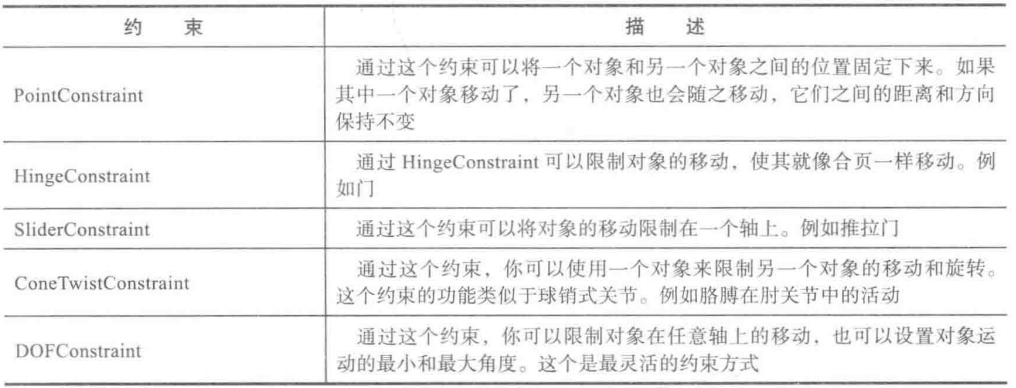
Physijs提供的约束对象如下:

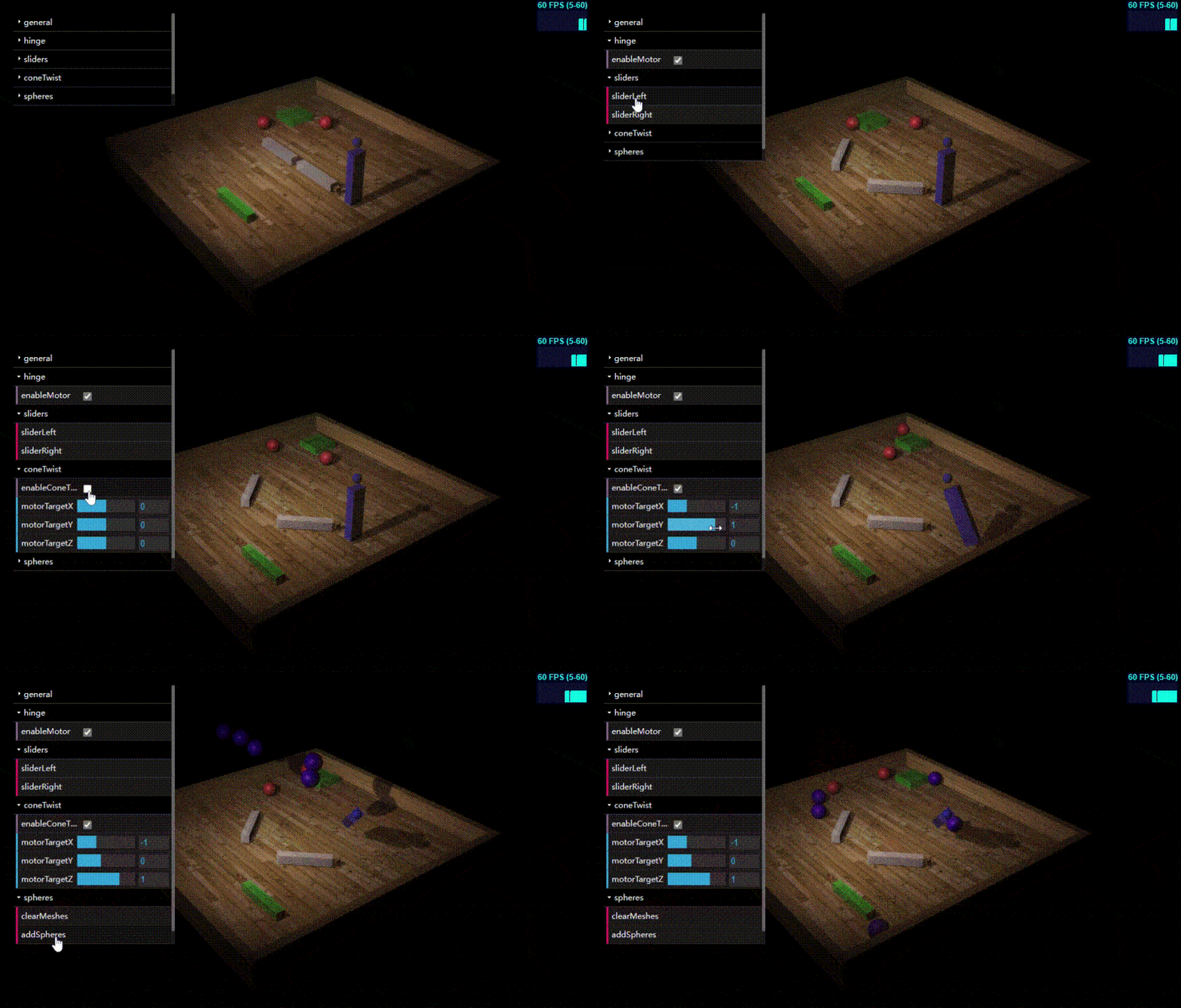
前面4个约束示例:

1
2
3
4
5
6
7
8
9
10
11
12
13
14
15
16
17
18
19
20
21
22
23
24
25
26
27
28
29
30
31
32
33
34
35
36
37
38
39
40
41
42
43
44
45
46
47
48
49
50
51
52
53
54
55
56
57
58
59
60
61
62
63
64
65
66
67
68
69
70
71
72
73
74
75
76
77
78
79
80
81
82
83
84
85
86
87
88
89
90
91
92
93
94
95
96
97
98
99
100
101
102
103
104
105
106
107
108
109
110
111
112
113
114
115
116
117
118
119
120
121
122
123
124
125
126
127
128
129
130
131
132
133
134
135
136
137
138
139
140
141
142
143
144
145
146
147
148
149
150
151
152
153
154
155
156
157
158
159
160
161
162
163
164
165
166
167
168
169
170
171
172
173
174
175
176
177
178
179
180
181
182
183
184
185
186
187
188
189
190
191
192
193
194
195
196
197
198
199
200
201
202
203
204
205
206
207
208
209
210
211
212
213
214
215
216
217
218
219
220
221
222
223
224
225
226
227
228
229
230
231
232
233
234
235
236
237
238
239
240
241
242
243
244
245
246
247
248
249
250
251
252
253
254
255
256
257
258
259
260
261
262
263
264
265
266
267
268
269
270
271
272
273
274
275
276
277
278
279
280
281
282
283
284
285
286
287
288
289
290
291
292
293
294
295
296
297
298
299
300
301
302
303
304
305
306
307
308
309
310
311
312
313
314
315
316
317
318
319
320
321
322
323
324
325
326
327
328
329
330
331
332
333
334
335
336
337
338
339
340
341
342
343
344
345
346
347
348
349
350
351
352
353
354
355
356
357
358
359
360
361
362
363
364
365
366
367
368
369
370
371
372
373
374
375
376
377
378
379
380
381
382
383
384
385
386
387
388
389
390
391
392
393
394
395
396
397
398
399
400
401
402
403
404
405
406
407
408
409
410
411
412
413
414
415
416
417
418
419
420
421
422
423
424
425
426
427
428
429
430
431
432
433
434
435
436
437
438
439
440
441
442
443
444
445
446
447
448
449
450
451
452
453
454
455
456
457
458
459
460
461
462
463
464
465
466
467
468
469
470
471
472
473
474
475
476
477
478
479
480
481
482
483
484
485
486
487
488
<!DOCTYPE html>

<html>

<head>
<style>
body {
/* set margin to 0 and overflow to hidden, to go fullscreen */
margin: 0;
overflow: hidden;
background-color: #000000;
}
</style>

<title>Physijs Constraints</title>

<script type="text/javascript" src="../libs/three.js"></script>
<script type="text/javascript" src="../libs/stats.js"></script>
<script type="text/javascript" src="../libs/physi.js"></script>
<script type="text/javascript" src="../libs/dat.gui.js"></script>
<script type="text/javascript" src="../libs/chroma.js"></script>

<script type="text/javascript">

'use strict';

Physijs.scripts.worker = '../libs/physijs_worker.js';
Physijs.scripts.ammo = '../libs/ammo.js';

var scale = chroma.scale(['white', 'blue', 'red', 'yellow']);

var initScene, render, applyForce, setMousePosition, mouse_position,
ground_material, box_material,
projector, renderer, render_stats, physics_stats, scene, ground, light, camera, box, boxes = [];

initScene = function () {
projector = new THREE.Projector;

renderer = new THREE.WebGLRenderer({antialias: true});
renderer.setSize(window.innerWidth, window.innerHeight);

renderer.setClearColor(new THREE.Color(0x000000));
renderer.shadowMapEnabled = true;


document.getElementById('viewport').appendChild(renderer.domElement);

render_stats = new Stats();
render_stats.domElement.style.position = 'absolute';
render_stats.domElement.style.top = '1px';
render_stats.domElement.style.right = '1px';
render_stats.domElement.style.zIndex = 100;
document.getElementById('viewport').appendChild(render_stats.domElement);


scene = new Physijs.Scene({reportSize: 10, fixedTimeStep: 1 / 60});

scene.setGravity(new THREE.Vector3(0, -10, 0));

camera = new THREE.PerspectiveCamera(
35,
window.innerWidth / window.innerHeight,
1,
1000
);
camera.position.set(85, 65, 65);
camera.lookAt(new THREE.Vector3(0, 0, 0));
scene.add(camera);

// Light
light = new THREE.SpotLight(0xFFFFFF);
light.position.set(20, 50, 50);
light.castShadow = true;
light.shadowMapDebug = true;
light.shadowCameraNear = 10;
light.shadowCameraFar = 100;


scene.add(light);


var meshes = [];

createGround();
var flipperLeftConstraint = createLeftFlipper();
var flipperRightConstraint = createRightFlipper();
var sliderBottomConstraint = createSliderBottom();
var sliderTopConstraint = createSliderTop();
var coneTwistConstraint = createConeTwist();

var point2point = createPointToPoint(true);


var controls = new function () {
this.enableMotor = false;
this.acceleration = 2;
this.velocity = -10;

this.enableConeTwistMotor = false;
this.motorTargetX = 0;
this.motorTargetY = 0;
this.motorTargetZ = 0;

this.updateCone = function () {
if (controls.enableConeTwistMotor) {
coneTwistConstraint.enableMotor();
coneTwistConstraint.setMotorTarget(new THREE.Vector3(controls.motorTargetX, controls.motorTargetY, controls.motorTargetZ));
} else {
coneTwistConstraint.disableMotor();
}

};

this.updateMotor = function () {
if (controls.enableMotor) {
// velocity is the velocity we are going for.
// acceleration is how fast we're going to reach it
flipperLeftConstraint.disableMotor();
flipperLeftConstraint.enableAngularMotor(controls.velocity, controls.acceleration);
flipperRightConstraint.disableMotor();
flipperRightConstraint.enableAngularMotor(-1 * controls.velocity, controls.acceleration);
} else {
flipperLeftConstraint.disableMotor();
flipperRightConstraint.disableMotor();
}
};

this.sliderLeft = function () {
sliderBottomConstraint.disableLinearMotor();
sliderBottomConstraint.enableLinearMotor(controls.velocity, controls.acceleration);
sliderTopConstraint.disableLinearMotor();
sliderTopConstraint.enableLinearMotor(controls.velocity, controls.acceleration);
};

this.sliderRight = function () {
sliderBottomConstraint.disableLinearMotor();
sliderBottomConstraint.enableLinearMotor(-1 * controls.velocity, controls.acceleration);
sliderTopConstraint.disableLinearMotor();
sliderTopConstraint.enableLinearMotor(-1 * controls.velocity, controls.acceleration);
};

this.clearMeshes = function () {
meshes.forEach(function (e) {
scene.remove(e);
});
meshes = [];
};

this.addSpheres = function () {
var colorSphere = scale(Math.random()).hex();
for (var i = 0; i < 5; i++) {

box = new Physijs.SphereMesh(
new THREE.SphereGeometry(2, 20),
Physijs.createMaterial(
new THREE.MeshPhongMaterial(
{
color: colorSphere,
opacity: 0.8,
transparent: true
// map: THREE.ImageUtils.loadTexture( '../assets/textures/general/floor-wood.jpg' )
}),
controls.sphereFriction,
controls.sphereRestitution
)
, 0.1);
box.castShadow = true;
box.receiveShadow = true;
box.position.set(
Math.random() * 50 - 25,
20 + Math.random() * 5,
Math.random() * 5
);
meshes.push(box);
scene.add(box);
}
};
};

controls.updateMotor();

var gui = new dat.GUI();
gui.domElement.style.position = 'absolute';
gui.domElement.style.top = '20px';
gui.domElement.style.left = '20px';

var generalFolder = gui.addFolder('general');
generalFolder.add(controls, "acceleration", 0, 15).onChange(controls.updateMotor);
generalFolder.add(controls, "velocity", -10, 10).onChange(controls.updateMotor);

var hingeFolder = gui.addFolder('hinge');
hingeFolder.add(controls, "enableMotor").onChange(controls.updateMotor);

var sliderFolder = gui.addFolder('sliders');
sliderFolder.add(controls, "sliderLeft").onChange(controls.sliderLeft);
sliderFolder.add(controls, "sliderRight").onChange(controls.sliderRight);

var coneTwistFolder = gui.addFolder('coneTwist');
coneTwistFolder.add(controls, "enableConeTwistMotor").onChange(controls.updateCone);
coneTwistFolder.add(controls, "motorTargetX", -Math.PI / 2, Math.PI / 2).onChange(controls.updateCone);
coneTwistFolder.add(controls, "motorTargetY", -Math.PI / 2, Math.PI / 2).onChange(controls.updateCone);
coneTwistFolder.add(controls, "motorTargetZ", -Math.PI / 2, Math.PI / 2).onChange(controls.updateCone);

var spheresFolder = gui.addFolder('spheres');
spheresFolder.add(controls, "clearMeshes").onChange(controls.updateMotor);
spheresFolder.add(controls, "addSpheres").onChange(controls.updateMotor);


requestAnimationFrame(render);
scene.simulate();
};

function createGround() {
// Materials
ground_material = Physijs.createMaterial(
new THREE.MeshPhongMaterial(
{
// color: 0xaaaaaa,
map: THREE.ImageUtils.loadTexture('../assets/textures/general/floor-wood.jpg')
}),
.9, // high friction
.7 // low restitution
);

// Ground
ground = new Physijs.BoxMesh(
new THREE.BoxGeometry(60, 1, 65),
ground_material,
0 // mass
);

ground.receiveShadow = true;


var borderLeft = new Physijs.BoxMesh(
new THREE.BoxGeometry(2, 6, 65),
ground_material,
0 // mass
);

borderLeft.position.x = -31;
borderLeft.position.y = 2;
borderLeft.receiveShadow = true;


ground.add(borderLeft);

var borderRight = new Physijs.BoxMesh(new THREE.BoxGeometry(2, 6, 65),
ground_material,
0 // mass
);
borderRight.position.x = 31;
borderRight.position.y = 2;
borderRight.receiveShadow = true;

ground.add(borderRight);


var borderBottom = new Physijs.BoxMesh(
new THREE.BoxGeometry(64, 6, 2),
ground_material,
0 // mass
);

borderBottom.position.z = 32;
borderBottom.position.y = 1.5;
borderBottom.receiveShadow = true;
ground.add(borderBottom);

var borderTop = new Physijs.BoxMesh(
new THREE.BoxGeometry(64, 6, 2),
ground_material,
0 // mass
);

borderTop.position.z = -32;
borderTop.position.y = 2;
borderTop.receiveShadow = true;

ground.add(borderTop);

ground.receiveShadow = true;

scene.add(ground);
}

function createConeTwist() {
var baseMesh = new THREE.SphereGeometry(1);
var armMesh = new THREE.BoxGeometry(2, 12, 3);

var objectOne = new Physijs.BoxMesh(baseMesh, Physijs.createMaterial(
new THREE.MeshPhongMaterial({color: 0x4444ff, transparent: true, opacity: 0.7}), 0, 0), 0);
objectOne.position.z = 0;
objectOne.position.x = 20;
objectOne.position.y = 15.5;
objectOne.castShadow = true;
scene.add(objectOne);


var objectTwo = new Physijs.SphereMesh(armMesh, Physijs.createMaterial(
new THREE.MeshPhongMaterial({color: 0x4444ff, transparent: true, opacity: 0.7}), 0, 0), 10);
objectTwo.position.z = 0;
objectTwo.position.x = 20;
objectTwo.position.y = 7.5;
scene.add(objectTwo);

objectTwo.castShadow = true;

//position is the position of the axis, relative to the ref, based on the current position
var constraint = new Physijs.ConeTwistConstraint(objectOne, objectTwo, objectOne.position);

scene.addConstraint(constraint);
// set limit to quarter circle for each axis
constraint.setLimit(0.5 * Math.PI, 0.5 * Math.PI, 0.5 * Math.PI);
constraint.setMaxMotorImpulse(1);
constraint.setMotorTarget(new THREE.Vector3(0, 0, 0)); // desired rotation

return constraint;
}

function createPointToPoint() {
var obj1 = new THREE.SphereGeometry(2);
var obj2 = new THREE.SphereGeometry(2);

var objectOne = new Physijs.SphereMesh(obj1, Physijs.createMaterial(
new THREE.MeshPhongMaterial({color: 0xff4444, transparent: true, opacity: 0.7}), 0, 0));
objectOne.position.z = -18;
objectOne.position.x = -10;
objectOne.position.y = 2;
objectOne.castShadow = true;
scene.add(objectOne);

var objectTwo = new Physijs.SphereMesh(obj2, Physijs.createMaterial(
new THREE.MeshPhongMaterial({color: 0xff4444, transparent: true, opacity: 0.7}), 0, 0));
objectTwo.position.z = -5;
objectTwo.position.x = -20;
objectTwo.position.y = 2;
objectTwo.castShadow = true;
scene.add(objectTwo);

// if no position two, its fixed to a position. Else fixed to objectTwo and both will move
var constraint = new Physijs.PointConstraint(objectOne, objectTwo, objectTwo.position);
scene.addConstraint(constraint);
}

function createSliderBottom() {
var sliderCube = new THREE.BoxGeometry(12, 2, 2);


var sliderMesh = new Physijs.BoxMesh(sliderCube, Physijs.createMaterial(
new THREE.MeshPhongMaterial({color: 0x44ff44, opacity: 0.6, transparent: true}), 0, 0), 0.01);
sliderMesh.position.z = 20;
sliderMesh.position.x = 6;
sliderMesh.position.y = 1.5;
sliderMesh.castShadow = true;


scene.add(sliderMesh);
var constraint = new Physijs.SliderConstraint(sliderMesh, new THREE.Vector3(0, 0, 0), new THREE.Vector3(0, 1, 0));

scene.addConstraint(constraint);
constraint.setLimits(-10, 10, 0, 0);
constraint.setRestitution(0.1, 0.1);

return constraint;
}

function createSliderTop() {
var sliderSphere = new THREE.BoxGeometry(7, 2, 7);


var sliderMesh = new Physijs.BoxMesh(sliderSphere, Physijs.createMaterial(
new THREE.MeshPhongMaterial({color: 0x44ff44, transparent: true, opacity: 0.5}), 0, 0), 10);
sliderMesh.position.z = -15;
sliderMesh.position.x = -20;
sliderMesh.position.y = 1.5;
scene.add(sliderMesh);
sliderMesh.castShadow = true;

//position is the position of the axis, relative to the ref, based on the current position
var constraint = new Physijs.SliderConstraint(sliderMesh, new THREE.Vector3(-10, 0, 20), new THREE.Vector3(Math.PI / 2, 0, 0));

scene.addConstraint(constraint);
constraint.setLimits(-20, 10, 0.5, -0, 5);
constraint.setRestitution(0.2, 0.1);

return constraint;
}

function createLeftFlipper() {
var flipperLeft = new Physijs.BoxMesh(
new THREE.BoxGeometry(12, 2, 2), Physijs.createMaterial(new THREE.MeshPhongMaterial(
{opacity: 0.6, transparent: true}
)), 0.3
);
flipperLeft.position.x = -6;
flipperLeft.position.y = 2;
flipperLeft.position.z = 0;
flipperLeft.castShadow = true;
scene.add(flipperLeft);
var flipperLeftPivot = new Physijs.SphereMesh(
new THREE.BoxGeometry(1, 1, 1), ground_material, 0);

flipperLeftPivot.position.y = 1;
flipperLeftPivot.position.x = -15;
flipperLeftPivot.position.z = 0;
flipperLeftPivot.rotation.y = 1.4;
flipperLeftPivot.castShadow = true;

scene.add(flipperLeftPivot);

// when looking at the axis, the axis of object two are used.
// so as long as that one is the same as the scene, no problems
// rotation and axis are relative to object2. If position == cube2.position it works as expected
var constraint = new Physijs.HingeConstraint(flipperLeft, flipperLeftPivot, flipperLeftPivot.position, new THREE.Vector3(0, 1, 0));
scene.addConstraint(constraint);

constraint.setLimits(
-2.2, // minimum angle of motion, in radians, from the point object 1 starts (going back)
-0.6, // maximum angle of motion, in radians, from the point object 1 starts (going forward)
0.1, // applied as a factor to constraint error, how big the kantelpunt is moved when a constraint is hit
0 // controls bounce at limit (0.0 == no bounce)
);

return constraint;
}

function createRightFlipper() {
var flipperright = new Physijs.BoxMesh(
new THREE.BoxGeometry(12, 2, 2), Physijs.createMaterial(new THREE.MeshPhongMaterial(
{opacity: 0.6, transparent: true}
)), 0.3
);
flipperright.position.x = 8;
flipperright.position.y = 2;
flipperright.position.z = 0;
flipperright.castShadow = true;
scene.add(flipperright);
var flipperLeftPivot = new Physijs.SphereMesh(
new THREE.BoxGeometry(1, 1, 1), ground_material, 0);

flipperLeftPivot.position.y = 2;
flipperLeftPivot.position.x = 15;
flipperLeftPivot.position.z = 0;
flipperLeftPivot.rotation.y = 1.4;
flipperLeftPivot.castShadow = true;

scene.add(flipperLeftPivot);

// when looking at the axis, the axis of object two are used.
// so as long as that one is the same as the scene, no problems
// rotation and axis are relative to object2. If position == cube2.position it works as expected
var constraint = new Physijs.HingeConstraint(flipperright, flipperLeftPivot, flipperLeftPivot.position, new THREE.Vector3(0, 1, 0));
// var constraint = new Physijs.HingeConstraint(cube1, new THREE.Vector3(0,0,0), new THREE.Vector3(0,1,0));
scene.addConstraint(constraint);

constraint.setLimits(
-2.2, // minimum angle of motion, in radians, from the point object 1 starts (going back)
-0.6, // maximum angle of motion, in radians, from the point object 1 starts (going forward)
0.1, // applied as a factor to constraint error, how big the kantelpunt is moved when a constraint is hit
0 // controls bounce at limit (0.0 == no bounce)
);

return constraint;
}

var direction = 1;

render = function () {
requestAnimationFrame(render);
renderer.render(scene, camera);
render_stats.update();
ground.__dirtyRotation = true;
scene.simulate(undefined, 2);
};


window.onload = initScene;

</script>
</head>

<body>
<div id="viewport"></div>
</body>

</html>

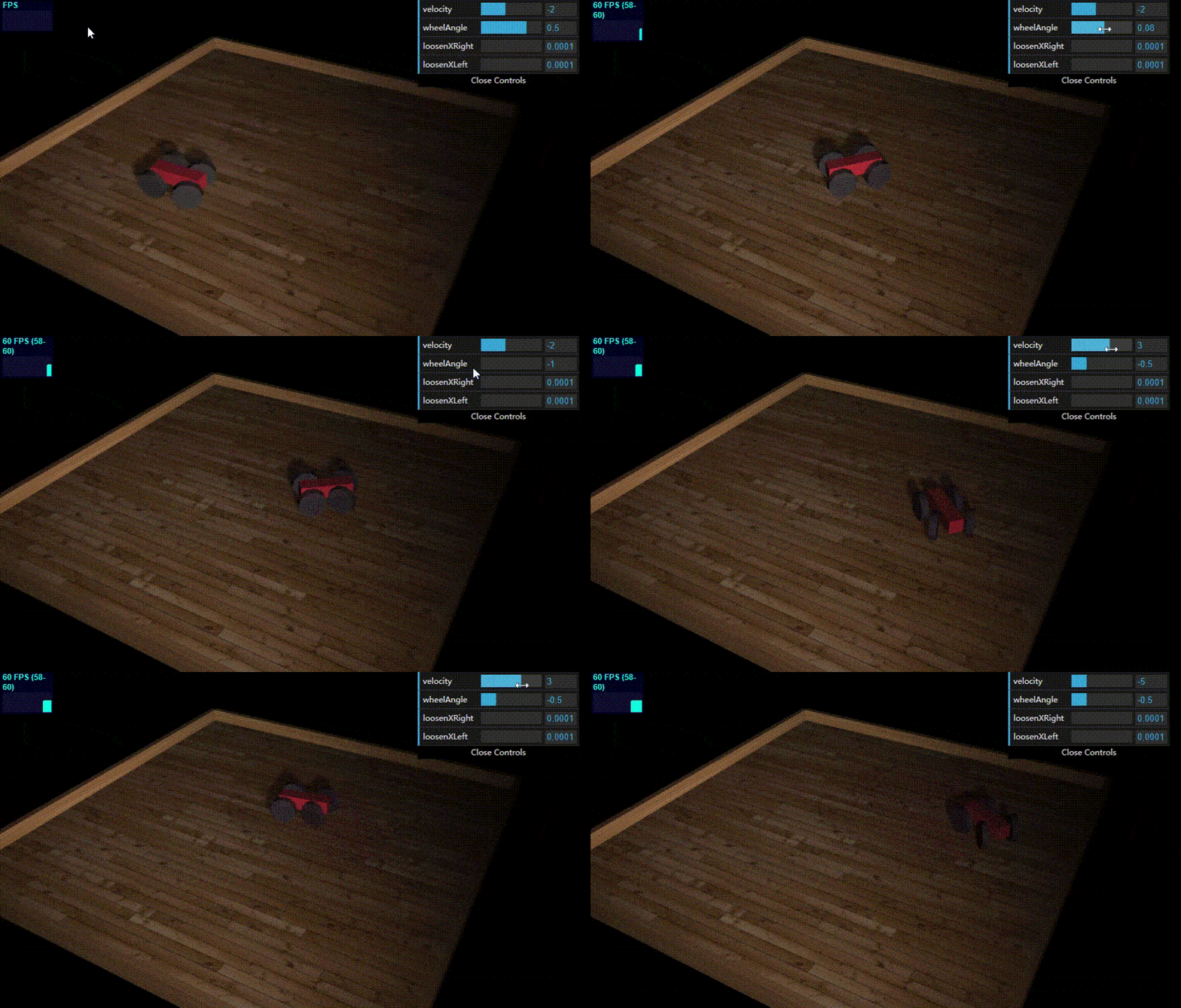
最后一个DOFConstraint约束示例(可以准确的控制对象的线性方向和角度方向的移动):

1
2
3
4
5
6
7
8
9
10
11
12
13
14
15
16
17
18
19
20
21
22
23
24
25
26
27
28
29
30
31
32
33
34
35
36
37
38
39
40
41
42
43
44
45
46
47
48
49
50
51
52
53
54
55
56
57
58
59
60
61
62
63
64
65
66
67
68
69
70
71
72
73
74
75
76
77
78
79
80
81
82
83
84
85
86
87
88
89
90
91
92
93
94
95
96
97
98
99
100
101
102
103
104
105
106
107
108
109
110
111
112
113
114
115
116
117
118
119
120
121
122
123
124
125
126
127
128
129
130
131
132
133
134
135
136
137
138
139
140
141
142
143
144
145
146
147
148
149
150
151
152
153
154
155
156
157
158
159
160
161
162
163
164
165
166
167
168
169
170
171
172
173
174
175
176
177
178
179
180
181
182
183
184
185
186
187
188
189
190
191
192
193
194
195
196
197
198
199
200
201
202
203
204
205
206
207
208
209
210
211
212
213
214
215
216
217
218
219
220
221
222
223
224
225
226
227
228
229
230
231
232
233
234
235
236
237
238
239
240
241
242
243
244
245
246
247
248
249
250
251
252
253
254
255
256
257
258
259
260
261
262
263
264
265
266
267
268
269
270
271
272
273
274
275
276
277
278
279
280
281
282
283
284
285
286
287
288
289
290
291
292
293
294
295
296
297
298
299
300
301
302
303
304
305
306
307
308
309
310
311
312
313
314
315
316
317
318
319
320
321
322
323
324
325
326
327
328
329
330
331
332
333
334
335
336
337
338
339
<!DOCTYPE html>

<html>

<head>
<style>
body {
/* set margin to 0 and overflow to hidden, to go fullscreen */
margin: 0;
overflow: hidden;
background-color: #000000;
}
</style>

<title>Physijs Constraints</title>

<script type="text/javascript" src="../libs/three.js"></script>
<script type="text/javascript" src="../libs/stats.js"></script>
<script type="text/javascript" src="../libs/physi.js"></script>
<script type="text/javascript" src="../libs/dat.gui.js"></script>
<script type="text/javascript" src="../libs/chroma.js"></script>

<script type="text/javascript">

'use strict';

Physijs.scripts.worker = '../libs/physijs_worker.js';
Physijs.scripts.ammo = '../libs/ammo.js';

var scale = chroma.scale(['white', 'blue', 'red', 'yellow']);

var initScene, render, applyForce, setMousePosition, mouse_position,
ground_material, box_material,
projector, renderer, render_stats, physics_stats, scene, ground, light, camera, box, boxes = [];

initScene = function () {

renderer = new THREE.WebGLRenderer({antialias: true});
renderer.setSize(window.innerWidth, window.innerHeight);

renderer.setClearColor(new THREE.Color(0x000000));
renderer.shadowMapEnabled = true;


document.getElementById('viewport').appendChild(renderer.domElement);

render_stats = new Stats();
render_stats.domElement.style.position = 'absolute';
render_stats.domElement.style.top = '1px';
render_stats.domElement.style.left = '1px';
render_stats.domElement.style.zIndex = 100;
document.getElementById('viewport').appendChild(render_stats.domElement);


scene = new Physijs.Scene({reportSize: 10, fixedTimeStep: 1 / 60});

scene.setGravity(new THREE.Vector3(0, -40, 0));

camera = new THREE.PerspectiveCamera(
35,
window.innerWidth / window.innerHeight,
1,
1000
);
camera.position.set(90, 90, 90);
camera.lookAt(new THREE.Vector3(30, 0, -20));
scene.add(camera);

// Light
light = new THREE.SpotLight(0xFFFFFF);
light.position.set(120, 70, 100);
light.castShadow = true;
light.shadowMapDebug = true;
light.shadowCameraNear = 10;
light.shadowCameraFar = 200;


scene.add(light);


var meshes = [];


createGround();
var car = createCar();


var controls = new function () {
this.velocity = -2;
this.wheelAngle = 0.5;

this.loosenXRight = 0.0001;
this.loosenXLeft = 0.0001;

this.changeVelocity = function () {
// if you add a motor, the current constraint is overridden
// if you want to rotate set min higher then max
car.flConstraint.configureAngularMotor(2, 0.1, 0, controls.velocity, 15000);
car.frConstraint.configureAngularMotor(2, 0.1, 0, controls.velocity, 15000);

// motor one is for left and right
// frConstraint.enableAngularMotor(1);

// motor two is forward and backwards
car.flConstraint.enableAngularMotor(2);
car.frConstraint.enableAngularMotor(2);
};

this.changeOrientation = function () {
car.rrConstraint.setAngularLowerLimit({x: 0, y: controls.wheelAngle, z: 0.1});
car.rrConstraint.setAngularUpperLimit({x: controls.loosenXRight, y: controls.wheelAngle, z: 0});
car.rlConstraint.setAngularLowerLimit({x: controls.loosenXLeft, y: controls.wheelAngle, z: 0.1});
car.rlConstraint.setAngularUpperLimit({x: 0, y: controls.wheelAngle, z: 0});
}

};

var gui = new dat.GUI();
gui.add(controls, 'velocity', -10, 10).onChange(controls.changeVelocity);
gui.add(controls, 'wheelAngle', -1, 1).onChange(controls.changeOrientation);
gui.add(controls, 'loosenXRight', 0, 0.5).step(0.01).onChange(controls.changeOrientation);
gui.add(controls, 'loosenXLeft', 0, 0.6).step(-0.01).onChange(controls.changeOrientation);
controls.loosenXLeft = 0;
controls.loosenXRight = 0;


requestAnimationFrame(render);
scene.simulate();
};


function createWheel(position) {
var wheel_material = Physijs.createMaterial(
new THREE.MeshLambertMaterial({color: 0x444444, opacity: 0.9, transparent: true}),
1.0, // high friction
.5 // medium restitution
);

var wheel_geometry = new THREE.CylinderGeometry(4, 4, 2, 10);
var wheel = new Physijs.CylinderMesh(
wheel_geometry,
wheel_material,
100
);

wheel.rotation.x = Math.PI / 2;
wheel.castShadow = true;
wheel.position.copy(position);
return wheel;
}


function createCar() {
var car = {};
var car_material = Physijs.createMaterial(
new THREE.MeshLambertMaterial({color: 0xff4444, opacity: 0.9, transparent: true}),
.5, // high friction
.5 // medium restitution
);

// create the car body
var geom = new THREE.BoxGeometry(15, 4, 4);
var body = new Physijs.BoxMesh(geom, car_material, 500);
body.position.set(5, 5, 5);
body.castShadow = true;
scene.add(body);

// create the wheels
var fr = createWheel(new THREE.Vector3(0, 4, 10));
var fl = createWheel(new THREE.Vector3(0, 4, 0));
var rr = createWheel(new THREE.Vector3(10, 4, 10));
var rl = createWheel(new THREE.Vector3(10, 4, 0));

// add the wheels to the scene
scene.add(fr);
scene.add(fl);
scene.add(rr);
scene.add(rl);

var frConstraint = createWheelConstraint(fr, body, new THREE.Vector3(0, 4, 8));
scene.addConstraint(frConstraint);

var flConstraint = createWheelConstraint(fl, body, new THREE.Vector3(0, 4, 2));
scene.addConstraint(flConstraint);

var rrConstraint = createWheelConstraint(rr, body, new THREE.Vector3(10, 4, 8));
scene.addConstraint(rrConstraint);

var rlConstraint = createWheelConstraint(rl, body, new THREE.Vector3(10, 4, 2));
scene.addConstraint(rlConstraint);


// backwheels don't move themselves and are restriced in their
// movement. They should be able to rotate along the z-axis
// same here, if the complete angle is allowed set lower higher
// than upper.
// by setting the lower and upper to the same value you can
// fix the position
// we can set the x position to 'loosen' the axis for the directional
rrConstraint.setAngularLowerLimit({x: 0, y: 0.5, z: 0.1});
rrConstraint.setAngularUpperLimit({x: 0, y: 0.5, z: 0});
rlConstraint.setAngularLowerLimit({x: 0, y: 0.5, z: 0.1});
rlConstraint.setAngularUpperLimit({x: 0, y: 0.5, z: 0});


// front wheels should only move along the z axis.
// we don't need to specify anything here, since
// that value is overridden by the motors
frConstraint.setAngularLowerLimit({x: 0, y: 0, z: 0});
frConstraint.setAngularUpperLimit({x: 0, y: 0, z: 0});
flConstraint.setAngularLowerLimit({x: 0, y: 0, z: 0});
flConstraint.setAngularUpperLimit({x: 0, y: 0, z: 0});

// if you add a motor, the current constraint is overridden
// if you want to rotate set min higher then max
flConstraint.configureAngularMotor(2, 0.1, 0, -2, 1500);
frConstraint.configureAngularMotor(2, 0.1, 0, -2, 1500);

// motor one is for left and right
// frConstraint.enableAngularMotor(1);

// motor two is forward and backwards
flConstraint.enableAngularMotor(2);
frConstraint.enableAngularMotor(2);

car.flConstraint = flConstraint;
car.frConstraint = frConstraint;
car.rlConstraint = rlConstraint;
car.rrConstraint = rrConstraint;

return car;
}

function createWheelConstraint(wheel, body, position) {
var constraint = new Physijs.DOFConstraint(
wheel, body, position);

return constraint;
}

function createGround() {
var length = 120;
var width = 120;
// Materials
ground_material = Physijs.createMaterial(
new THREE.MeshPhongMaterial(
{
// color: 0xaaaaaa,
map: THREE.ImageUtils.loadTexture('../assets/textures/general/floor-wood.jpg')
}),
1, // high friction
.7 // low restitution
);

// Ground
ground = new Physijs.BoxMesh(
new THREE.BoxGeometry(length, 1, width),
ground_material,
0 // mass
);

ground.receiveShadow = true;


var borderLeft = new Physijs.BoxMesh(
new THREE.BoxGeometry(2, 6, width),
ground_material,
0 // mass
);

borderLeft.position.x = -1 * length / 2 - 1;
borderLeft.position.y = 2;
borderLeft.receiveShadow = true;


ground.add(borderLeft);

var borderRight = new Physijs.BoxMesh(new THREE.BoxGeometry(2, 6, width),
ground_material,
0 // mass
);
borderRight.position.x = length / 2 + 1;
borderRight.position.y = 2;
borderRight.receiveShadow = true;

ground.add(borderRight);


var borderBottom = new Physijs.BoxMesh(
new THREE.BoxGeometry(width - 1, 6, 2),
ground_material,
0 // mass
);

borderBottom.position.z = width / 2;
borderBottom.position.y = 1.5;
borderBottom.receiveShadow = true;
ground.add(borderBottom);

var borderTop = new Physijs.BoxMesh(
new THREE.BoxGeometry(width, 6, 2),
ground_material,
0 // mass
);

borderTop.position.z = -width / 2;
borderTop.position.y = 2;

borderTop.receiveShadow = true;

ground.position.x = 20;
ground.position.z = -20;
ground.add(borderTop);

ground.receiveShadow = true;

scene.add(ground);
}


render = function () {
requestAnimationFrame(render);
renderer.render(scene, camera);
render_stats.update();
scene.simulate(undefined, 2);
};


window.onload = initScene;

</script>
</head>

<body>
<div id="viewport"></div>
</body>

</html>


四、在场景中添加声源

Threejs中声音很有意思,因为它会受到摄像机距离的影响:

  • 声源离摄像机的距离决定着声音的大小
  • 摄像机左右侧的位置分别决定着左右侧扬声器声音的大小。

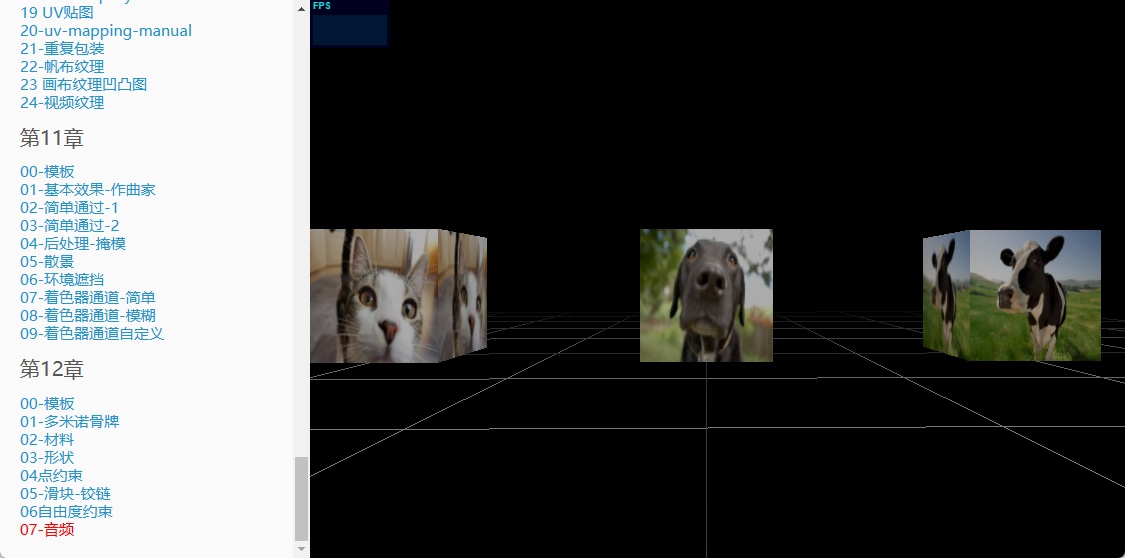
下面示例展示了一个第一人视角,你会发现离哪个方块近,哪个动物的声音就会大。如果将摄像机放在狗和牛之间,你会听到牛的声音来自右侧,狗的声音来自左侧。

1
2
3
4
5
6
7
8
9
10
11
12
13
14
15
16
17
18
19
20
21
22
23
24
25
26
27
28
29
30
31
32
33
34
35
36
37
38
39
40
41
42
43
44
45
46
47
48
49
50
51
52
53
54
55
56
57
58
59
60
61
62
63
64
65
66
67
68
69
70
71
72
73
74
75
76
77
78
79
80
81
82
83
84
85
86
87
88
89
90
91
92
93
94
95
96
97
98
99
100
101
102
103
104
105
106
107
108
function init() {
var stats = initStats();
var renderer = initRenderer();
var camera = initCamera(new THREE.Vector3(10, 10, 10));
var clock = new THREE.Clock();
scene = new THREE.Scene();

initDefaultLighting(scene);
camera = new THREE.PerspectiveCamera(50, window.innerWidth / window.innerHeight, 1, 10000);
camera.position.set(-200, 25, 0);
// 1. 定义声音监听对象,并添加到摄像机
var listener1 = new THREE.AudioListener();
camera.add(listener1);
var listener2 = new THREE.AudioListener();
camera.add(listener2);
var listener3 = new THREE.AudioListener();
camera.add(listener3);

// 第一人称视角
controls = new THREE.FirstPersonControls(camera);
controls.movementSpeed = 70;
controls.lookSpeed = 0.15;
controls.noFly = true;
controls.lookVertical = false;

scene = new THREE.Scene();
scene.fog = new THREE.FogExp2(0x000000, 0.0035);

light = new THREE.DirectionalLight(0xffffff);
light.position.set(0, 0.5, 1).normalize();
scene.add(light);

var cube = new THREE.BoxGeometry(40, 40, 40);
var material_1 = new THREE.MeshBasicMaterial({
color: 0xffffff,
map: THREE.ImageUtils.loadTexture("../../assets/textures/animals/cow.png")
});

var material_2 = new THREE.MeshBasicMaterial({
color: 0xffffff,
map: THREE.ImageUtils.loadTexture("../../assets/textures/animals/dog.jpg")
});

var material_3 = new THREE.MeshBasicMaterial({
color: 0xffffff,
map: THREE.ImageUtils.loadTexture("../../assets/textures/animals/cat.jpg")
});
var mesh1 = new THREE.Mesh(cube, material_1);
mesh1.position.set(0, 20, 100);
var mesh2 = new THREE.Mesh(cube, material_2);
mesh2.position.set(0, 20, 0);
var mesh3 = new THREE.Mesh(cube, material_3);
mesh3.position.set(0, 20, -100);
scene.add(mesh1);
scene.add(mesh2);
scene.add(mesh3);

// 2. 绑定声音监听对象,并添加到对应的物体上
var posSound1 = new THREE.PositionalAudio( listener1 );
var posSound2 = new THREE.PositionalAudio( listener2 );
var posSound3 = new THREE.PositionalAudio( listener3 );
mesh1.add(posSound1);
mesh2.add(posSound2);
mesh3.add(posSound3);

// 3. 加载声音并设置属性
var audioLoader = new THREE.AudioLoader();
audioLoader.load('../../assets/audio/cow.ogg', function(buffer) {
posSound1.setBuffer( buffer );
posSound1.setRefDistance( 30 ); // 决定距离物体多远时声音开始降低
posSound1.play();
posSound1.setRolloffFactor(10); // 决定远离物体多远时声音开始降低
posSound1.setLoop(true);
});

audioLoader.load('../../assets/audio/dog.ogg', function(buffer) {
posSound2.setBuffer( buffer );
posSound2.setRefDistance( 30 );
posSound2.play();
posSound2.setRolloffFactor(10);
posSound2.setLoop(true);
});

audioLoader.load('../../assets/audio/cat.ogg', function(buffer) {
posSound3.setBuffer( buffer );
posSound3.setRefDistance( 30 );
posSound3.play();
posSound3.setRolloffFactor(10);
posSound3.setLoop(true);
});

// 辅助对象GridHelper创建网格地面
var helper = new THREE.GridHelper(500, 10);
helper.position.y = 0.1;
scene.add(helper);

animate();
function animate() {
requestAnimationFrame(animate);
render();
}

function render() {
var delta = clock.getDelta(), time = clock.getElapsedTime() * 5;
controls.update(delta);
renderer.render(scene, camera);
}
}


五、第3版最新案例代码

代码是基于Threejs的r95版本,相比本系列教程使用的第二版,在示例代码质量和渲染效果上都有一定提升。

第三版案例代码资源下载